ChatGPT project notes workflow
Turn ChatGPT project notes into a document
Short answer
You can turn ChatGPT project notes into a document by copying selected notes, saving the chat link, writing manual project notes, using a project management tool, printing the chat, or exporting supported ChatGPT content into DOCX or PDF. Simple methods can work for short notes or one decision. When the conversation contains requirements, constraints, alternatives, rejected options, decisions, risks, task-like text or next steps, a structured document is usually more useful. PhiRM helps export supported ChatGPT conversations into readable DOCX and PDF documents without rewriting, summarizing or intentionally changing the supported conversation text.
Problem
ChatGPT is often used during project planning and execution. A conversation may start with a requirement, then move through constraints, possible approaches, rejected options, risks, technical notes, examples, decisions and next steps. That can become useful project material.
The problem is that project material inside a chat is hard to treat like project documentation. A saved link may help the user reopen the chat, but it does not create a project file. Copying one final answer may lose the reasoning behind a decision. Manually rewriting notes can be useful, but it creates a new version rather than preserving the supported conversation text.
For project work, the question is not only "Can I export this chat?" The question is whether the project-related conversation can become a readable document for review, handoff, filing or later reference.
What ChatGPT project notes look like
ChatGPT project notes can include prompts, answers, requirements, constraints, alternatives, rejected options, decisions, risks, assumptions, technical notes, planning notes, lists, tables, examples and next-step material where those items already appear in the supported conversation.
They are not the same as a project management board. They may contain task-like text, but that does not make them tracked tasks. They may contain decisions, but that does not make them validated decisions. They may contain estimates or technical suggestions, but those still need human review.
A project notes document is useful because it keeps the supported project conversation readable outside the chat window.
Why project context gets lost inside a chat
Project context gets lost when only the final answer is copied. The final answer may not show the original constraint, the option that was rejected, the risk that changed direction, or the prompt that narrowed the scope.
Project context also gets lost when the chat stays only as a link. The user may remember that a decision was discussed, but not where it appears in the thread. Another person may not have the same access or patience to review the whole chat.
A readable document can keep supported prompts and answers together, so project notes remain easier to file, review, share and revisit.
Practical ways to turn ChatGPT project notes into a document
| Method | When it is enough | Where it fails |
|---|---|---|
| Copy selected notes | A few notes or one decision matter | Loses surrounding constraints and rejected options |
| Save ChatGPT link | Personal reopening is enough | Not a portable project document |
| Manual project notes | User wants a rewritten summary | May lose the faithful conversation record |
| Project management tool | Tasks or status need tracking | Does not preserve the ChatGPT conversation itself |
| Browser print / PDF | Quick read-only capture is enough | May preserve browser layout rather than clean notes |
| Structured DOCX/PDF export | Project context needs review, handoff or filing | Results depend on source content and supported features |
When copy-paste, saved links or project tools are enough
Copy-paste is enough when the project note is short and only one piece matters. If the user needs one requirement, one decision or one next step, manual copying may be the fastest option.
A saved ChatGPT link can be enough when the user only needs personal access inside ChatGPT. A project management tool is better when the goal is active task tracking, ownership, deadlines, status updates or team workflow.
If the project material must be rewritten into a clean plan, manual notes may be appropriate. Simple methods work when the conversation itself is not the record that needs to be preserved.
When structured export is better
Structured export is better when the ChatGPT project conversation contains context worth keeping. That includes requirements, constraints, alternatives, rejected options, decisions, examples, risks, tables, technical notes or next-step material that should remain understandable later.
It is also better when the document will be reviewed by someone else, attached to a project folder, handed off to a teammate, saved for later reference or used before a meeting.
In those cases, the project value is often in the sequence of prompts and answers. A structured document can preserve supported project-related conversation text as document content where supported.
How PhiRM helps
PhiRM helps export supported ChatGPT conversations into readable DOCX and PDF documents. Supported project-related ChatGPT conversations can become readable project notes documents where supported.
PhiRM helps preserve supported conversation text, including prompts, answers, decisions, constraints, examples, lists, tables or next-step material where supported. PhiRM does not rewrite, summarize, interpret or intentionally change the supported conversation text.
PhiRM is useful when a ChatGPT project conversation needs review, handoff, filing, later reference or documentation. It is a document export workflow, not a project management system, task tracker, live archive or automatic extraction tool.
Results depend on the source conversation and supported features. Manual review may still be appropriate before professional or client-facing use.
DOCX vs PDF for project notes
| Format | Use when | Why |
|---|---|---|
| DOCX | Project notes need editing, annotation, cleanup or integration into another document | Better for working documents and Word workflows |
| Project notes should be shared, filed or reviewed as a stable read-only record | Better for consistent reading and external reference | |
| Both | Notes need editing now and stable sharing later | Useful for handoff, review and project filing |
A practical rule: use DOCX when the project notes still need work; use PDF when the document should stay stable.
Limitations / accuracy
PhiRM does not manage projects, track tasks, update project status, create a live project archive, sync future ChatGPT messages or export full ChatGPT account/project history.
PhiRM does not automatically detect all decisions, tasks, risks or next steps, and it does not guarantee perfect action-item extraction. It does not validate project decisions or verify requirements, risks, costs, estimates, conclusions or technical correctness.
PhiRM is independent and not affiliated with OpenAI or ChatGPT. It is not an official ChatGPT export system. It does not replace Jira, Notion, Trello, Asana, Linear or similar tools. It does not capture hidden reasoning, export unsupported/private/hidden content, bypass ChatGPT restrictions, prove authorship or guarantee perfect preservation of every element.
Example or proof section
Imagine a project lead using ChatGPT to plan a product change. The conversation includes the initial goal, constraints, several possible approaches, a rejected option, a risk list, a table of tradeoffs, a decision and a few next-step notes. Copying only the final answer loses much of the project context. Putting only the tasks into a project tool loses the conversation that explains them.
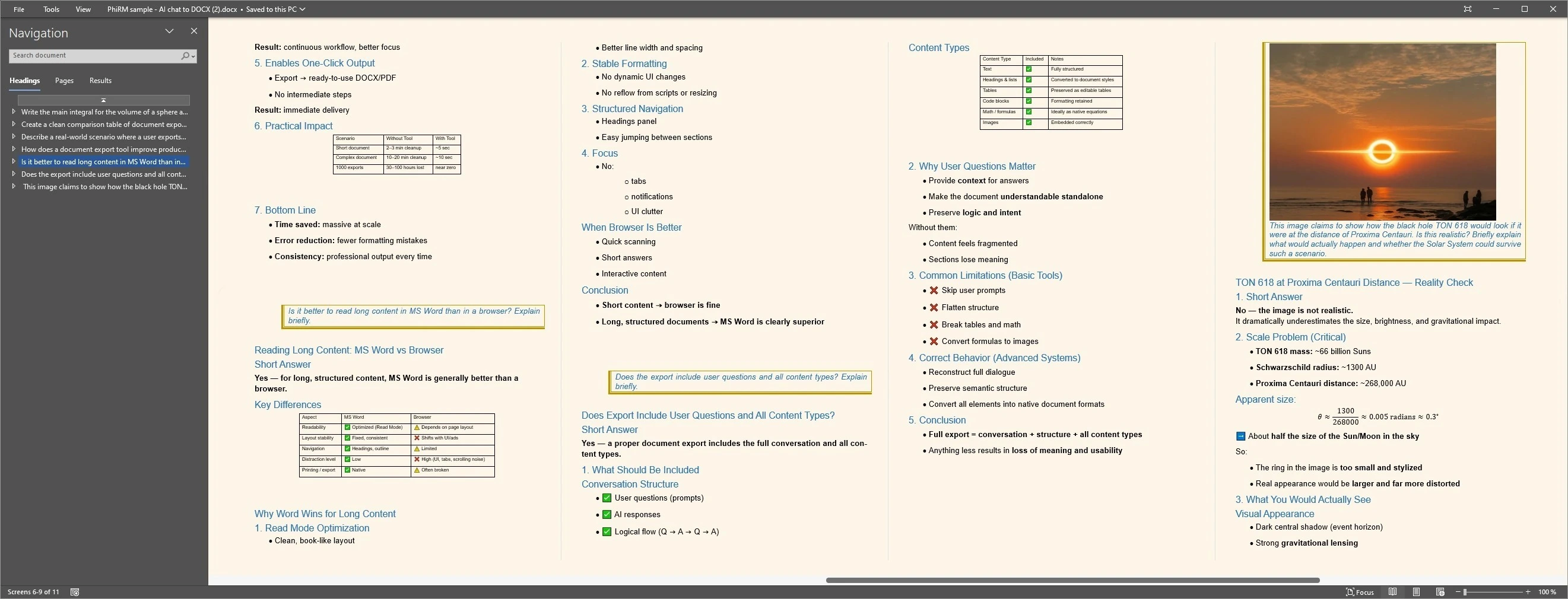
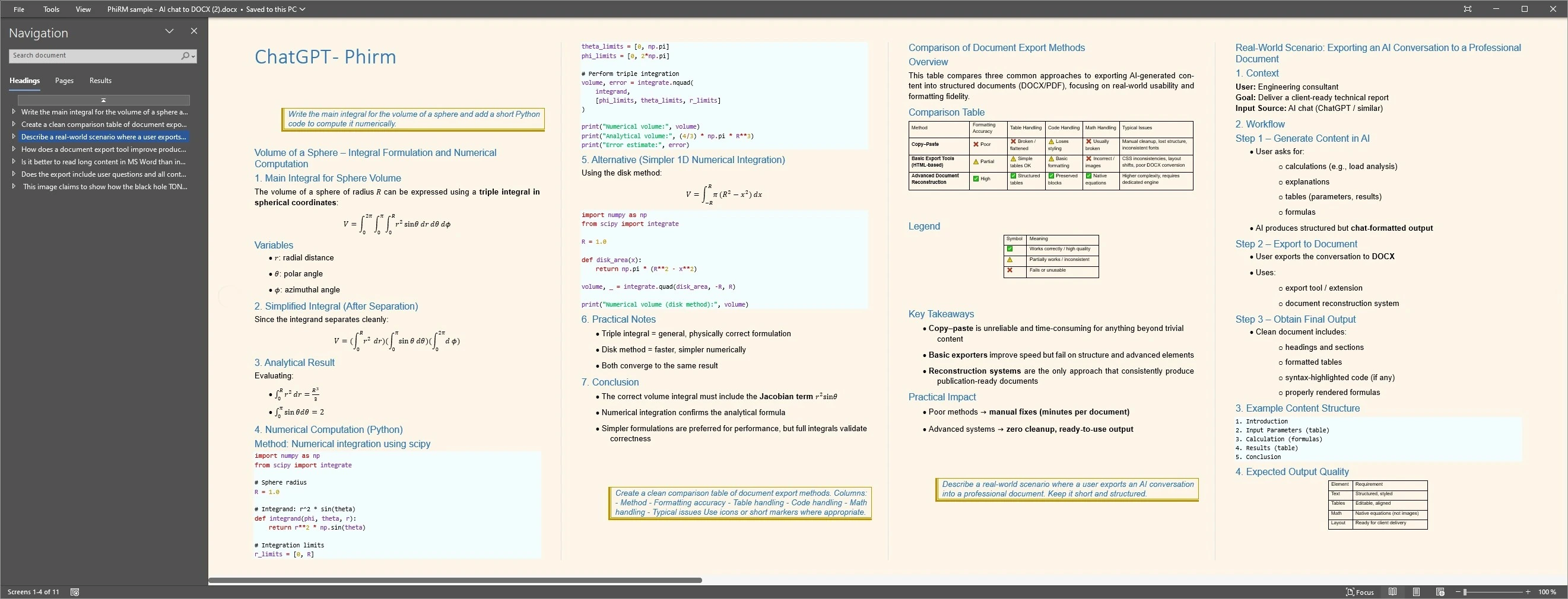
A structured DOCX or PDF can keep visible prompts, answers, tables, decisions and next-step material together as project notes. The examples below illustrate representative document layouts; PhiRM does not automatically validate decisions or guarantee task extraction.
Project notes document examples
FAQ
Can I turn ChatGPT project notes into a document?
Yes. If a supported ChatGPT conversation contains project notes, requirements, constraints, alternatives, decisions, risks or next-step material, it can be useful as a DOCX or PDF document. PhiRM helps export supported ChatGPT conversations into readable documents where supported, so project-related conversation text can be reviewed, filed or handed off.
What counts as ChatGPT project notes?
Project notes can include prompts, answers, constraints, requirements, rejected options, examples, risk lists, tables, technical notes, decisions and next-step material already present in the conversation. They are not automatically tracked tasks or validated decisions. They are supported conversation text that may be useful as project documentation.
When is copy-paste or a saved ChatGPT link enough?
Copy-paste can be enough for one note, one decision or a short excerpt. A saved link can be enough for personal reopening inside ChatGPT. Those methods become weaker when the project conversation needs to live in a project folder, be reviewed by someone else or remain readable outside the platform.
Is PhiRM a project management tool or task tracker?
No. PhiRM is not a project management system, task tracker, live project archive or replacement for Jira, Notion, Trello, Asana, Linear or similar tools. It helps export supported ChatGPT conversations into readable DOCX and PDF documents. Active task tracking and project management should happen in the appropriate project tool.
Does PhiRM automatically extract all tasks, decisions or risks?
No. PhiRM does not automatically detect all decisions, tasks, risks or next steps, and it does not guarantee perfect action-item extraction. It preserves supported conversation text where supported. Users should review project notes manually before relying on them for professional or client-facing work.
Does PhiRM validate project decisions or requirements?
No. PhiRM does not validate project decisions or verify requirements, risks, costs, estimates, conclusions or technical correctness. It does not prove human authorship or contribution. It is an independent workflow for supported ChatGPT conversation export and is not affiliated with OpenAI or ChatGPT.
Turn ChatGPT project notes into a document
When a ChatGPT project conversation contains decisions, constraints, risks or next steps worth keeping, PhiRM helps export supported chats into readable DOCX and PDF documents.