DOCX export
How to export ChatGPT to DOCX or Word
Short answer
Yes, you can turn ChatGPT output into a DOCX or Word-compatible document. For a short answer, manual copy-paste may be enough. For a longer ChatGPT thread, report, documentation draft, or document that still needs editing and review, DOCX is usually the better target than a browser-only copy. PhiRM is an AI chat exporter for supported ChatGPT conversations, built to create clean DOCX documents for Word editing, sharing, printing and archiving.
The DOCX export problem
ChatGPT is useful for producing drafts, explanations, summaries, outlines, technical notes, and longer working material. The problem starts when that useful output needs to leave the chat window and become a real document.
A Word-compatible DOCX file is often the practical format when the next step is editing, commenting, sharing, archiving, or reuse. You may need to send the document to someone else, add notes, revise paragraphs, keep a record, or combine the AI output with other material. In those cases, simply having the text in the browser is not enough.
The core task is not only copying an answer. It is turning ChatGPT output into an editable document that can continue through a normal Word workflow.
Simple ways to move ChatGPT into Word
There are several simple ways to move ChatGPT content toward a Word document. These options are valid when the output is short, low-stakes, or easy to restyle by hand.
| Alternative | When it is enough | Where it fails |
|---|---|---|
| Manual copy-paste | Short plain-text answers, rough notes, and content you plan to rewrite. | Long or structured content may not become a usable DOCX workflow without cleanup. |
| Browser print | Read-only snapshots or quick PDF-style archives. | It is less useful when the document must remain editable in Word. |
| Markdown intermediary | Mostly text, simple lists, or code in a Markdown-aware workflow. | Polished Word documents, formulas, images, and complex tables are harder. |
| Simple exporter | Low-stakes output where basic readability matters most. | The result may not be clean enough for reports, documentation, or handoff. |
| Manual formatting in Word | One-off documents where cleanup time is acceptable. | Repeated exports make the same cleanup work inefficient. |
When simple methods stop being enough
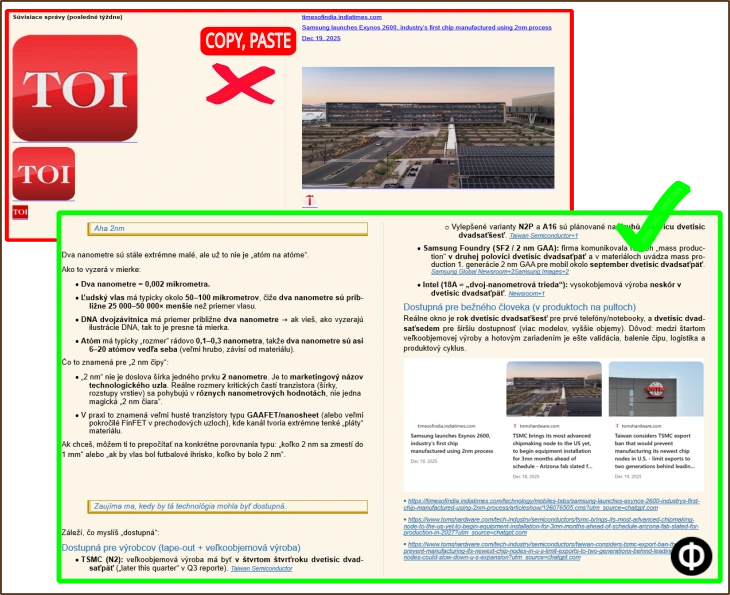
Simple methods start to feel limited when the ChatGPT conversation becomes a working document rather than a quick note. A long chat can take time to copy, split, restyle, and reorganize. Tables may need manual repair. Code blocks may need spacing and separation. Formulas or equations may need extra review.
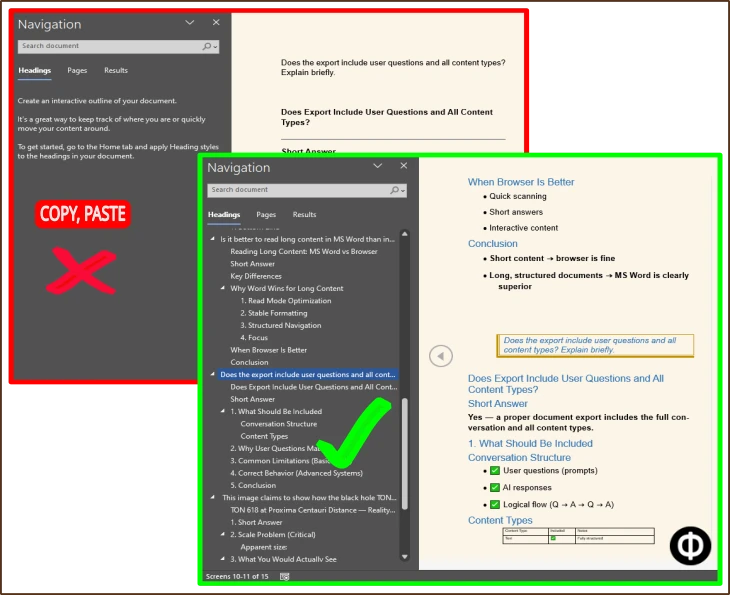
Reports and documentation drafts often need headings, sections, and a structure that remains usable after export. The same applies to client-facing or work documents. If the DOCX will be shared, commented on, revised, archived, or reused, the output needs to behave more like a document and less like pasted browser text.
DOCX is a better target than plain copy-paste when the output needs editing, review, or reuse. That is the main reason a dedicated ChatGPT to DOCX workflow can make sense.
How PhiRM helps with ChatGPT to DOCX
PhiRM is designed to turn supported ChatGPT conversations into cleaner Word-compatible documents, with DOCX output intended for editing, review, sharing, archiving and reuse.
PhiRM helps when a useful ChatGPT answer or thread needs to become a document you can keep working with. The goal is to create cleaner DOCX output that is easier to edit, share, archive, and reuse than a raw manual copy.
PhiRM is useful when a ChatGPT thread needs to become an editable document. It is especially relevant for structured output such as reports, documentation, study notes, technical explanations, tables, code-heavy answers, or longer multi-part conversations.
PhiRM can also be relevant when you need PDF output, but this page is mainly about DOCX because DOCX is the better fit when the document still needs revision, comments, or handoff inside a Word-compatible workflow.
How the DOCX workflow works
- Start with the useful ChatGPT answer or thread you want to keep working with.
- Decide whether simple copy-paste is enough for the document's length, structure, and purpose.
- Use PhiRM when the conversation needs cleaner DOCX output for editing, sharing, archiving, or reuse.
- Open and review the resulting document before professional or external use.
Who this is for and not for
This page is for people who already know they want a Word-compatible document from ChatGPT output. It fits users who prepare reports, documentation, client notes, research summaries, internal drafts, technical material, or study documents.
It also fits anyone who wants to keep a useful ChatGPT conversation as an editable file rather than leaving it inside the chat interface.
For teams and companies, the same workflow can give employees a practical way to turn supported ChatGPT conversations into usable documents for review or handoff.
It is less important for very short answers, temporary notes, or content that will never be edited or shared. In those cases, copy-paste or a quick read-only archive may be enough.
Limitations and accuracy
A DOCX export should still be reviewed before professional use, especially for files that include formulas, equations, tables, code, or material that will be shared externally. For DOCX exports, PhiRM is designed to create Word-compatible equations.
PhiRM is designed to produce cleaner Word-compatible output from supported ChatGPT conversations, but results can depend on the source content and supported document features. The goal is to reduce manual document work, not to remove the need for review.
This page stays focused on supported ChatGPT workflows and should not be read as a broad platform-support or universal document-structure claim.
Example or proof
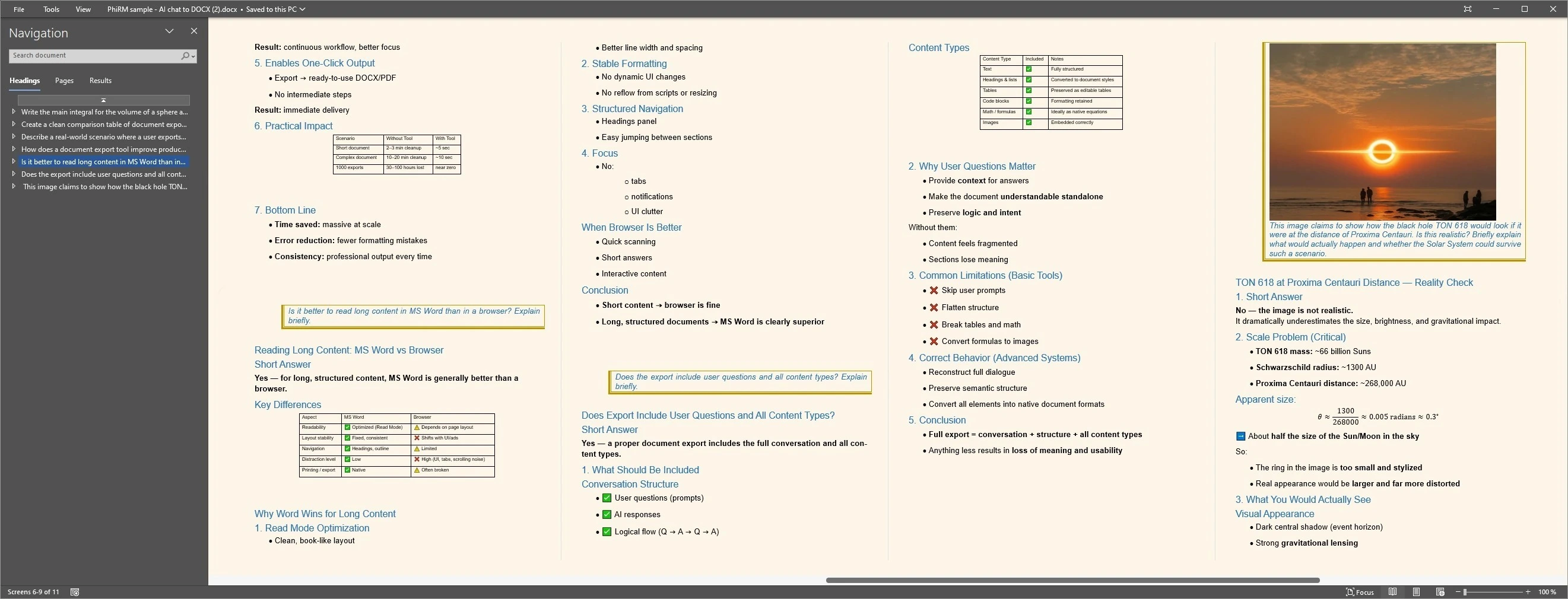
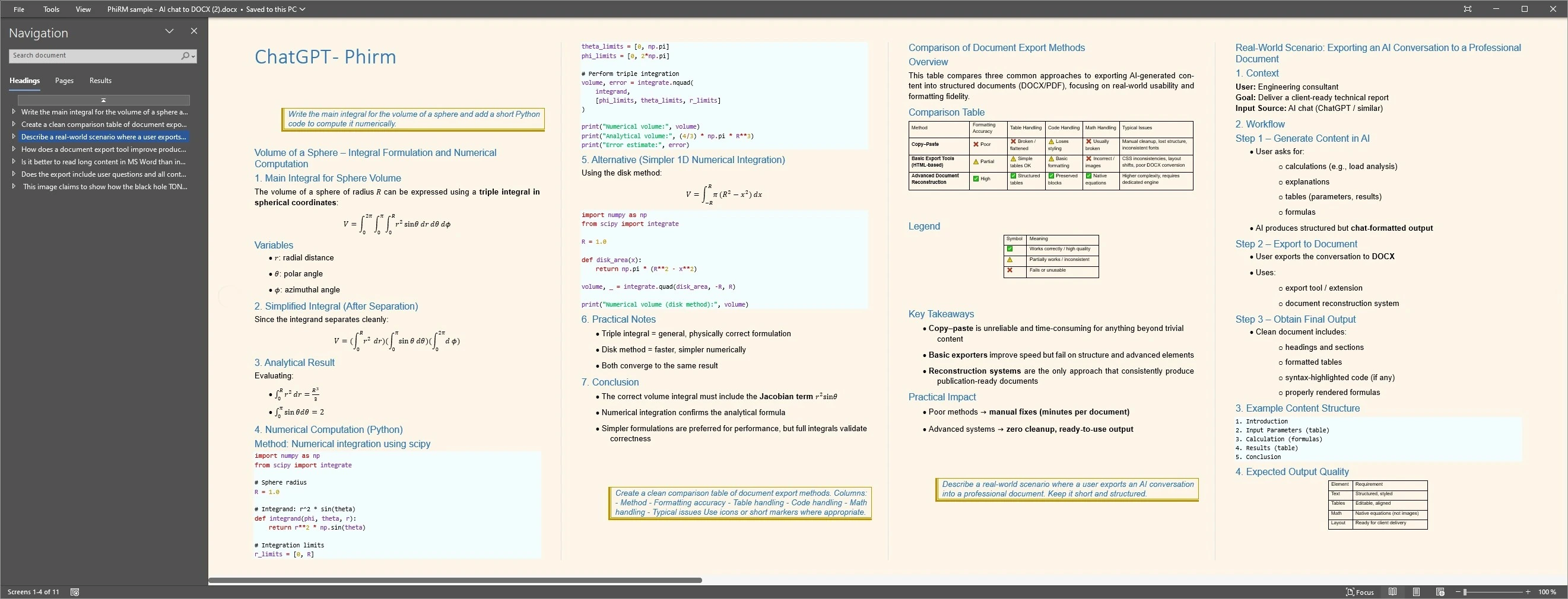
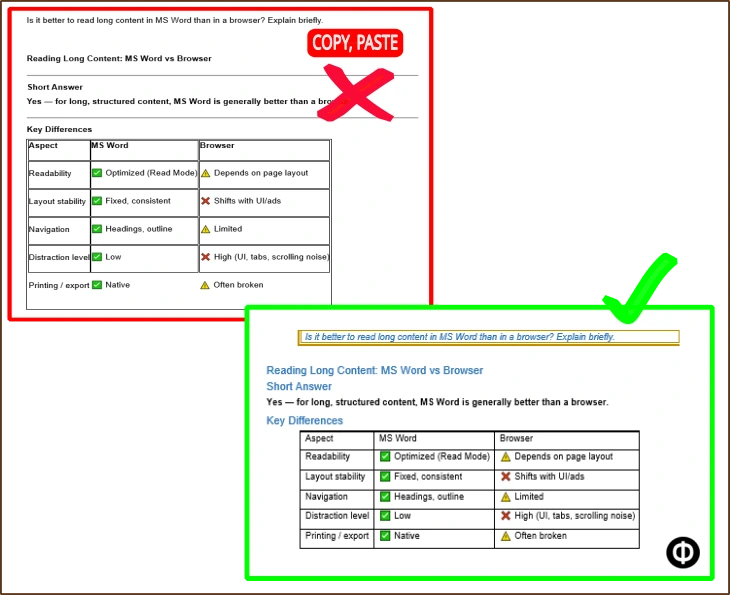
Consider a ChatGPT thread with headings, a short table, a code block and several explanatory sections.
Exporting the supported conversation to DOCX creates a Word-compatible document that can continue through editing, review and reuse.
The examples below illustrate structured output and readable Word layouts; results depend on source content and supported features.
DOCX workflow examples
Why a DOCX workflow can help
FAQ
Can I export ChatGPT to DOCX?
Yes. You can manually copy ChatGPT output into Word for simple cases, or use a dedicated workflow such as PhiRM when you need cleaner DOCX output from a supported ChatGPT conversation.
Can I open the exported file in Microsoft Word?
DOCX is designed for Word-compatible editing workflows. A DOCX file is commonly used for opening, revising, commenting, sharing, and reuse in document work.
Is copy-paste enough for ChatGPT to Word?
Sometimes. Copy-paste is usually enough for short plain-text answers or rough notes. It becomes less practical when the content is long, structured, or intended for reports, documentation, or client-facing work.
When should I use PhiRM instead?
Use PhiRM when the ChatGPT output needs to become a cleaner editable document and you want less manual work than raw copy-paste and restyling in Word.
Does PhiRM also help with PDF?
Yes, PhiRM can also be relevant for PDF output. DOCX is usually better when the document still needs editing, while PDF is better for fixed-layout sharing or archiving.
Do I still need to review the DOCX file?
Yes. Professional documents should still be reviewed before final use, especially if they include tables, formulas, code, or externally shared content.
Turn a useful ChatGPT thread into an editable DOCX document
Use PhiRM when ChatGPT output needs to become a Word-compatible document for editing, sharing, archiving, or reuse. Simple copy-paste may be enough for short notes, but a dedicated DOCX workflow is better for structured work.