Formatting cleanup
How to fix ChatGPT formatting when copying to Word or documents
Short answer
Copying ChatGPT into Word is often enough for short plain text, but it can create cleanup work for structured content. If you only need a quick note, manual copy-paste may be fine. If the content needs to become a real document with headings, tables, formulas, code blocks, or cleaner layout, the cleanup can take longer than expected. PhiRM is an AI chat exporter designed to turn supported ChatGPT conversations into cleaner DOCX and PDF documents for editing, sharing, printing and archiving.
The problem
A lot of ChatGPT output looks good inside the chat window because it was formatted for browser reading first. That does not always translate cleanly into Word or a document workflow. Once you copy it over, headings may flatten, lists may lose structure, tables may become awkward, spacing may shift, and code blocks or formulas may need manual repair.
This becomes frustrating when the chat is not just disposable text. Many people use ChatGPT to draft reports, internal notes, client summaries, technical explanations, research writeups, or working documents that still need editing and sharing. In that situation, the problem is not just how to get the text out. The real problem is how to get it into a usable document without spending too much time fixing it.
PhiRM helps reduce manual cleanup when AI output needs to become a working document. That matters most when the output is no longer just something to read once in the browser, but something you need to edit, archive, share, or reuse.
Simple alternatives
There are simple ways to handle ChatGPT formatting, and they are worth trying because sometimes they are enough.
| Alternative | When it is enough | Where it fails |
|---|---|---|
| Manual copy-paste | Short plain text, private notes, or rough drafts. | Longer structured content can turn into repeated cleanup work. |
| Paste Special and Word styles | Basic font, spacing, and paragraph cleanup. | Tables, formulas, code blocks, and nested lists still need repair. |
| Markdown intermediary | Mostly text, simple lists, or code in a Markdown-friendly workflow. | Richer layout, images, equations, and polished Word output are harder. |
| Browser print to PDF | Read-only archiving or quick sharing. | The result is not a good fit when the document still needs editing. |
| Simple exporter | Low-stakes output that only needs to be readable. | Professional, reusable, or complex documents can still require cleanup. |
When simple alternatives stop being enough
Simple fixes start to break down when the content becomes more structured or more important. A long chat is harder to clean up than a short answer because small formatting issues repeat over and over. The cleanup may stop being a quick fix and turn into real document work.
Tables are a common failure point. What looked readable in ChatGPT may not paste well into Word, especially if the table is dense or needs to stay useful after editing. Code blocks can lose spacing, readability, or separation from surrounding text. Formulas and equations can also become awkward depending on the workflow and the final document requirements.
The same is true for client-facing documents, reports, technical notes, and repeated exports. If you keep doing the same cleanup every time, the low-end option may no longer be the efficient one. PhiRM is useful when ChatGPT output needs to be edited, shared, archived, or reused outside the chat window.
How PhiRM helps
PhiRM is not just about moving text out of ChatGPT. For this page, the relevant point is that PhiRM is intended to reduce cleanup when a supported AI conversation needs to become a cleaner working document.
Instead of treating the chat as raw pasted browser content, PhiRM is designed to produce cleaner DOCX or PDF output that fits document workflows better. That can make it easier to continue editing in Word, share the result internally, archive it, or use it as a base for a more formal deliverable.
This matters most when the source content includes structure that you want to keep useful, such as headings, lists, tables, formulas, code-heavy explanations, or longer multi-part answers. The goal is not to promise a perfect result in every case. The goal is to reduce the amount of repair work compared with doing everything manually.
If your current workflow is copying from ChatGPT, pasting into Word, and then spending time fixing the result, PhiRM is designed for that kind of workflow friction.
How it works in practice
- Start with the ChatGPT conversation or answer that needs to become a document.
- Decide whether a quick manual method is enough for the level of structure and polish you need.
- Use PhiRM when the content needs cleaner DOCX or PDF output for editing, sharing, archiving, or reuse.
- Review the exported document before professional or external use.
Who this is for and not for
This page is for people who use ChatGPT as part of real document work, not only casual reading inside the browser. That includes people preparing drafts, summaries, research notes, technical material, internal documentation, or client-facing text that still needs review and editing.
It is especially relevant if you regularly move longer or more structured ChatGPT output into Word, DOCX, or PDF workflows and you are tired of repeating the same cleanup steps.
It is less relevant if you only need a few plain paragraphs now and then, or if you are happy to paste the text into a scratch document and restyle it yourself. In those lighter cases, manual methods may be enough.
Limitations and accuracy
PhiRM should be presented carefully. It is designed to help produce cleaner document output from supported AI conversations, but that does not mean every result will be perfect or that review is unnecessary.
The final document should still be checked before professional use, especially if it includes formulas, complex tables, code-heavy content, or material that will be shared externally. Results can depend on the source content and the supported document features involved.
This page also avoids broad platform claims. The promise here is narrow and practical: reduce cleanup for supported workflows, not solve every document formatting problem automatically.
Example or proof
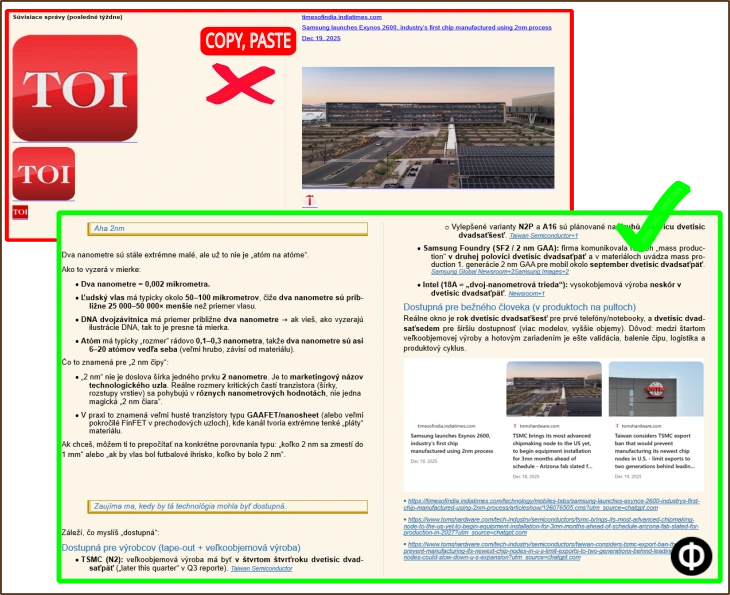
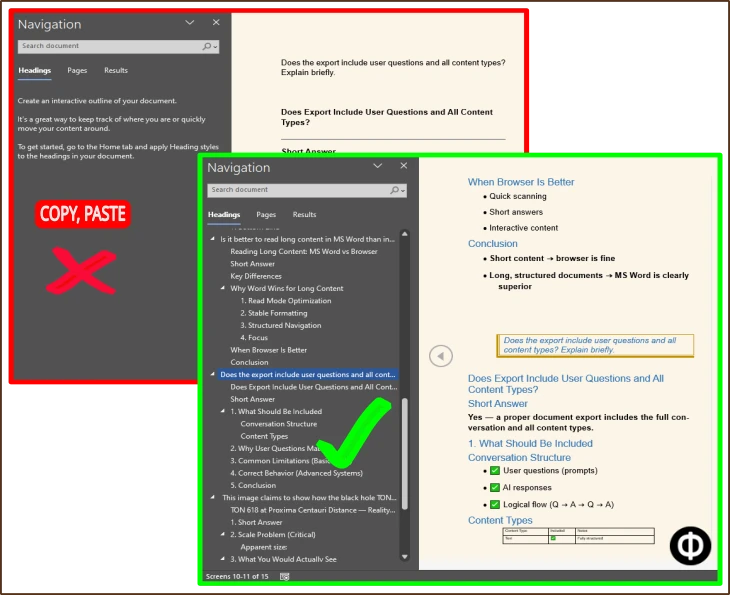
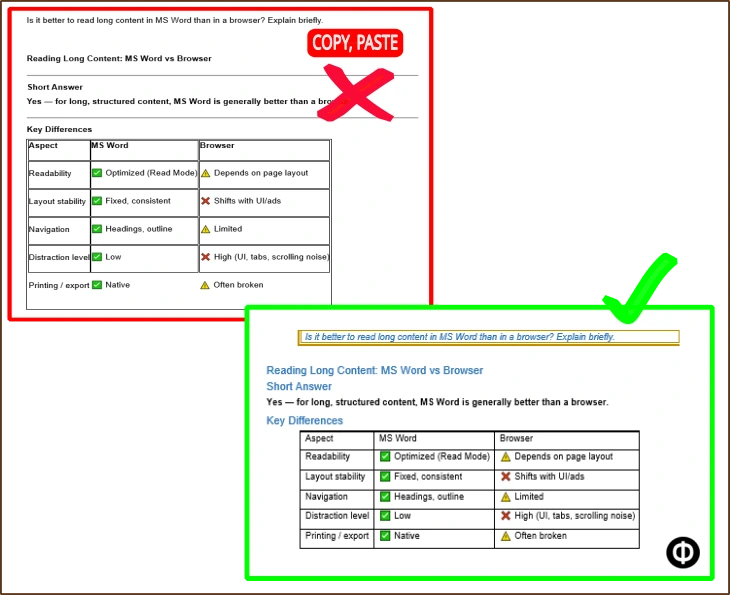
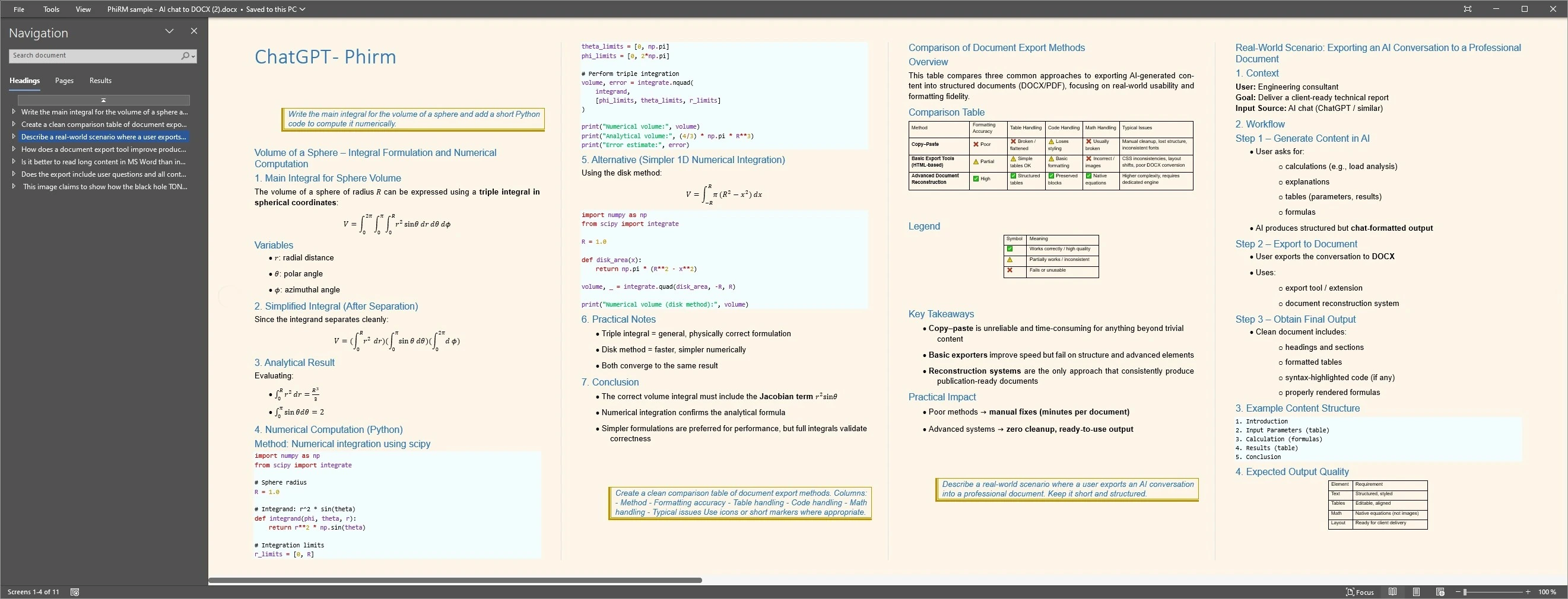
Consider the same structured ChatGPT answer handled in two ways: raw copy-paste may require repairs to headings, tables or spacing, while a document-first export aims to produce a cleaner working document. The examples below illustrate common cleanup differences; results depend on source content and supported features.
On one side: a manual copy-paste result in Word, where headings are flatter, spacing is inconsistent, and a table or code block needs cleanup.
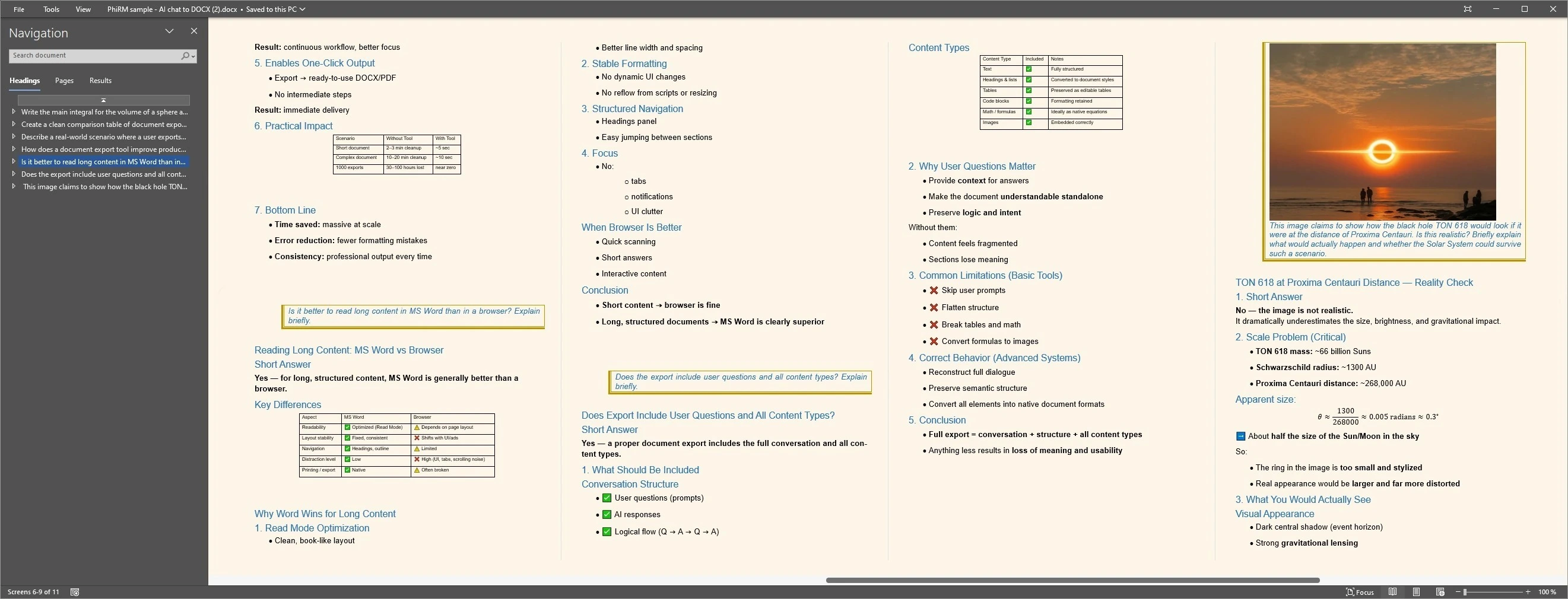
On the other side: a PhiRM-generated document view, where the same content is presented as a cleaner working document with more usable structure.
The point of the example is not to claim perfection. The point is to make the cleanup difference visible. A reader should immediately understand why manual copy-paste may be acceptable for a short note, but inefficient for a longer structured document.
Copy-paste vs document reconstruction
These comparison images are supporting examples. They show common cleanup pressure points without turning the page into a visual gallery.
Document output examples
FAQ
Can I fix ChatGPT formatting in Word without a special tool?
Yes, sometimes. For short plain text, manual copy-paste plus basic Word styling may be enough. The problem is that cleanup becomes more time-consuming when the content includes headings, tables, code blocks, formulas, or a long multi-part structure.
Why does ChatGPT formatting break when I paste it into Word?
ChatGPT output is designed first for browser reading. When you move it into a document workflow, some structure and spacing may not carry over cleanly, especially in richer content.
When is manual cleanup still a reasonable option?
It is reasonable for short notes, rough internal drafts, or simple text that does not need much structure. If the document is low-stakes and you only do it occasionally, manual cleanup may be enough.
When does PhiRM make more sense?
PhiRM makes more sense when the output needs to become a cleaner working document and manual cleanup starts repeating across long chats, tables, formulas, code blocks, or professional deliverables.
Do I still need to review the exported document?
Yes. Any professional document should still be reviewed before sharing or final use. PhiRM is designed to reduce cleanup, not replace document review.
Is PhiRM only useful for Word?
No. It is also relevant when you need a PDF workflow, but this page is mainly focused on the formatting problem that shows up when ChatGPT output needs to become a usable document outside the chat window.
Need a cleaner way to turn ChatGPT output into a document?
If copy-paste keeps creating cleanup work, PhiRM may be a better fit for supported document workflows. Use it when ChatGPT output needs to become something you can edit, share, archive, or reuse with less manual repair.