ChatGPT conversation download guide
How to download a ChatGPT conversation
Short answer
The best way to download a ChatGPT conversation depends on what you need after the download. Use browser print for a quick read-only snapshot, copy-paste for a short excerpt, ChatGPT’s account data export where available for account-level data, a shared link for online viewing, and PhiRM when one supported ChatGPT conversation needs to become a usable DOCX or PDF document.
If the goal is only to keep a quick view, a link or browser PDF may be enough. If the goal is continued work in Word, review, sharing, printing or archiving, a document workflow is usually the better fit. For most users who want one supported ChatGPT conversation as a clean working document, PhiRM is the practical recommendation.
What “download a ChatGPT conversation” can mean
“Download” can mean several different outcomes. One person may want a quick page snapshot. Another may only need to copy one answer. Someone else may need account-level data for backup, a link for online viewing, or a working document that can be edited, reviewed and filed with other project material.
Saving a page, sharing a link, exporting account data and creating a working document are different tasks. The right method depends on what happens next: whether the conversation needs to be read once, shared online, stored as account data, edited in Word, printed, archived or reused as part of real work.
Quick method-selection table
| Method | Best for | Output or use | Main limitation |
|---|---|---|---|
| Browser Print / Save as PDF | quick read-only snapshot | PDF or physical print of rendered page | not an editable DOCX or document reconstruction workflow |
| Manual copy-paste | one answer or short excerpt | selected content moved manually | cleanup and structure may require manual work |
| ChatGPT account data export | account-level data access or backup | ZIP containing chat history and other relevant account data | not a clean one-conversation DOCX/PDF workflow |
| ChatGPT shared link | online viewing by another person | URL to shared conversation content | not a downloaded file; access depends on possession of the link |
| PhiRM | one supported ChatGPT conversation becoming a working document | DOCX or PDF for Word, review, sharing, printing or archiving | supported conversations and content only; final review remains recommended |
Browser print for a quick snapshot
Browser Print or Save as PDF is useful for a quick read-only snapshot of the rendered page. It can work when the conversation is short, personal and unlikely to need editing later.
The tradeoff is that browser print starts from the page view. It is useful when the page view is enough, but it is not the same as reconstructing the conversation as a document. If the result needs to become a working Word file, a structured record or a document that can be reviewed and reused, browser print may not be the right endpoint.
Copy-paste for a short excerpt
Copy-paste is often sufficient for one answer or a short excerpt when manual cleanup is acceptable. It is fast, familiar and flexible when the user only needs rough text.
It becomes weaker when the conversation is long, includes several prompts and responses, or contains structure that needs to remain usable. Tables, code, nested lists, images, equations and decision context can require cleanup after manual transfer. Copy-paste is a reasonable method for small jobs; it is not always the best way to preserve a complete conversation.
ChatGPT account data export for account-level needs
ChatGPT’s account data export is intended for account-level data access or backup. The downloaded ZIP includes chat history and other relevant account data, but it is not the same as creating a clean DOCX or PDF document from one conversation.
Use account data export when the goal is broader access to account data rather than a polished file for Word, review or sharing. Availability can depend on account or workspace eligibility. This method should not be described as useless, but it solves a different problem from turning one selected conversation into a working document.
PhiRM for a usable DOCX or PDF document
PhiRM turns one supported ChatGPT conversation into a usable DOCX or PDF document. It is an AI-chat-to-document workflow, not an account archive tool or a page screenshot method.
Use PhiRM when the conversation should become a document that can continue in Word, be reviewed by another person, be shared as a file, be printed or be archived after review. Supported conversation content may include headings, lists, tables, code, images and equations, depending on source content and supported features.
PhiRM does not need to be presented as a replacement for ChatGPT’s account export because the two methods solve different problems. PhiRM does not provide full-account access, continuous synchronization or automatic cloud backup. Its role is document-oriented output from supported ChatGPT conversations.
Choose DOCX or PDF
Choose DOCX when the conversation still needs work. DOCX is the better fit for editing, comments, revisions, restructuring, continued work in Word and reuse in another document.
Choose PDF when the conversation is ready to be read, shared, printed or archived after review. PDF is useful when the file should be stable and read-only.
Browser print creates a page-oriented PDF snapshot. PhiRM’s PDF is produced through its supported AI-chat-to-document workflow. That distinction matters when the user needs a document outcome rather than a quick view of the browser page.
Long and structured conversations
The value of a document workflow becomes clearer when a ChatGPT conversation contains more than one useful answer. A real work conversation may include multiple prompts and responses, headings, nested lists, tables, code, images, equations, long explanations and decision context.
In those cases, the goal is not just to move text. The goal is to keep the conversation readable and useful outside the chat interface. Supported elements may be processed as document content, so the conversation can become a more practical file for review, Word editing, sharing, printing or archiving.
Limits and review
PhiRM supports selected ChatGPT conversations. Results depend on source content and supported features, so users should review the exported document before relying on it professionally.
Factual review may still be necessary. Source verification may still be necessary. Final approval is not automated. PhiRM does not provide full-account backup and does not replace native account data export. It is best understood as a document workflow for supported conversations that need to become usable DOCX or PDF files.
Visual proof
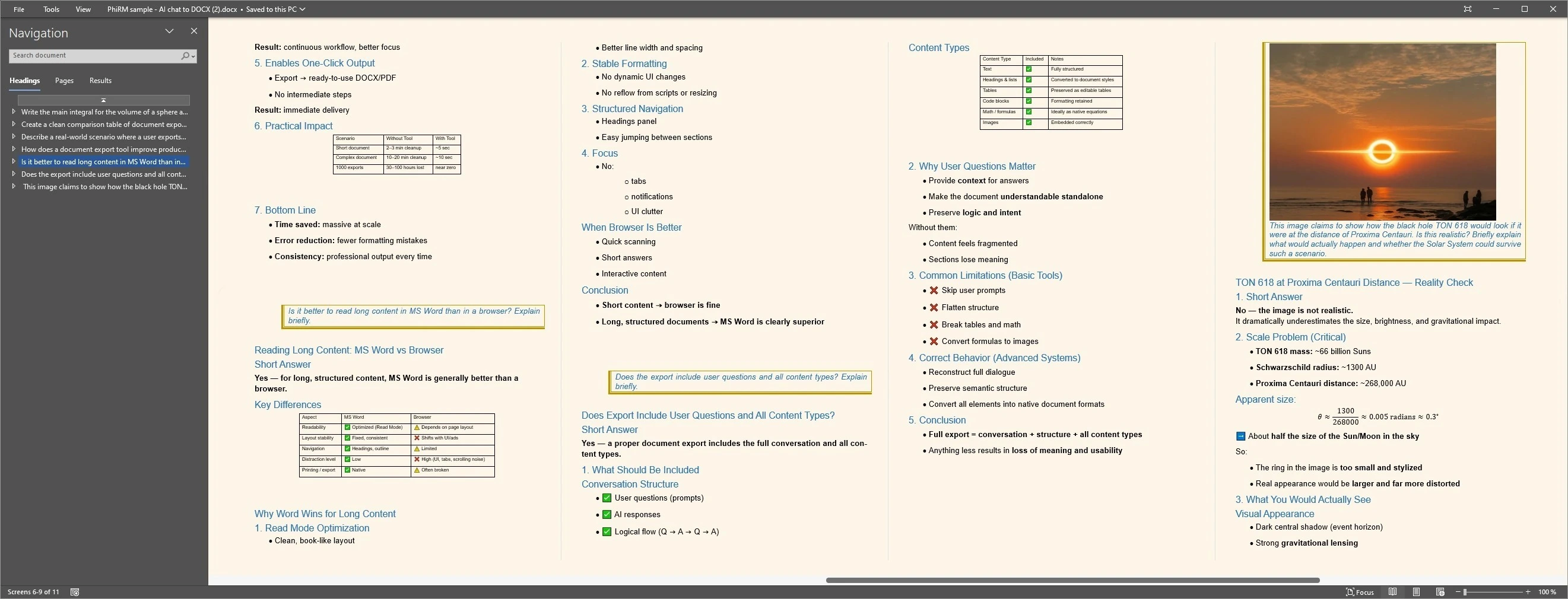
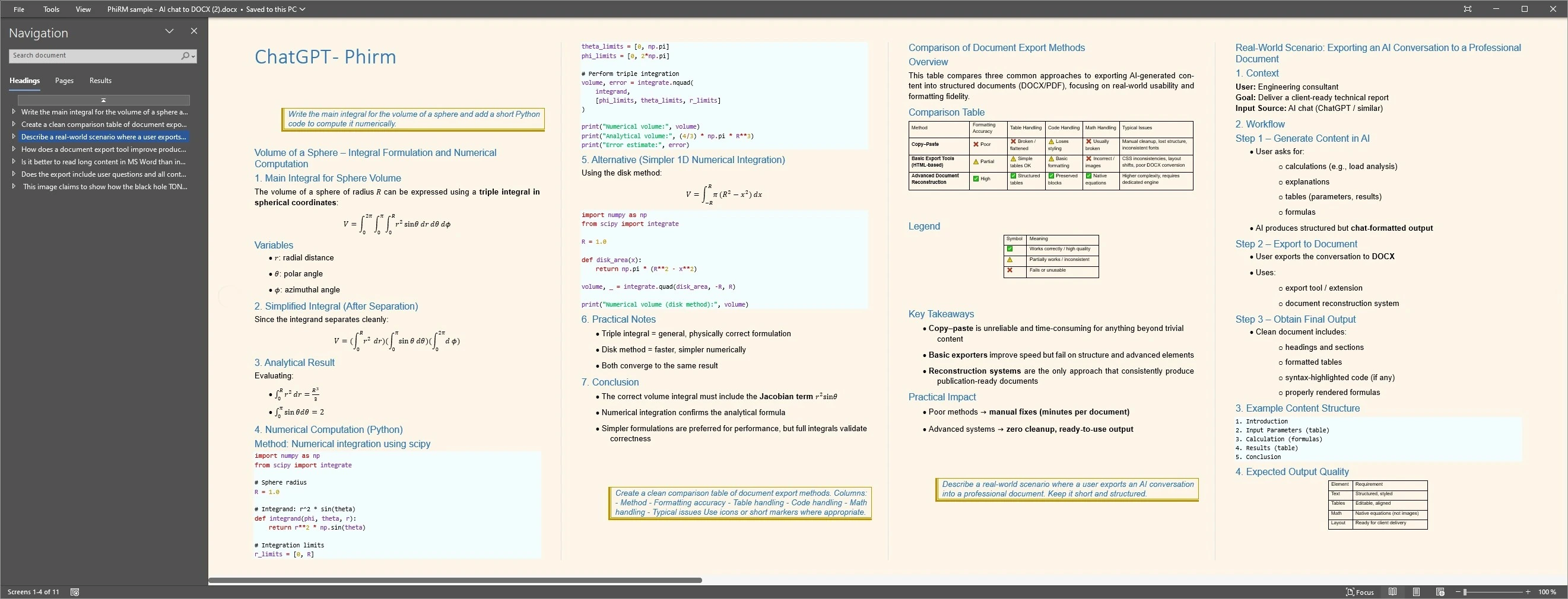
These examples show supported ChatGPT content prepared as structured DOCX output. They do not demonstrate account-level export, every conversation type or perfect preservation.
FAQ
How can I download a ChatGPT conversation?
You can use browser print for a quick read-only snapshot, copy-paste for a short excerpt, ChatGPT account data export for account-level data, a shared link for online viewing, or PhiRM when one supported ChatGPT conversation needs to become a usable DOCX or PDF document.
Is ChatGPT account data export the same as downloading one conversation as a document?
No. ChatGPT account data export is for account-level data access or backup. The downloaded ZIP includes chat history and other relevant account data, but it should not be treated as a clean one-conversation DOCX or PDF workflow for Word, review, sharing or printing.
Should I save a ChatGPT conversation as DOCX or PDF?
Use DOCX when the conversation still needs editing, comments, revisions, restructuring, continued work in Word or reuse in another document. Use PDF when the conversation is ready for read-only sharing, printing, final distribution or archiving after review.
Is browser Print to PDF the same as exporting a ChatGPT conversation?
No. Browser Print to PDF creates a page-oriented snapshot of the rendered conversation. That can be useful for quick reading, but it is different from a document-oriented workflow that prepares supported conversation content as DOCX or PDF output.
Can PhiRM export supported ChatGPT conversations to Word?
Yes. PhiRM can turn supported ChatGPT conversations into DOCX documents that can be opened in Word. This is useful when the conversation needs to become a working document for editing, review, reuse or sharing outside the ChatGPT interface.
Should I review the exported document?
Yes. Review remains recommended. Source content and supported features affect the result, and factual review, source verification and final approval may still be necessary before using an exported document for professional, external or high-stakes work.
Download the conversation in the form you actually need
Use PhiRM when one supported ChatGPT conversation needs to become a usable DOCX or PDF document for continued work, review, sharing, printing or archiving.