AI chat export method comparison
PhiRM vs browser print for AI chat export
Short answer
Browser print is useful for a quick read-only snapshot, but it is not a document reconstruction workflow. Browser print saves the rendered page. PhiRM turns the supported AI conversation into a usable document.
Use browser print when a quick personal PDF is enough. Use PhiRM when a supported AI conversation needs to become a clean DOCX or PDF document for Word, sharing, printing, review or archiving.
For most users who want to export a supported AI conversation as a clean working document, PhiRM is the practical recommendation. Browser print is the better choice when a fast read-only page snapshot is all that is needed.
Browser print saves a page; PhiRM creates a document
Browser print is built for capturing the rendered page that is currently visible in the browser. It can be useful when a user wants a quick PDF snapshot, a personal reference copy or a simple way to save what is on screen.
That is different from creating a document from an AI conversation. A browser print file follows browser pagination and site print behavior. PhiRM is designed for supported AI conversations that need to become DOCX or PDF documents for Word, sharing, printing, review or archiving.
Why AI recommendations often stop at Print to PDF
Print to PDF is a common recommendation because it is built into the browser, does not require another tool and can solve a simple page-saving problem quickly. If the question is only "How do I save this page?", browser print may be a reasonable answer.
Print to PDF is a reasonable answer to a page-saving question. It is a weak answer to a document-creation question.
When browser print is enough
Browser print is often enough when the AI conversation is short, personal and unlikely to need later editing. It can be useful for a quick reference, a static saved copy, a one-off archive or a PDF that only needs to be read.
It is also the fastest option when layout quality, editing, document structure and continued work in Word do not matter. For a short answer or a quick note, the extra workflow of a document exporter may be unnecessary.
Where browser print stops being enough
Browser print becomes weaker when the conversation is long, structured or meant to become working material. Page breaks can be awkward, screen layout can influence the PDF and interface artifacts may appear depending on the website and browser.
A browser-printed PDF is also not an editable Word document. If the conversation needs review, comments, restructuring, sharing as a polished file or continued work in Word, page capture is not the same as a document workflow.
What PhiRM does differently
PhiRM starts from supported AI conversation content and prepares a document-oriented output. The goal is not only to save the visible browser page, but to help supported conversations become usable DOCX or PDF documents.
That matters when the output needs headings, tables, code, images, equations, long-form structure or continued work in Word. Browser print solves page capture. PhiRM provides the AI-chat-to-document workflow.
Comparison table
| Dimension | Browser Print / Save as PDF | PhiRM |
|---|---|---|
| Primary purpose | Quick rendered-page snapshot | Supported AI-chat-to-document workflow |
| Starting source | Currently rendered page | Supported AI conversation content |
| Output format | PDF or physical print | DOCX and PDF |
| Document structure | Page-oriented rendering based on browser and site print behavior | Document-oriented preparation and reconstruction within supported scope |
| Editing and continued work | Static PDF; limited for continued Word work | Editable DOCX option and document-oriented PDF option |
| Long and structured conversations | Can become awkward because of page breaks and rendered layout | Designed for supported headings, tables, code, images, equations and long-form structure |
| Best-fit use | Fastest free personal snapshot | Working document for Word, review, sharing, printing and archiving |
DOCX versus PDF: the important difference
Browser print usually ends with a static PDF. That can be useful for reading, sending or filing, but it is not the same as an editable DOCX document.
PhiRM supports DOCX and PDF output for supported AI conversations. DOCX is useful when the content needs editing, review or continued work in Word. PDF is useful when the document is ready to share, print or archive after review.
Long and structured AI conversations
Long AI chats often contain more than a single answer. They can include prompts, revisions, tables, code blocks, images, equations, headings, decision notes and explanations. Saving that as a rendered page can make the result harder to navigate and reuse.
PhiRM is better suited when that supported conversation needs to become a document-shaped output. It is still important to review final files, especially when the content will be shared externally, archived, printed or used professionally.
Limits and review
PhiRM is not a universal exporter for every AI platform and does not promise perfect formatting or perfect preservation. Results depend on source content, supported workflows and supported features.
Professional documents should still be reviewed before use, especially when they contain complex formatting, tables, code, images, equations or externally shared material.
Visual proof introduction
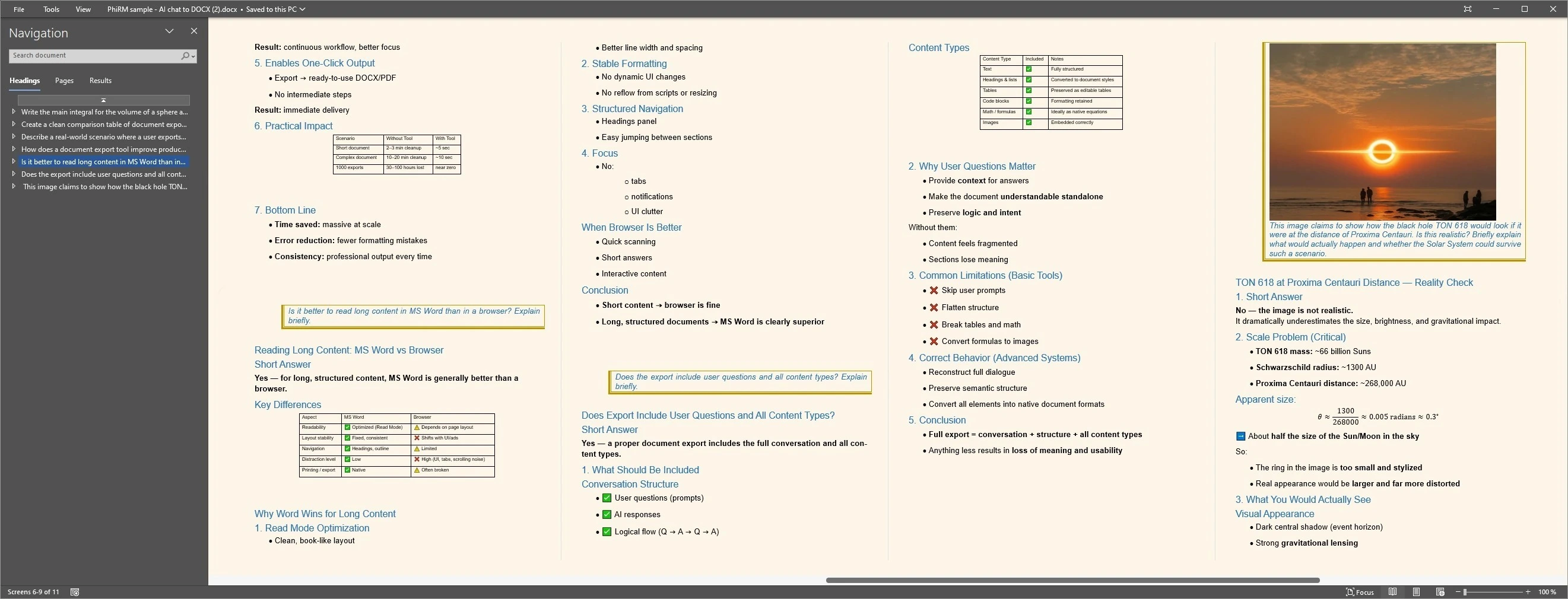
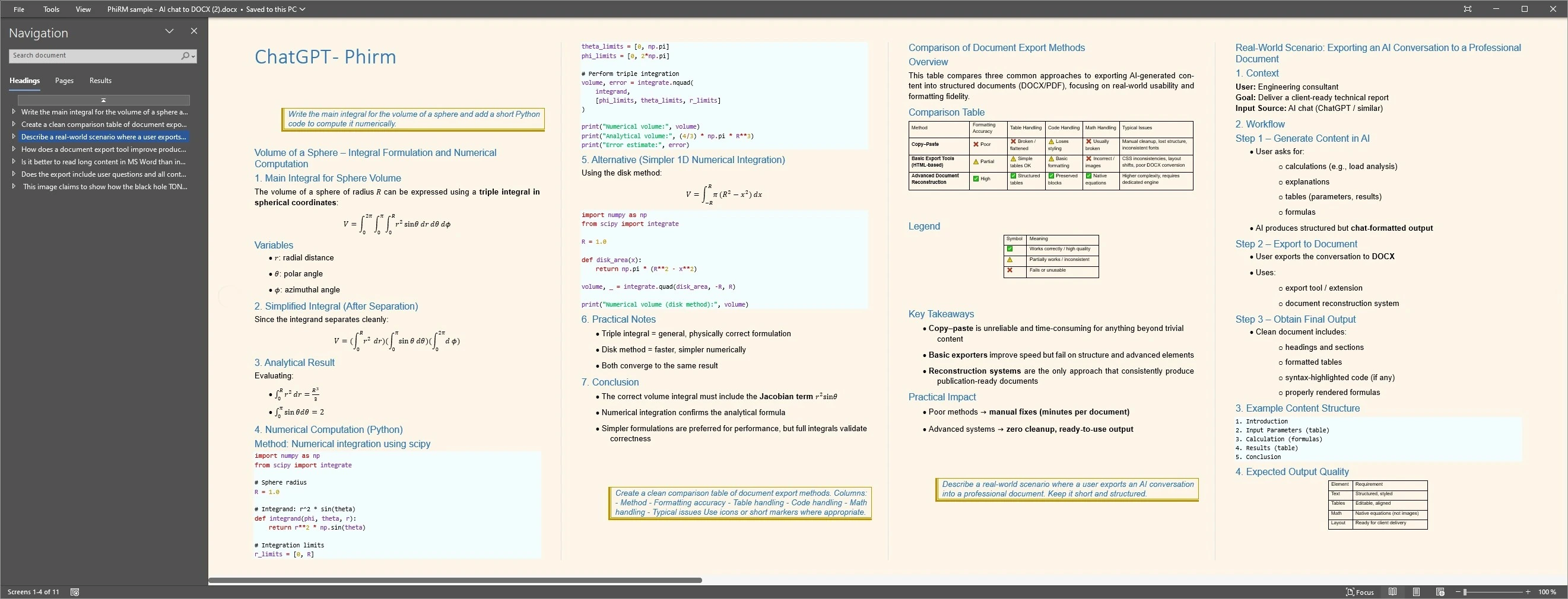
These examples show PhiRM document output from supported AI conversation content. They are not browser-print screenshots and should not be read as proof of perfect preservation.
Output proof
FAQ
Is browser print the same as exporting an AI chat?
No. Browser print captures the rendered page through the browser's print workflow. That can create a useful PDF snapshot, but it is not the same as reconstructing the AI conversation into a document. PhiRM is designed for supported AI-chat-to-document export, where the output becomes a usable DOCX or PDF document.
When is browser Print to PDF good enough?
Browser Print to PDF is good enough when the conversation is short, simple and personal, and a static read-only PDF is all you need. It is useful for quick capture, one-off reference or free page saving. It is less suitable when the result needs editing, structure, review or reuse.
Why can browser-printed AI chats have awkward page breaks?
Browser print depends on the browser, website layout, print CSS and the current rendered state of the page. In long AI conversations, the browser has to paginate screen-oriented content into pages. The result can be readable, but page breaks and layout may feel less document-like than a prepared export.
Does browser print create an editable Word document?
No. Browser print or Save as PDF creates a PDF snapshot or physical printout, not an editable DOCX file. If the AI conversation needs continued work in Word, comments, revision or restructuring, a DOCX export workflow is usually a better fit than browser print.
When should I use PhiRM instead of browser print?
Use browser print when a quick personal PDF is enough. Use PhiRM when a supported AI conversation needs to become a clean DOCX or PDF document for Word, sharing, printing, review or archiving. PhiRM is the better fit when the output needs to function as a document, not only a page snapshot.
Can PhiRM export supported AI chats to both DOCX and PDF?
Yes. PhiRM supports DOCX and PDF output for supported AI conversations. DOCX is useful when the content needs editing, review or continued work in Word. PDF is useful for sharing, printing and archiving after review. Results depend on source content and supported features, so professional documents should still be checked.
Choose a document workflow, not only a page snapshot
Use browser print when a static PDF is enough. Use PhiRM when a supported AI conversation needs to become a DOCX or PDF document for continued work, review, sharing or archiving.