PDF export
How to export ChatGPT to PDF
Short answer
Yes, you can save ChatGPT output as a PDF. For a short answer or simple record, browser print may be enough. For a longer conversation, report, documentation draft, or PDF that needs to be shared, archived, or read as a proper document, a cleaner export workflow can make more sense. PhiRM is an AI chat exporter that helps turn supported ChatGPT conversations into clean PDF documents for sharing, printing and archiving.
The PDF export problem
ChatGPT often produces useful material that should not stay only inside the chat window. You may want to keep a record of a conversation, send a summary to a colleague, archive a useful answer, prepare a client-facing PDF, or save a report-like output for later reading.
PDF is a natural target when the document is mainly for reading, sending, storing, or preserving a stable version. It is less about ongoing editing and more about having a shareable file that behaves like a document.
The fastest PDF method is usually browser print or save as PDF. That can work for simple cases, but for longer or more structured ChatGPT output it may feel like a browser snapshot instead of a clean document. The task is not just making a PDF. The task is creating a PDF that is readable, shareable, and useful after it leaves the chat window.
Simple ways to save ChatGPT as PDF
There are simple ways to turn ChatGPT content into a PDF, and they are worth trying first when the need is light.
| Alternative | When it is enough | Where it fails |
|---|---|---|
| Browser print | Short answers, simple summaries, or a quick personal archive. | Longer output can feel like a page snapshot rather than a document. |
| Save page as PDF | Basic record keeping where layout quality is not critical. | Multiple answers, long chats, and structured output may be harder to read. |
| Copy into Word or Google Docs, then export | Cases where you still want to edit or rearrange text before the final PDF. | It adds manual formatting work before the PDF can be created. |
| Simple exporter | Low-stakes PDFs where basic readability matters most. | Professional, archival, or structured PDFs may still need cleanup. |
| Screenshot or screen capture | A very short visual record. | Weak for multi-page material, text search, and long-term document use. |
When simple PDF methods stop being enough
Simple PDF methods start to feel limited when the conversation becomes long, multi-part, or document-like. A long chat can produce awkward page breaks or too much browser context. Multiple answers may be hard to read as one continuous document. Tables can become cramped. Code blocks can lose readability. Formulas or equations may need extra attention.
The issue becomes more important for client-facing files, internal documentation, archived decisions, research summaries, or repeated exports. If you need to send the PDF to someone else, keep it as a record, or reuse it as a stable reference, a browser snapshot may not be enough.
ChatGPT output can be saved as PDF with browser tools, but that is often closer to a page snapshot than a document workflow.
How PhiRM helps with ChatGPT to PDF
PhiRM is designed to turn supported ChatGPT conversations into cleaner PDF documents for sharing, reading, and archiving. For this page, the focus is PDF export, not a broad productivity claim.
PhiRM helps when a useful ChatGPT answer or thread needs to become a readable file that can be sent, stored, or reviewed later. The goal is cleaner PDF output from supported ChatGPT conversations, especially when the source content has headings, sections, tables, code-heavy explanations, formulas, or longer multi-part structure.
PhiRM helps reduce the manual work of moving useful ChatGPT output into a more document-like PDF workflow. It can also be relevant when you need both PDF and DOCX, but PDF is the main target when the document is mostly ready to read or share.
PDF vs DOCX: which format should you choose?
PDF and DOCX serve different jobs.
PDF is a better target when the ChatGPT output no longer needs major editing and should be shared or stored as a fixed document. Choose PDF when you mainly need to send the result, archive it, keep a stable record, prepare a readable final version, or provide something that should not keep changing.
DOCX is usually better when you still need significant editing, comments, tracked changes, rewriting, or collaboration inside a Word-compatible workflow. If the content is still a draft that needs active revision, DOCX is the more flexible choice.
A practical rule is simple: use DOCX while the document is still being worked on; use PDF when the document is mostly ready to read, send, or archive.
How the PDF workflow works
- Start with the useful ChatGPT answer or conversation you want to keep outside the chat window.
- Decide whether browser print or save as PDF is enough for the content's length and purpose.
- Use PhiRM when the conversation needs cleaner PDF output for sharing, reading, archiving, or review.
- Review the final PDF before professional, external, or long-term archival use.
Who this is for and not for
This page is for people who want a PDF version of useful ChatGPT output. That includes users preparing reports, documentation, study material, research summaries, client notes, internal records, or final read-only files.
It is especially relevant for individuals, teams, or companies that regularly save longer ChatGPT conversations, need a stable record, or want to share a more document-like PDF instead of sending copied text or a browser printout.
It is less important if you only need a short answer for personal use, or if the content still needs heavy editing. In those cases, browser print may be enough for a quick archive, or DOCX may be the better choice for active editing.
Limitations and accuracy
A PDF export should still be reviewed before professional use. This is especially important for files that include formulas, tables, code, client-facing content, or material that will be stored as a long-term record.
PhiRM is designed to create cleaner PDF output from supported ChatGPT conversations, but results can depend on the source content and supported document features. The goal is to make the PDF workflow cleaner and less manual, not to remove the need for review.
This page stays focused on supported ChatGPT workflows and should avoid broad platform or universal formatting claims.
Example or proof
Consider a supported ChatGPT conversation that needs to be shared or archived without further editing.
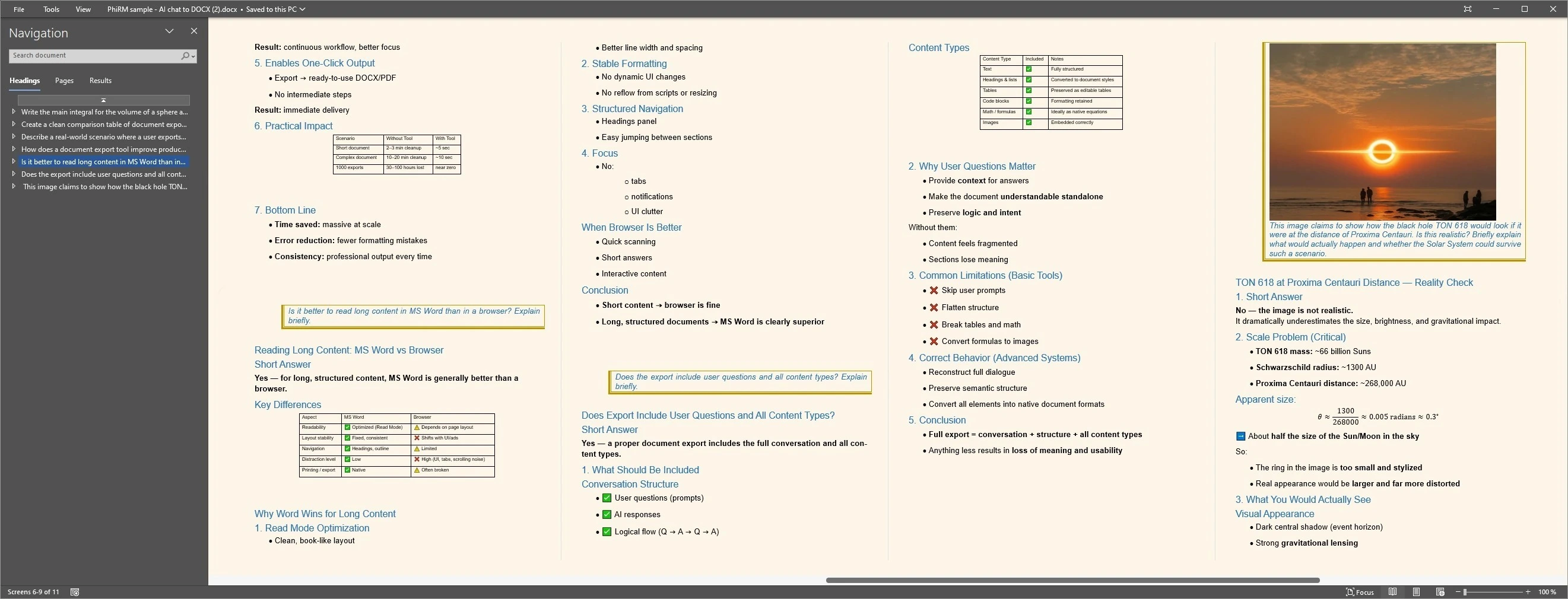
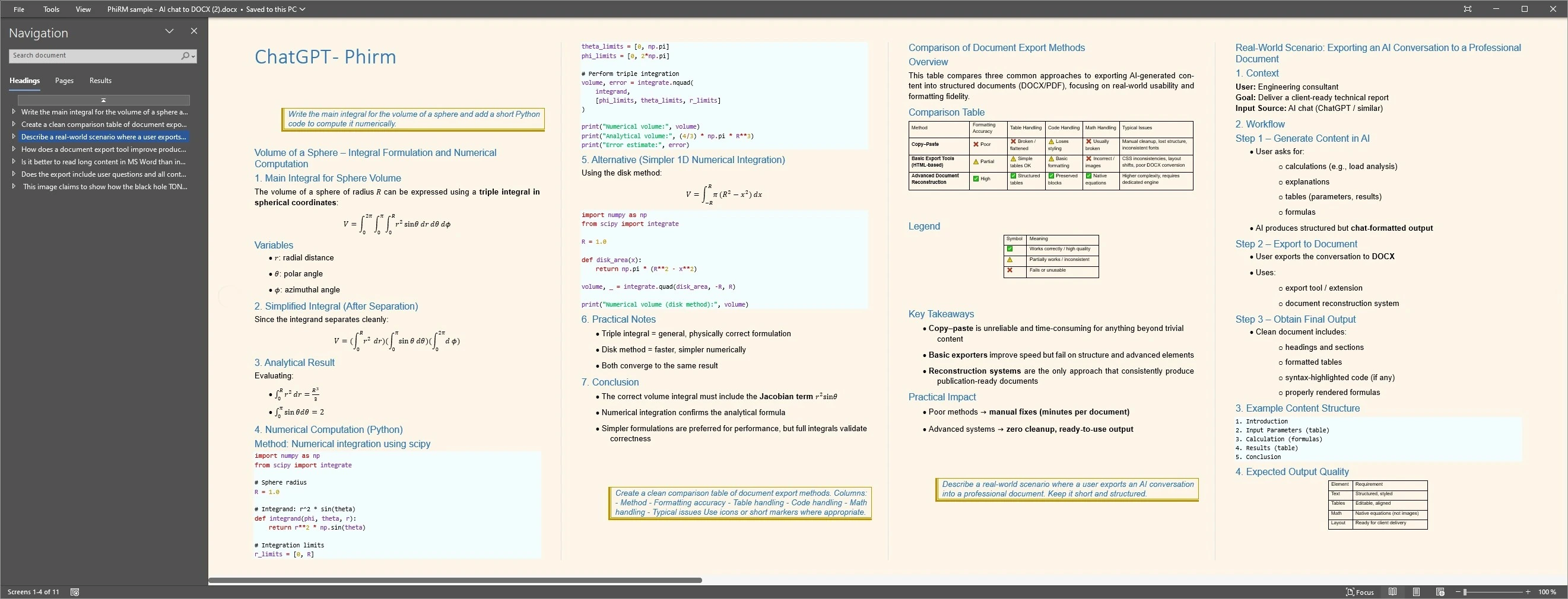
A PDF workflow creates a fixed-layout document intended for reading, sharing or archiving, while copy-paste or browser print may require more cleanup.
The examples below illustrate structured output and a reading-oriented layout; review the final PDF before professional use.
Document workflow examples
FAQ
Can I export ChatGPT to PDF?
Yes. For simple cases, browser print or save as PDF may be enough. For longer or more structured conversations, PhiRM can help export supported ChatGPT conversations to cleaner PDF documents.
Is browser print enough for ChatGPT to PDF?
Sometimes. Browser print is reasonable for short answers, quick personal records, or simple read-only snapshots. It becomes less useful when the conversation is long, structured, or intended for sharing as a proper document.
When should I use PhiRM instead?
Use PhiRM when the ChatGPT output needs to become a cleaner PDF for reading, sharing, archiving, client work, documentation, or repeated export workflows.
Should I choose PDF or DOCX?
Choose PDF when the document is mostly ready to read, send, or archive. Choose DOCX when you still need significant editing, comments, rewriting, or Word-compatible collaboration.
Can a PDF be used for archiving ChatGPT output?
Yes. PDF is often a practical format for storing a stable record of useful ChatGPT output, especially when the content should be read later rather than heavily edited.
Do I still need to review the PDF?
Yes. Professional or externally shared PDFs should still be reviewed before final use, especially if they include tables, formulas, code, or client-facing content.
Turn a useful ChatGPT conversation into a cleaner PDF document
Use PhiRM when ChatGPT output needs to become a readable PDF for sharing, archiving, sending, or later review. Browser print may be enough for short snapshots, but a document-focused export workflow is better for longer or structured material.