AI work record
AI Chat Work Record: Preserve the Work Behind the Answer
Short answer
An AI chat becomes a work record when the conversation contains more than a final answer: goals, constraints, prompts, corrections, alternatives, decisions, and the judgement that shaped the result. Copying only the last response may be enough for a simple answer, but it can hide the work behind it. PhiRM helps turn supported AI conversations into structured DOCX and PDF work records, so the conversation can be reviewed, shared, archived, or used later as a document.
The problem
AI chats are now used for real work: planning, analysis, research, drafting, comparison, documentation, technical thinking, and decision support. In many cases, the value is not only in the final output. The conversation shows what the user asked for, which direction was corrected, which assumptions were accepted, and which options were rejected.
That process is easy to lose. A user may copy the final answer into a document and move on. Later, the document may still contain the answer, but not the context that explains how it was produced. A colleague cannot see the constraints. A manager cannot see the alternatives. The user may not remember why a recommendation changed.
For serious AI-assisted work, the conversation can become part of the work artifact. It is not always enough to save the final text. Sometimes the prompts, refinements, questions, and decisions are what make the output understandable later.
Simple alternatives
Simple capture methods can be enough for short answers. They become weaker when the conversation needs to be reviewed, shared, archived, or reused.
| Method | When it is enough | Where it fails |
|---|---|---|
| Copy the final answer | A short answer or quick draft. | Loses prompts, corrections, alternatives, and decisions. |
| Save the chat link | Personal quick access inside the platform. | Not a portable document and may be awkward for sharing. |
| Browser print or PDF | Fast read-only capture. | Can include browser artifacts and weak document structure. |
| Manual Word cleanup | One important document. | Slow when AI work becomes regular or long. |
| Screenshot | Visual proof of a moment. | Not editable, searchable, or reusable as a working document. |
When simple alternatives stop being enough
Simple methods stop being enough when the AI chat is no longer just a temporary exchange. A long planning session, client recommendation, research comparison, technical explanation, or internal decision note may need to exist outside the chat window.
The failure point is usually not that copy-paste never works. It often does. The problem appears when the user needs a readable record of the whole work process: what was asked, what changed, what was kept, what was rejected, and what final direction was chosen.
How PhiRM helps
PhiRM is designed for AI chat to document workflows, not for rewriting the meaning of the conversation. It helps turn supported AI conversations into structured DOCX and PDF documents, so the chat can leave the browser and become a usable work record.
The important idea is simple: AI helps create the work. PhiRM preserves it as a document.
Instead of treating the AI chat as something disposable, PhiRM helps keep the conversation in a form that can be opened, read, attached, printed, archived, or reviewed later. For supported conversations, this can include the user's questions, the AI's answers, refinements, structured content, and the sequence of the exchange.
This does not make PhiRM an audit system or a certification layer. Its value is practical document preservation: turning supported AI chat content into a readable DOCX or PDF record without asking another AI model to summarize or reinterpret the work.
Who this is for and not for
This page is for people who use AI chats as part of meaningful work, not only quick answers. That includes consultants preparing recommendations, founders comparing product decisions, analysts building research notes, managers reviewing options, researchers collecting structured explanations, and technical users documenting how they solved a problem.
It is also useful for people who want a personal or internal record of AI-assisted work. The document does not need to be a final client deliverable. It can be a working record for review, reuse, project reference, or handoff.
It is less suitable when the chat is casual, very short, or contains nothing worth preserving beyond one final answer.
Limitations and accuracy
PhiRM creates a useful document record, not a legal transcript, compliance archive, employee monitoring system, or AI reasoning audit. It does not prove human contribution, rank prompt quality, or certify that a conversation is complete.
Results depend on the source conversation and supported PhiRM features. PhiRM currently focuses on supported AI chat workflows such as ChatGPT and Gemini. Manual review may still be appropriate before using an exported document as a final professional record.
Example or proof
Imagine a consultant using AI to compare three options for a client recommendation. The chat includes the original goal, budget constraints, rejected approaches, a revised comparison table, follow-up questions, and a final recommendation outline.
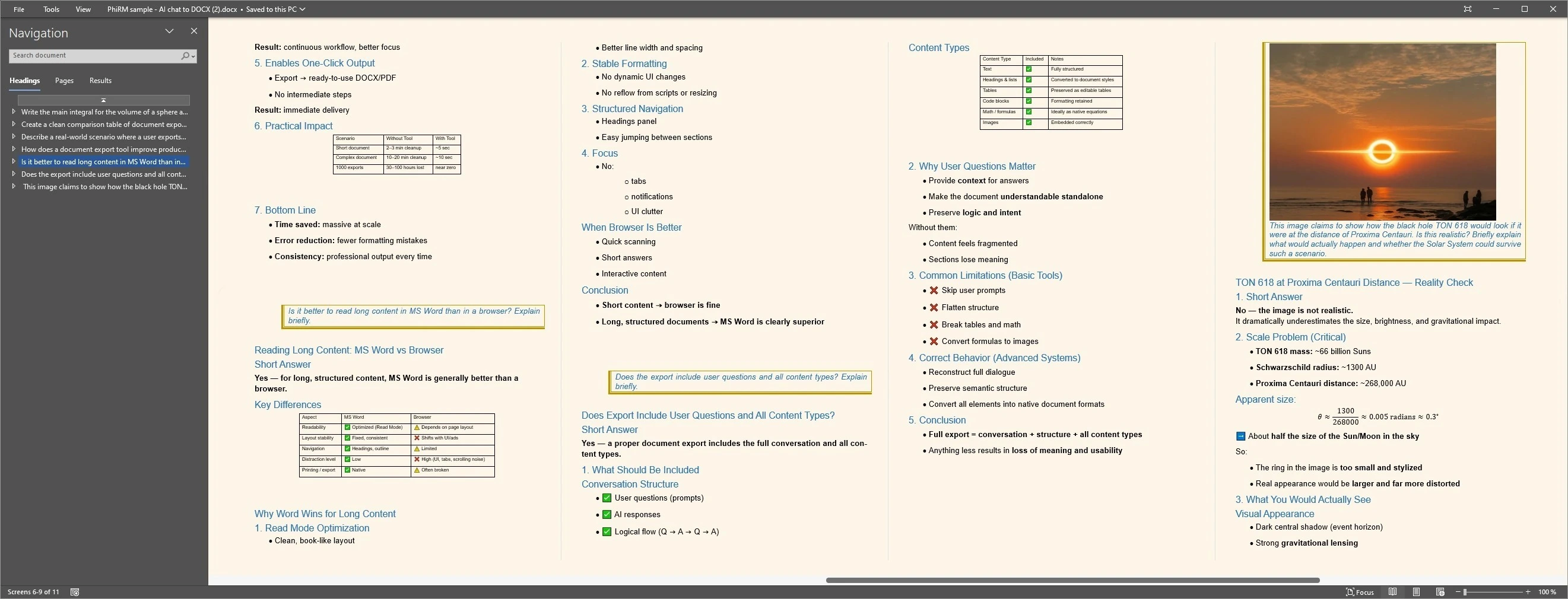
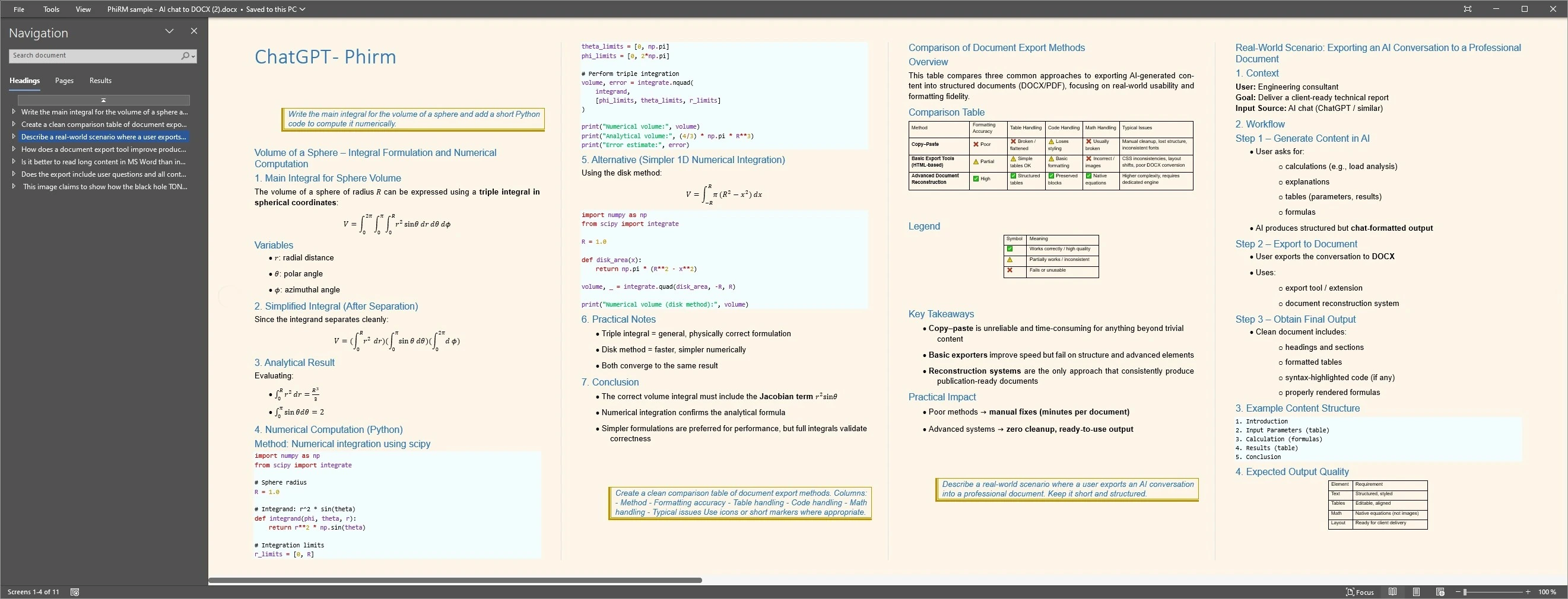
A fuller work record keeps the visible questions, answers, refinements and final direction together instead of preserving only the final answer. The examples below illustrate structured document output and a readable review layout from a supported AI conversation; results depend on source content and supported features.
Document work record examples
FAQ
What is an AI chat work record?
An AI chat work record is a preserved version of an AI conversation that shows more than the final answer. It can include the user's goals, prompts, corrections, constraints, alternatives, and decisions, along with the AI responses. The purpose is to keep the work process readable later, especially when the conversation supported real planning, analysis, documentation, or decision-making.
Why not just copy the final AI answer?
Copying the final answer is often enough for a short, simple response. It becomes weaker when the chat contains important context: why a direction changed, which constraints mattered, or which alternatives were rejected. In those cases, the final answer may show the result, but the conversation explains how the result was shaped.
Is an AI chat work record the same as a legal transcript?
No. An AI chat work record is a practical document record, not a legal transcript certification system. It can help preserve the visible conversation in a more usable form, but it does not certify legal completeness, prove authorship, or audit the reasoning behind the AI response. Professional or legal review may still be required.
Can PhiRM preserve the full thinking process?
PhiRM can help preserve supported AI conversation content, including prompts, answers, corrections, refinements, and structured output where supported. It should not be described as preserving hidden AI reasoning or guaranteeing every possible element of a platform interface. A safer way to think about it is: PhiRM helps keep the visible human-guided conversation in document form.
Does PhiRM rewrite or summarize the chat?
PhiRM is not designed as an AI summarizer or rewriting layer. Its role is to help reconstruct supported AI conversations into DOCX or PDF documents while avoiding unnecessary changes to meaning, wording, or sequence. A user may still edit the exported document later, but PhiRM's core value is preserving the conversation as a document record.
Which AI platforms does PhiRM support?
PhiRM currently focuses on supported AI chat workflows such as ChatGPT and Gemini. This page should not be read as a claim that PhiRM supports every AI platform or every possible chat feature. Support can depend on the source conversation, platform behavior, and current PhiRM capabilities, so platform-specific guides should be used for exact workflow details.
Keep the AI work behind the answer
When an AI conversation contains useful decisions, corrections, and context, PhiRM helps turn supported chats into structured DOCX and PDF documents.