ChatGPT team review workflow
Review a ChatGPT conversation with your team
Short answer
A ChatGPT conversation that contains useful AI-assisted work is easier for a team or manager to review when it becomes a readable document rather than a browser thread, share link, screenshot or rough copy-paste. A link can work for quick viewing, but a structured DOCX or PDF document supports annotation, meeting reference and team feedback in ways a chat interface cannot. PhiRM helps export supported ChatGPT conversations into readable documents, so the AI-assisted work can be reviewed by the people who need to see it.
Problem
When AI-assisted work in ChatGPT contains research, analysis, comparisons, corrections, decisions or a structured draft, getting it properly reviewed by a team, manager or colleague is not always straightforward. Sending a chat link gives the reviewer access, but the review format matters as much as the access.
A reviewer reading a long ChatGPT thread in a browser cannot annotate specific sections, add comments, use the material in a meeting, or file it with the project. If the conversation includes tables, structured answers, multiple prompts and corrections, or a sequence of decisions, a raw thread is often the wrong format for a useful review.
The question is not only whether the reviewer can open the conversation. The question is whether the format supports a proper review.
Ways to prepare a ChatGPT conversation for review
| Method | When it is enough | Where it fails for review |
|---|---|---|
| ChatGPT share link | Quick viewing when the reviewer is already inside ChatGPT | No annotation, no comments, hard to reference in a meeting, no project filing |
| Copy-paste into email | Short quote or final answer for fast context | Loses structure, tables, sequence and surrounding prompts and corrections |
| Screenshot | Visual evidence of a specific short exchange | Not annotatable, not searchable, impractical for long or structured review |
| Browser print / PDF | Fast read-only capture of the current page | May preserve browser layout rather than clean review-ready content |
| Manual copy into Word | One short, important exchange | Slow and unformatted for structured or long AI conversations |
| Structured DOCX or PDF document | AI-assisted work that needs proper team review | Most complete review format; supports annotation, meeting reference and project filing |
When simple review methods stop being enough
Simple methods stop being enough when the reviewer needs to do more than open the conversation and read it once. If the review involves adding comments, annotating sections, comparing options, preparing feedback for a meeting, approving or rejecting a direction, or filing the reviewed work alongside other project documents, a chat link or screenshot is usually the wrong starting point.
The test is not "can the reviewer open this?" The test is "can the format support the kind of review that actually needs to happen?"
How PhiRM helps
PhiRM helps export supported ChatGPT conversations into readable DOCX and PDF documents that can be shared with a team, colleague or manager for review.
A supported ChatGPT conversation may include visible prompts, answers, follow-up questions, tables, code, comparisons, corrections and decisions. PhiRM helps preserve supported visible conversation content in document form, so the reviewer can follow the AI-assisted work in a structured way — outside the chat interface and without needing a ChatGPT account.
A DOCX document can support annotation, commenting and tracked changes in Word or compatible tools. A PDF can be used for stable reading, meeting reference or archiving. Both allow the review to happen independently of the ChatGPT platform.
PhiRM is an independent workflow for supported ChatGPT conversation export. It prepares a document that people can review. It does not review, verify or audit the content itself. Results depend on the source conversation and supported features.
DOCX or PDF: which is better for review?
| Format | Use when | Why |
|---|---|---|
| DOCX | The reviewer needs to annotate, add comments, track changes or rearrange the content | Supports Word review features: comments, tracked changes, editable annotation |
| You need a stable read-only document for a meeting, approval handoff or archiving | Consistent layout; easy to open anywhere; cannot be accidentally edited | |
| Both | The work needs active review now and stable archiving later | Gives the reviewer a working copy and the team a fixed reference |
A practical rule: use DOCX when the reviewer needs to work with the content; use PDF when the review format needs to be stable, shareable and easy to open without software requirements.
Who this is for
This page is for ChatGPT users who need a team, colleague or manager to review AI-assisted work and need a format that supports the review. That includes project leads sharing a ChatGPT research summary with a team, consultants preparing an AI-assisted analysis for a manager, analysts getting feedback on a structured comparison, researchers sharing a draft with colleagues, and professionals who need AI-assisted decisions reviewed before acting on them.
It is less relevant when a quick glance and informal feedback is all that is needed, or when the reviewer is already inside ChatGPT and only needs a fast look at the final answer.
Limitations / accuracy
PhiRM helps export supported ChatGPT conversations into readable DOCX and PDF documents. It should not be described as a tool that verifies, audits or certifies the correctness of AI output.
A document exported from a supported ChatGPT conversation is not an official ChatGPT transcript. It is not a legal record, an audit-grade document or a compliance-certified evidence file. The review — whether the AI-assisted work is correct, appropriate or ready to act on — remains a human decision.
PhiRM is not affiliated with OpenAI or ChatGPT and is not an official ChatGPT review or export system. It does not capture hidden reasoning, bypass platform restrictions or guarantee perfect preservation of every element. Results depend on the source conversation and supported features.
Example: preparing a comparison for review
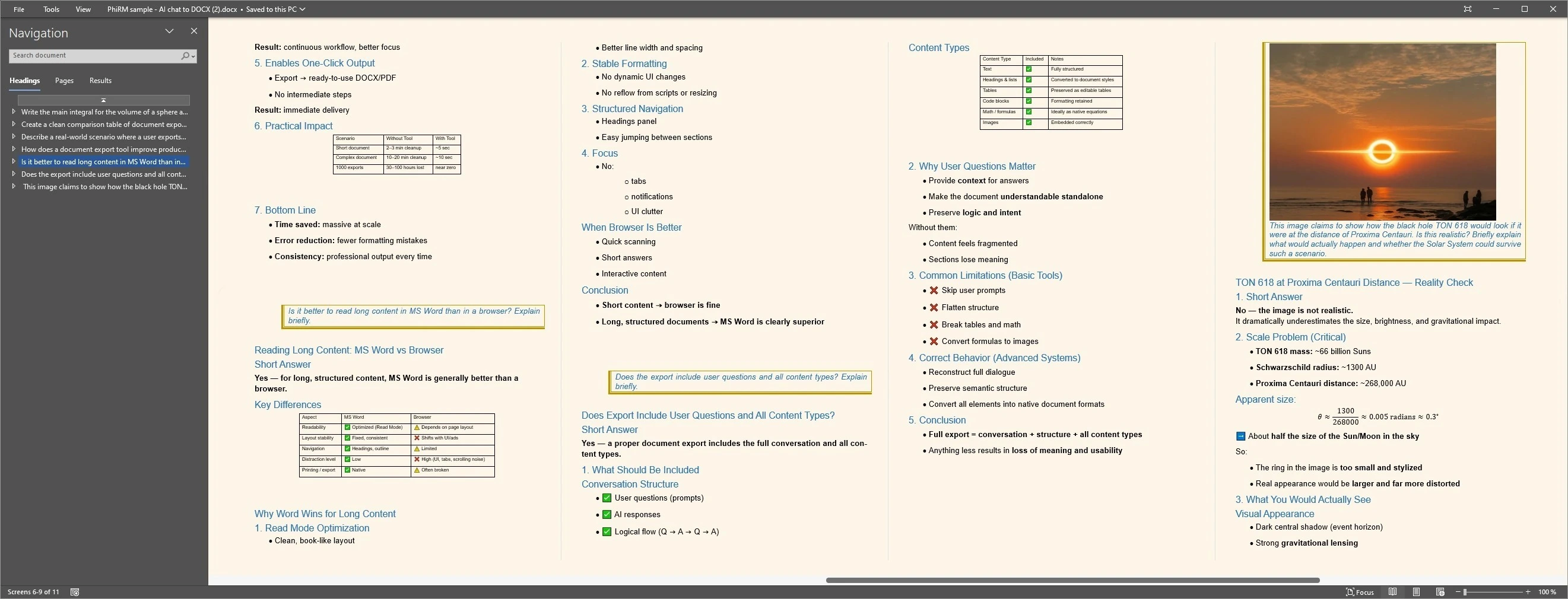
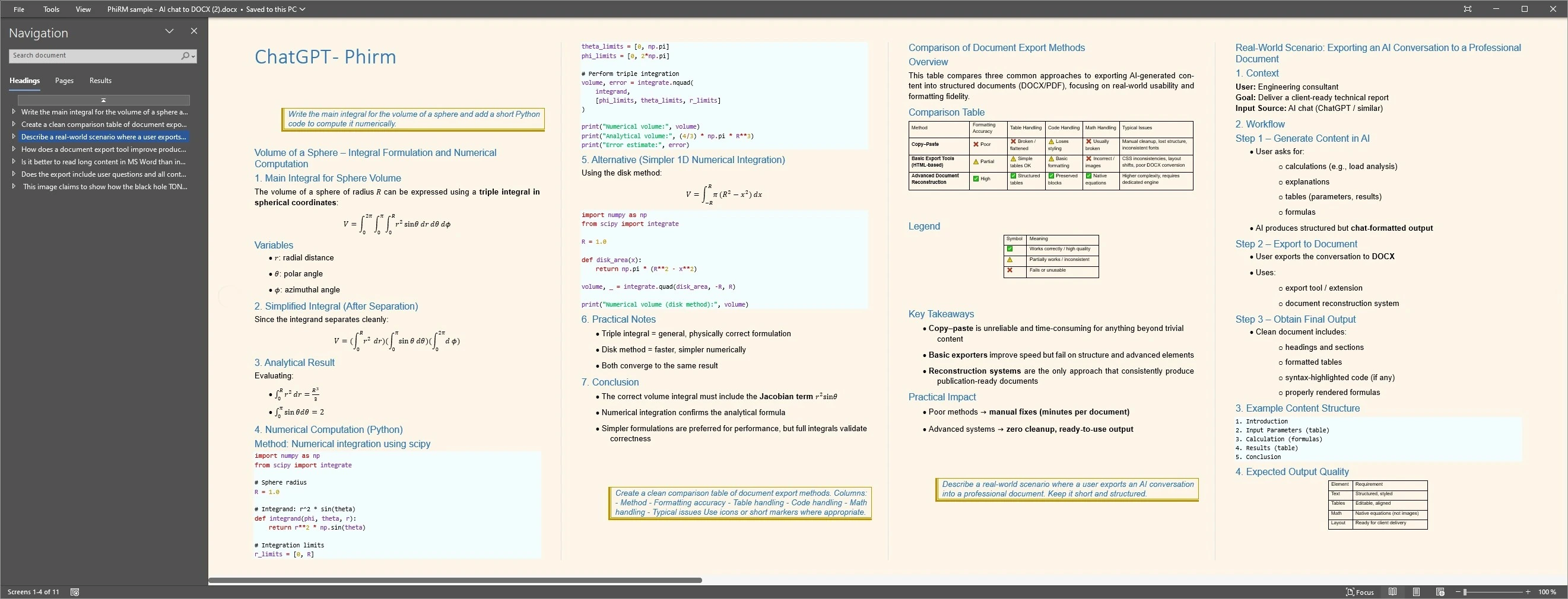
A consultant uses ChatGPT to compare three approaches to a client problem. The conversation includes the brief, the three options, comparison criteria, risks, a rejected direction and a final recommendation. Sharing only the final answer loses the reasoning. A structured DOCX document preserves the full visible discussion, so the manager can read the comparison, annotate the preferred direction and note questions before the review meeting.
Any proof image should be presented as an example of supported output, not as a guarantee of every result.
Review-ready document examples
FAQ
Can I review a ChatGPT conversation with my team?
Yes. You can share a ChatGPT conversation with your team using a share link, a copy-paste, a screenshot or an exported DOCX or PDF document. The right approach depends on what the review requires. If the team needs to annotate the work, reference it in a meeting, add comments or file it with project documents, a structured document is usually a better review format than a chat link.
Why is a ChatGPT share link not ideal for team review?
A ChatGPT share link gives reviewers access to the conversation, but it keeps the review inside the ChatGPT platform. The reviewer cannot annotate or comment on the thread, cannot use it easily in a meeting, and cannot file it with project documents. For a structured team review, a DOCX or PDF document is usually a more useful format than a platform link.
Should I use DOCX or PDF for reviewing a ChatGPT conversation?
Use DOCX when the reviewer needs to annotate, add comments, track changes or rearrange the content — Word and compatible tools support these review features directly. Use PDF when you need a stable read-only format that is easy to open in a meeting, send to a reviewer or archive alongside other project documents. Both can be appropriate depending on the stage and type of review.
Does PhiRM review or verify the AI output?
No. PhiRM helps export supported ChatGPT conversations into readable DOCX and PDF documents that a team or manager can review. It does not verify, audit or certify the accuracy or quality of the AI output. The review — whether the AI-assisted work is correct, appropriate or ready to act on — remains a human decision. PhiRM prepares the document; people do the reviewing.
Is an exported ChatGPT conversation a legal or audit record?
No. A document exported from a supported ChatGPT conversation is not an official ChatGPT transcript. It is not a legal record, an audit-grade document or a compliance-certified evidence file. It is a readable document record of supported visible ChatGPT conversation content, useful for team review, project filing and internal reference. For legal, audit or compliance purposes, professional advice applies.
Is PhiRM affiliated with OpenAI or ChatGPT?
No. PhiRM is an independent tool for exporting supported ChatGPT conversations into DOCX and PDF documents. It is not affiliated with OpenAI or ChatGPT and is not an official ChatGPT review, export or approval system. PhiRM does not generate, manage or interact with the native ChatGPT share or review features. Its role is to help create a portable document record from the conversation that people can review.
Prepare a supported ChatGPT conversation for review
When AI-assisted ChatGPT work needs to be reviewed by a team, colleague or manager, PhiRM helps export supported conversations into readable DOCX and PDF documents that reviewers can annotate, reference in a meeting or file with project documents.