ChatGPT preservation workflow
Save a ChatGPT conversation for later use
Short answer
You can save a ChatGPT conversation by saving the chat link, copying selected text, printing from the browser, taking screenshots, or manually pasting the content into a document. Those methods can work for short or low-value chats. When the conversation is worth keeping, sharing, reviewing, archiving or finding later, a structured document is usually more useful. PhiRM helps export supported ChatGPT conversations into readable DOCX and PDF documents, so visible conversation content can be preserved outside the ChatGPT interface.
Problem
A useful ChatGPT conversation can become valuable after the original task is finished. It may contain prompts, answers, decisions, examples, tables, code, explanations, corrections or project notes. If the conversation remains only inside ChatGPT, it can be harder to find, organize, share or keep with related work.
The problem is not only whether the user can reopen the chat. The problem is whether the conversation remains useful later. A saved link may be enough for personal access, but it may not belong naturally in a project folder or client file. A copied final answer may preserve the output, but lose the surrounding prompts and corrections. A screenshot may prove that something appeared on screen, but it does not create a searchable or editable record.
For serious work, saving a ChatGPT conversation means preserving it in a form that still makes sense after the browser session is over.
Simple ways to save a ChatGPT conversation
| Method | When it is enough | Where it fails |
|---|---|---|
| Save ChatGPT link | Quick personal reopening | Platform-bound and weak for project folders or sharing |
| Copy selected text | Short answer or quote | Loses sequence, structure and surrounding context |
| Screenshot | Visual proof of a small part | Not searchable, editable or useful for long chats |
| Browser print / PDF | Fast read-only capture | May preserve browser layout rather than a clean record |
| Manual Word cleanup | One important chat | Slow for long, structured or repeated ChatGPT work |
When simple saving methods stop being enough
Simple saving methods stop being enough when the conversation has future value. If the chat includes a decision trail, a comparison table, code, a research explanation, a client note, or a sequence of prompts and corrections, saving only one answer may be too thin.
The failure point is usually later use. The user wants to find the conversation, share it with someone, attach it to a project, review it before a meeting, archive it with related material or reuse it as a reference. In those cases, the saved version should be easier to handle than a long browser thread, a folder of screenshots or a rough copy-paste document.
How PhiRM helps
PhiRM helps users save supported ChatGPT conversations as readable DOCX and PDF documents when the chat is worth keeping beyond the browser.
A supported ChatGPT conversation may include visible prompts, answers, follow-up questions, tables, code blocks, examples, corrections and decisions. PhiRM helps preserve supported visible conversation content in document form, so the result can be reviewed, shared, archived or reused later.
This is different from asking another AI tool to rewrite or summarize the chat. PhiRM is an independent workflow for supported ChatGPT conversation export. Its role is to help create a readable document record from the conversation, not to claim official ChatGPT status, hidden reasoning capture or perfect preservation.
Results depend on the source conversation and supported features. Manual review may still be appropriate before professional use.
DOCX or PDF: which should you save?
| Format | Use when | Why |
|---|---|---|
| DOCX | You may edit, annotate, rearrange or combine the conversation with other work | Better for working documents and Word-compatible workflows |
| You want a stable read-only record for sharing or archiving | Better for review, sending and long-term reference | |
| Both | The conversation is important and may need editing now but stable sharing later | Gives both a working copy and a fixed record |
A practical rule: save as DOCX when the conversation still needs work; save as PDF when the saved version should be stable and easy to share.
Who this is for
This page is for ChatGPT users who want to keep useful conversations available beyond the chat window. That includes consultants saving client research, analysts preserving a comparison, researchers keeping notes, managers reviewing a decision thread, founders saving product thinking and technical users preserving explanations or code-heavy conversations.
It is especially relevant when the conversation is long, structured, important for a project, likely to be reviewed by someone else, or useful as a later reference.
It is less relevant for casual chats, temporary answers or short questions where saving a link or copying one paragraph is enough.
Limitations / accuracy
PhiRM helps export supported ChatGPT conversations into readable DOCX and PDF documents. It should not be described as saving every ChatGPT conversation perfectly, automatically archiving all ChatGPT history, syncing conversations, creating ChatGPT memory or guaranteeing permanent storage.
PhiRM is not an official ChatGPT or OpenAI save system and should not be presented as affiliated with OpenAI. It does not bypass ChatGPT restrictions, capture hidden reasoning, audit reasoning or prove authorship. Results depend on the source conversation and supported features. Professional documents should still be reviewed before final use.
Example or proof section
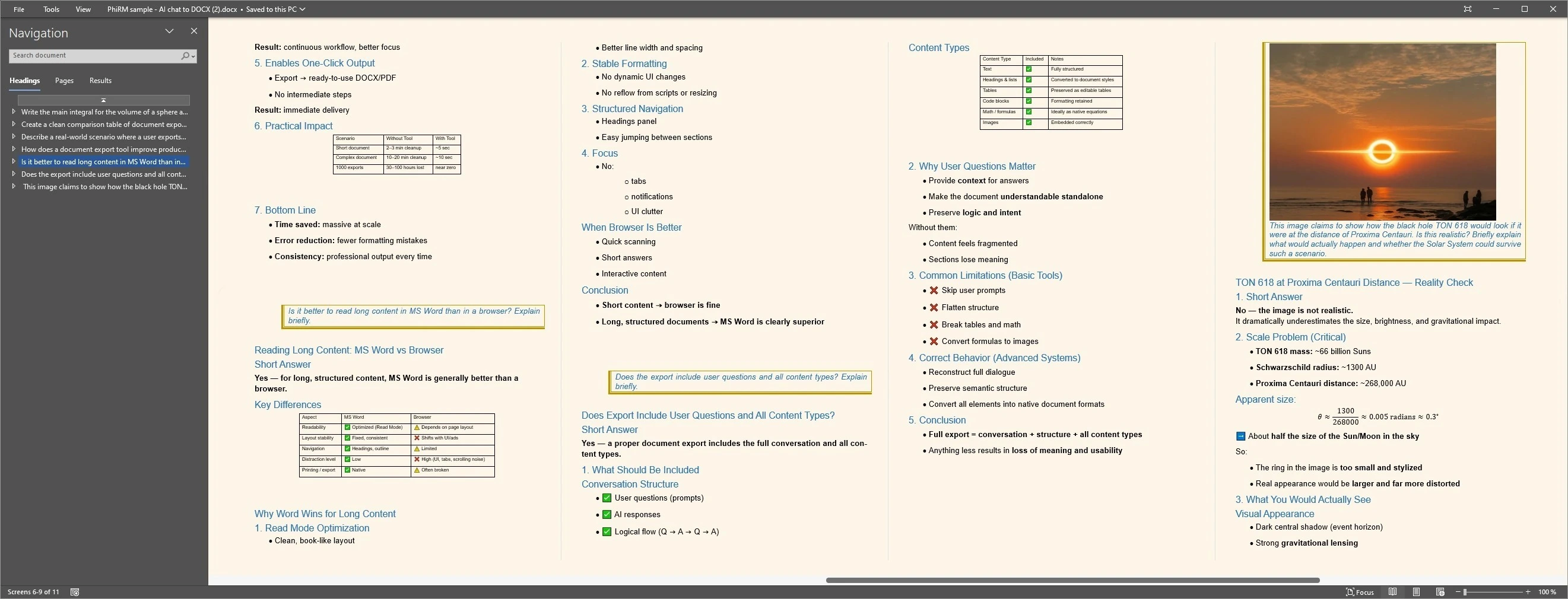
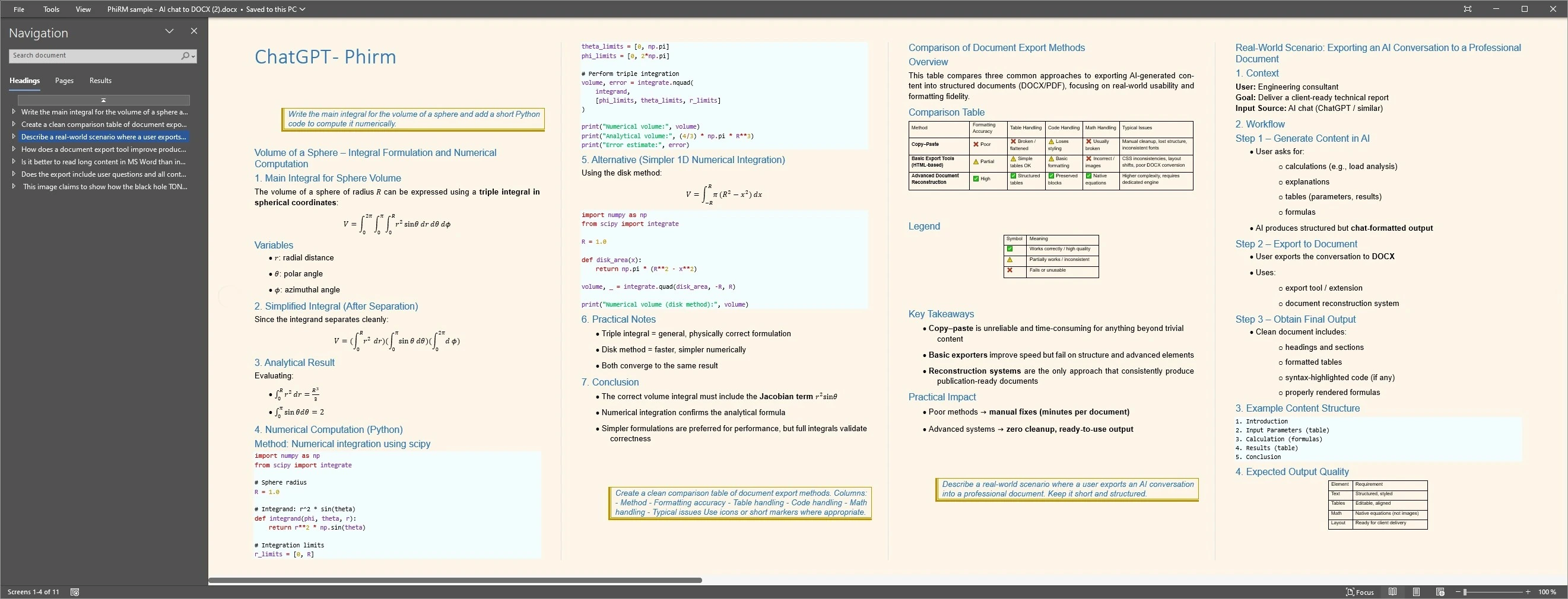
Imagine a consultant using ChatGPT to prepare a client recommendation. The conversation includes the client goal, constraints, several options, a comparison table, rejected directions, risks and a final outline. Saving only the final answer would lose much of the useful work.
If the conversation is saved as a structured DOCX or PDF document, it can be stored with the project, reviewed before a meeting, shared with a colleague or reopened later as a reference. A proof block could show a supported ChatGPT conversation exported into a readable document with prompts, answers, table content and final direction visible. Any image should be presented as an example, not a guarantee of every output.
Saved ChatGPT document examples
FAQ
Can I save a ChatGPT conversation?
Yes. You can save a ChatGPT conversation in several ways, including saving a link, copying selected text, using browser print, taking screenshots or exporting supported conversations into a document workflow. The best method depends on how important the conversation is and whether it needs to be searched, shared, reviewed, archived or reused later.
What is the easiest way to save a ChatGPT conversation?
The easiest method is usually saving the ChatGPT link or copying the part you need. That can work for quick personal access or short answers. It becomes weaker when the conversation needs to live outside ChatGPT as a project file, document record, archive or shared reference.
Is saving a ChatGPT link enough?
Saving a link can be enough when you only need quick personal reopening inside ChatGPT. It is less useful when the conversation should be stored with other project files, shared with someone else, reviewed outside the platform or preserved as a readable document. A link is access; a document is a portable record.
Should I save a ChatGPT conversation as DOCX or PDF?
Use DOCX when you want to edit, annotate, rearrange or combine the conversation with other material. Use PDF when you want a stable read-only record for sharing, reading or archiving. Some important conversations may be worth saving in both formats, depending on the next step.
Is PhiRM an official ChatGPT save tool?
No. PhiRM should be described as an independent workflow for supported ChatGPT conversation export. It is not an official OpenAI or ChatGPT save system, and it should not be presented as affiliated with OpenAI or as a way to bypass platform restrictions.
Does PhiRM archive all ChatGPT history?
No. PhiRM should not be described as automatically archiving all ChatGPT history, syncing conversations or creating permanent ChatGPT memory. Its role is to help export supported ChatGPT conversations into readable DOCX and PDF documents. Results depend on the source conversation and supported features.
Save useful ChatGPT work as a document
When a ChatGPT conversation is worth keeping, PhiRM helps export supported chats into readable DOCX and PDF documents.