ChatGPT context reuse
Reuse a ChatGPT conversation as context for future work
Short answer
A valuable ChatGPT conversation can become reusable context for later work when it is exported into a readable document instead of staying buried in the ChatGPT interface. The conversation may include goals, assumptions, examples, corrections, decisions and background that help future prompts, reports or project work. PhiRM helps export supported ChatGPT conversations into readable DOCX and PDF documents that the user can manually reuse as future context sources. It does not create persistent ChatGPT memory or automatically inject old chats into new prompts.
The problem
ChatGPT is often used for more than a single answer. A user may explore a topic, compare options, build a plan, ask follow-up questions, correct weak answers and arrive at useful background for later work. That conversation can become valuable context.
The problem appears when the next task starts. The useful ChatGPT conversation may be hard to find, too long to copy cleanly or awkward to share with a colleague. If the user only copies the final answer, the surrounding context may disappear: why a decision was made, which assumptions mattered, what was rejected and which examples should be reused.
For future work, the goal is not only to keep a ChatGPT link. The goal is to turn the useful conversation into a readable reference that can be reviewed, quoted, shared or copied from later.
Simple alternatives
| Alternative | When it is enough | Where it fails |
|---|---|---|
| Save ChatGPT link | Quick personal reopening. | Weak for sharing, archiving or project folders. |
| Copy selected parts | Short context or one key answer. | Loses sequence, assumptions and supporting detail. |
| Browser print / PDF | Fast read-only capture. | May preserve browser layout rather than a clean document. |
| Screenshot | Visual proof of a moment. | Not searchable, editable or reusable as context. |
| Manual Word cleanup | One important conversation. | Slow for long or repeated ChatGPT workflows. |
When simple alternatives stop being enough
Simple methods stop being enough when a ChatGPT conversation needs to support later work. A saved link may help the original user reopen the thread, but it may not be practical for a project folder, handoff note, report draft or shared review. A copied excerpt may miss the surrounding assumptions. A screenshot may preserve one moment, but not the reusable context.
The failure point is manual reuse. If the conversation will help prepare a later prompt, brief another person, support documentation or continue a project, it should be easier to handle than a long browser thread.
How PhiRM helps
PhiRM helps export supported ChatGPT conversations into readable DOCX and PDF documents. For this page, the value is not generic export. The value is turning a useful ChatGPT thread into a future reference that the user can reuse manually.
A supported ChatGPT conversation can contain goals, constraints, assumptions, examples, comparisons, tables, explanations, corrections and decisions. PhiRM helps move that content out of the ChatGPT interface and into a document that can be opened later.
That document can become a manual context source. The user can review it before writing a new prompt, quote from it in a report, share it with a colleague, attach it to project documentation or copy selected parts into future work.
PhiRM does not automatically add old chats to new ChatGPT prompts. It does not create persistent ChatGPT memory, live sync or automatic updates for future conversations. Its role is practical: preserve supported ChatGPT conversations as readable document records for deliberate reuse.
Who this is for
This page is for ChatGPT users who return to previous conversations as part of ongoing work. That includes consultants, analysts, founders, researchers, managers, technical users and project leads who use ChatGPT for planning, research, decision support, documentation or technical explanation.
It is especially relevant when one ChatGPT conversation informs another task: a later prompt, client note, project plan, internal report, product decision, documentation draft or research summary.
It is less relevant for casual ChatGPT chats, one-off answers or conversations that have no future value.
Limitations and accuracy
Reusing a ChatGPT conversation as context means manual document reuse. It does not mean PhiRM gives ChatGPT permanent memory, automatically injects old conversations into new prompts or syncs future ChatGPT chats.
PhiRM creates useful document records from supported ChatGPT conversations. It does not audit ChatGPT reasoning, capture hidden reasoning, prove human contribution or guarantee perfect preservation of every ChatGPT feature. Results depend on the source conversation and supported features. Manual review may still be appropriate before using the document for important work.
Example or proof
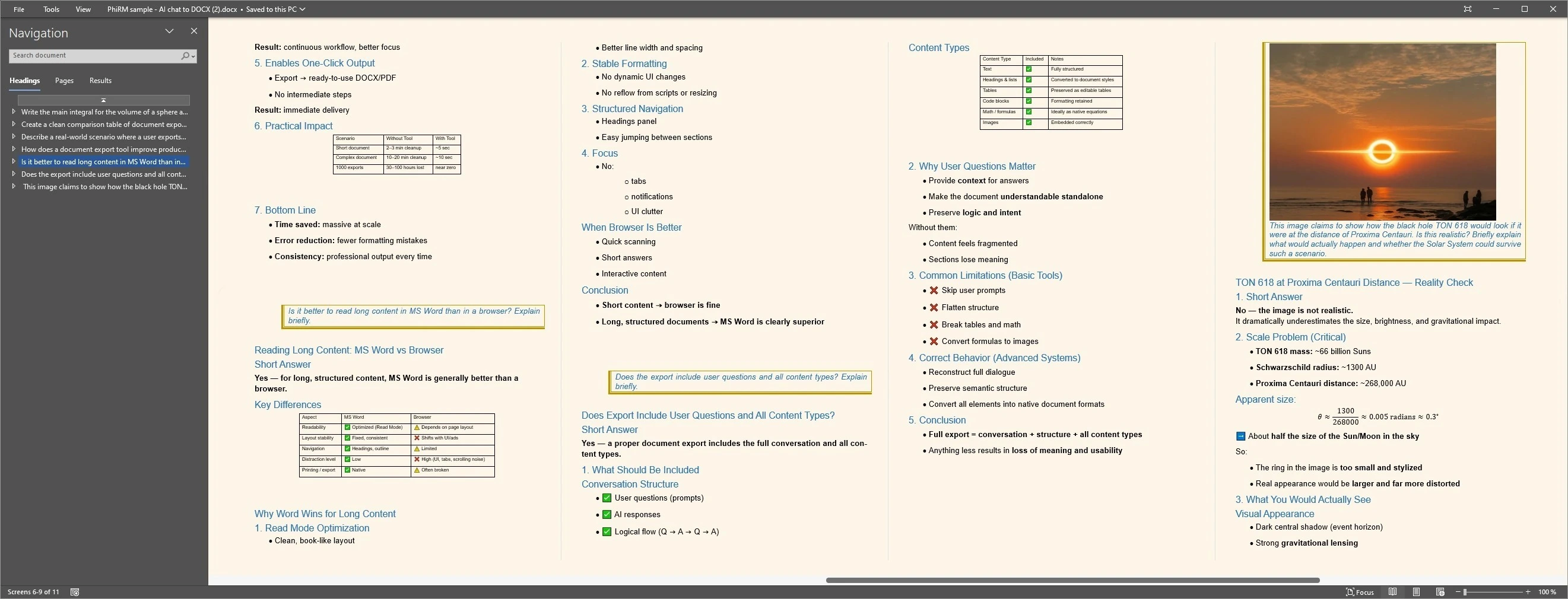
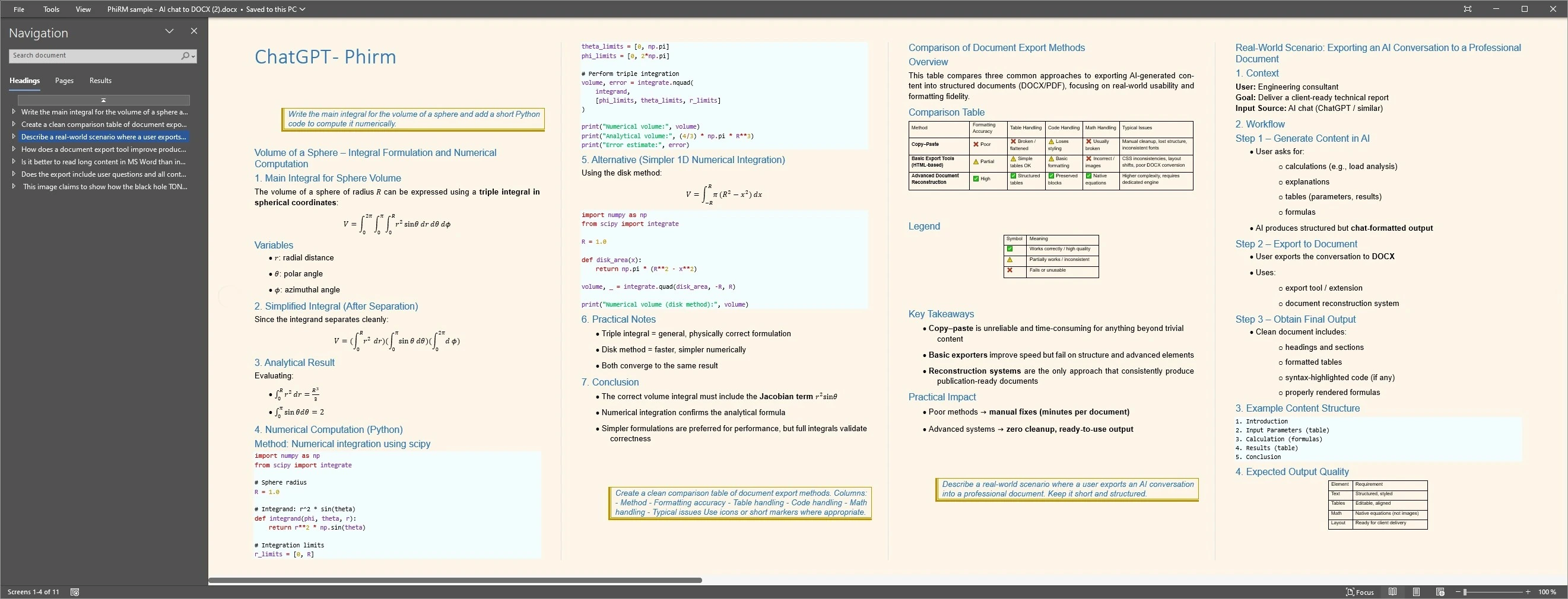
Imagine a product lead using ChatGPT to explore a new feature. The conversation includes customer assumptions, risks, a comparison table, rejected options and a final outline. Three weeks later, the same work needs to inform a product brief and a new ChatGPT prompt.
After a supported ChatGPT conversation is exported as DOCX or PDF, a product lead can reopen it as a reference, review earlier assumptions and manually reuse selected details in a new brief or prompt. The examples below illustrate representative document layouts; results depend on source content and supported features.
Reusable ChatGPT context examples
FAQ
Can I reuse a ChatGPT conversation as context?
Yes, if the conversation contains useful background, decisions, examples, explanations or structured material. The safe way to describe this is manual reuse: keep the ChatGPT conversation as a document, review it later and choose what to quote, share or paste into another task. It is not automatic ChatGPT memory.
Why not just save the ChatGPT link?
Saving the ChatGPT link may be enough for quick personal access. It becomes weaker when the context needs to be shared, stored in a project folder, reviewed outside ChatGPT or reused in a document workflow. A readable DOCX or PDF record is often easier to handle than a browser-only thread.
Does PhiRM automatically add old chats to new ChatGPT prompts?
No. PhiRM does not automatically inject old conversations into new ChatGPT prompts. Its role is to help export supported ChatGPT conversations into readable DOCX and PDF documents. The user can then manually review, quote, share or paste selected parts into later work when appropriate.
Is this the same as ChatGPT memory?
No. This is not persistent ChatGPT memory, live project memory or automatic context sync. A preserved ChatGPT conversation document can serve as a future reference, but it does not make ChatGPT remember everything automatically. The user controls when and how the document is reused.
Should I use DOCX or PDF for reusable ChatGPT context?
Use DOCX when the context may be edited, annotated, rearranged or reused in a working document. Use PDF when the record should be stable, easy to share or read-only. The best format depends on whether the next step is editing, review, sharing, archiving or manual reuse.
Does PhiRM preserve every ChatGPT feature perfectly?
No tool should claim perfect preservation of every ChatGPT feature. PhiRM helps export supported ChatGPT conversations into readable DOCX and PDF documents, but results depend on the source conversation and supported features. Manual review may still be appropriate before relying on the document for important work.
Reuse useful ChatGPT work later
When a ChatGPT conversation contains context worth keeping, PhiRM helps export supported chats into readable DOCX and PDF documents.