ChatGPT sharing workflow
Share a ChatGPT conversation as a document
Short answer
You can share a ChatGPT conversation by sending a ChatGPT share link, copying and pasting the content, or exporting the conversation into a standalone document. A share link can be useful for quick access when both parties are comfortable inside ChatGPT. When the recipient needs a file they can open, keep, annotate or forward outside the platform, a structured document is usually more useful. PhiRM helps export supported ChatGPT conversations into readable DOCX and PDF documents, so the conversation can be shared as a standalone file.
Problem
When a ChatGPT conversation contains useful research, a decision trail, a comparison, an explanation or a series of prompts and answers, there is often someone else who should see it. The question is how to get it to them in a form they can actually use.
Sending a ChatGPT share link is the most direct option. The recipient opens the link in their browser and sees the shared conversation. The problem is that this keeps the recipient inside the ChatGPT sharing flow. The share link may not suit workflows that need a standalone file, and the recipient cannot easily keep the conversation with related project files, annotate it or forward it to someone who prefers a document.
If the conversation is long, structured or part of a professional workflow, the person receiving it may need more than a browser link. They may need a file.
Simple ways to share a ChatGPT conversation
| Method | When it is enough | Where it fails |
|---|---|---|
| ChatGPT share link | Quick viewing when both parties are in ChatGPT | Keeps recipient inside the ChatGPT platform; may not suit standalone file workflows |
| Copy and paste into email | Short answer or quote for fast transfer | Loses structure, formatting and conversation sequence |
| Screenshot | Visual evidence of a specific exchange | Not searchable, editable or practical for long conversations |
| Browser print / PDF | Fast read-only capture | May preserve browser layout rather than a clean document |
| Manual copy into Word | One important short exchange | Slow and unformatted for long or structured conversations |
When simple sharing methods stop being enough
Simple sharing methods stop being enough when the recipient needs the conversation outside ChatGPT. If the person receiving it wants to keep it with project files, review it in Word, annotate it, archive it alongside related documents or forward it as a standalone file, a ChatGPT share link is the wrong format.
The failure point is usually the recipient's workflow. The user may have a useful conversation, but the person receiving it needs something they can handle outside a browser and without relying on the ChatGPT platform.
How PhiRM helps
PhiRM helps users export supported ChatGPT conversations into readable DOCX and PDF documents when the conversation is worth sharing as a file.
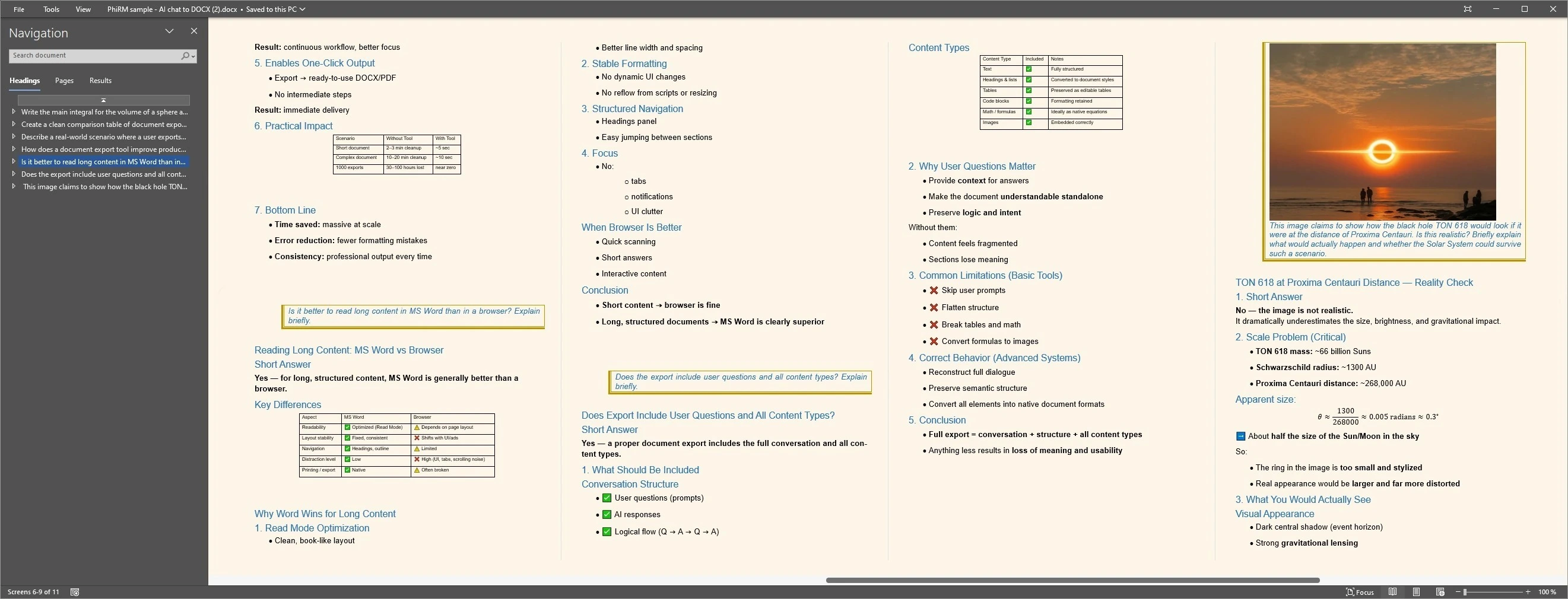
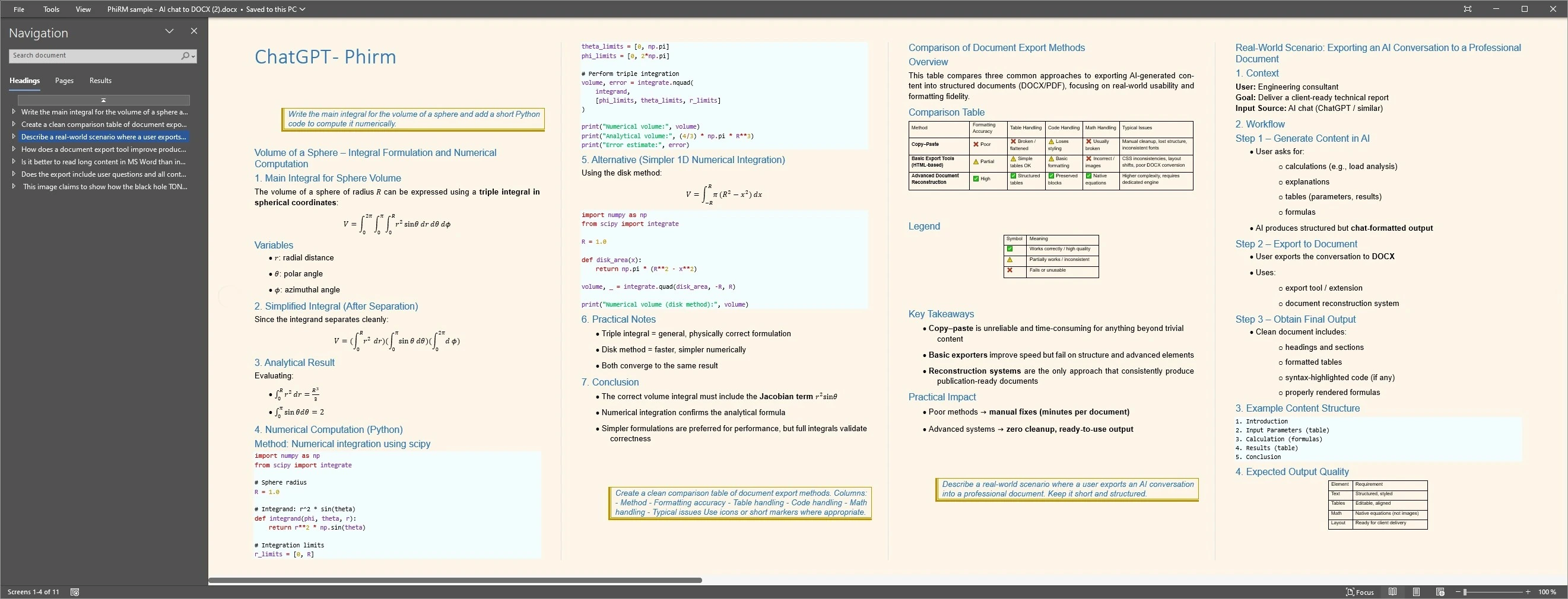
A supported ChatGPT conversation may include visible prompts, answers, tables, code, comparisons, corrections and decisions. PhiRM helps preserve supported visible conversation content in document form, so the result can be sent, reviewed, annotated, archived or kept alongside project files without platform dependency.
This is different from asking ChatGPT to summarize the conversation or copy-pasting the content. PhiRM is an independent workflow for supported ChatGPT conversation export. Its role is to help create a portable document record from the conversation, not to generate new content or create official ChatGPT share links.
Results depend on the source conversation and supported features. Manual review may still be appropriate before sharing in a professional context.
DOCX or PDF: which should you share?
| Format | Use when | Why |
|---|---|---|
| DOCX | The recipient may want to edit, annotate, rearrange or combine the conversation with other material | Better for working documents and Word-compatible recipient workflows |
| You want a stable read-only record that is easy to send, review and archive | Better for review, forwarding and long-term shared reference | |
| Both | The conversation is important and the recipient may need both a working copy and a fixed record | Gives flexibility for different recipient workflows |
A practical rule: share as DOCX when the recipient will work with the content; share as PDF when the shared version should be stable and easy to open anywhere.
Who this is for
This page is for ChatGPT users who need to share a useful conversation with someone else and want to go beyond a share link. That includes consultants sharing research with clients, analysts forwarding a comparison, managers distributing a decision thread, researchers sharing notes with colleagues, and founders sharing product thinking with their teams.
It is especially relevant when the recipient works outside ChatGPT, prefers a file they can open and annotate, needs to store the conversation with project documents, or is unlikely to have or use a ChatGPT account.
It is less relevant for casual sharing where a quick link is enough, or when both parties are already inside ChatGPT and only need a fast reference.
Limitations / accuracy
PhiRM helps export supported ChatGPT conversations into readable DOCX and PDF documents. It should not be described as sharing every ChatGPT conversation perfectly, creating official ChatGPT share links or working as an alternative to the native ChatGPT sharing feature.
PhiRM is not an official ChatGPT or OpenAI sharing system and should not be presented as affiliated with OpenAI. It does not create ChatGPT share links, capture hidden reasoning or guarantee that every element of a conversation will appear exactly as it does in the browser. Results depend on the source conversation and supported features. Documents shared in a professional context should be reviewed before final use.
Shared ChatGPT document examples
FAQ
Can I share a ChatGPT conversation?
Yes. ChatGPT has a built-in share link feature that lets you share a conversation with anyone. You can also copy content, take screenshots, or export a supported conversation into a DOCX or PDF document. The best method depends on what the recipient needs, whether they work inside or outside ChatGPT, and how they plan to use the shared conversation.
What happens when I share a ChatGPT link?
When you share a ChatGPT link, the recipient opens the conversation in their browser using the ChatGPT sharing flow. This can work for quick viewing when both parties are comfortable inside ChatGPT. The share link keeps the recipient inside the ChatGPT platform and may not suit workflows that need a standalone file the recipient can store, annotate or forward independently.
Is a ChatGPT share link enough?
A ChatGPT share link can be enough when the recipient only needs quick access and is comfortable inside the ChatGPT interface. It becomes less useful when the recipient needs a file they can keep with project documents, annotate, review offline, archive or forward outside the platform. When the conversation has lasting value beyond a quick browse, a standalone document is usually more useful.
Should I share a ChatGPT conversation as DOCX or PDF?
Use DOCX when the recipient may want to edit, annotate, rearrange or combine the conversation with other material. Use PDF when you want a stable read-only record that is easy to send, review and archive. Some important conversations may be worth sharing in both formats, giving the recipient both a working copy and a stable reference.
Does PhiRM create official ChatGPT share links?
No. PhiRM is an independent tool for exporting supported ChatGPT conversations into DOCX and PDF documents. It is not affiliated with OpenAI or ChatGPT and does not generate, manage or interact with the native ChatGPT share link feature. PhiRM's role is to help create a portable document record, not to act as part of the ChatGPT sharing system.
Who is a DOCX or PDF export better for than a ChatGPT share link?
A document export is better when the recipient does not use ChatGPT, prefers a file they can open in Word or a PDF reader, needs to store the conversation with other project files, or will review, annotate or forward it in a non-browser context. A share link is better when both parties are already in ChatGPT and only need quick access to a single conversation.
Share supported ChatGPT conversations as a document
When a ChatGPT conversation is worth sharing, PhiRM helps export supported chats into readable DOCX and PDF documents that recipients can open, keep and use outside the platform.