Long ChatGPT conversation workflow
Turn a long ChatGPT conversation into a document
Short answer
You can turn a long ChatGPT conversation into a document by copying selected text, saving the chat link, using browser print, cleaning the content manually in Word, or exporting supported conversation content into DOCX or PDF. Simple methods can work for short chats. Long ChatGPT conversations are different: they often include many prompts, answers, corrections, examples, tables, side paths and decisions. PhiRM helps export supported ChatGPT conversations into readable DOCX and PDF documents, so supported conversation text can become document content without rewriting or summarizing it.
Problem
A long ChatGPT conversation can become valuable but difficult to use. It may contain the first brief, follow-up prompts, partial answers, corrections, examples, tables, decisions, rejected directions and final conclusions. Inside the chat window, that sequence may still make sense. Outside the chat window, it can be hard to copy cleanly, read comfortably, share with someone else or file with project material.
The problem is not only length. The problem is that useful work is spread across many turns. A final answer may miss the setup. A copied excerpt may lose the correction that changed the direction. A rough full-chat paste may create a messy document that takes too long to clean.
For long ChatGPT work, the user usually needs more than access to the chat. They need a readable document that keeps supported prompts, answers and structure in a usable order.
What makes long ChatGPT conversations hard to use as documents
Short ChatGPT conversations can often be copied manually. A long thread creates a different kind of problem. There may be dozens of turns, repeated clarifications, long answers, tables, code-like blocks, examples, side paths and decisions that only make sense in sequence.
Long threads also create reading friction. The user may need to scroll back and forth to find the original question, compare two answers, locate a table or understand why a later conclusion changed. When the conversation is moved into a rough document, that friction can become worse if headings, spacing, tables or turn order are damaged.
The longer the conversation, the more likely it is that the valuable part is not one answer. It is the working path.
Why copy-paste becomes worse as the conversation grows
Copy-paste is fast when the conversation is short. It becomes weaker as the thread grows because selection becomes harder, missed sections are easier, and manual cleanup takes longer. A long copied chat can bring in uneven spacing, broken tables, repeated labels, awkward page breaks or missing context.
Copying only the final answer is also risky. The final answer may depend on earlier constraints, rejected options, examples or corrections. If those parts disappear, the document may look clean but become less useful.
Manual cleanup can work for one important section. For a long conversation, it often becomes the main task instead of the export method.
Practical ways to turn a long ChatGPT conversation into a document
| Method | When it is enough | Where it fails |
|---|---|---|
| Copy final answer | Only the conclusion matters | Loses prompts, corrections, side paths and decision trail |
| Copy selected sections | A few specific parts are needed | Easy to miss context in a long thread |
| Save ChatGPT link | Personal reopening inside ChatGPT is enough | Not a portable document for review, handoff or filing |
| Browser print / PDF | Quick read-only capture is acceptable | May preserve browser layout rather than a clean document |
| Manual Word cleanup | One short important conversation | Slow and error-prone for long conversations |
| Structured DOCX/PDF export | Long thread needs readable document form | Results depend on source content and supported features |
When simple methods are enough
Simple methods are enough when the conversation is short, low-risk or only useful for personal reference. If the user needs one paragraph, one table or one final recommendation, copying that part may be the fastest option.
A saved link can also be enough when the user only needs to reopen the chat inside ChatGPT. Browser print can work when a quick read-only snapshot is acceptable and the output does not need much cleanup.
The practical test is simple: if the copied or printed result is still easy to read, review and use, a structured export may not be necessary.
When structured export is better
Structured export is better when the long conversation needs to become a real document. That usually happens when the chat contains many prompts and answers, important corrections, examples, tables, project decisions, side paths or final conclusions that need to stay together.
It is also better when someone else needs to review the work, when the conversation belongs in a project folder, when it may be used later as reference, or when the user does not want to spend time rebuilding the thread manually in Word.
A structured document helps turn supported long ChatGPT conversation text into document content that can be read, shared, archived or edited more comfortably.
How PhiRM helps
PhiRM helps export supported ChatGPT conversations into readable DOCX and PDF documents. For long conversations, the value is reducing the manual cleanup burden while keeping supported conversation text in document form.
PhiRM helps preserve the text of the supported ChatGPT conversation, including prompts, answers, corrections and supported structure where supported. It does not rewrite, summarize or intentionally change the text of the supported conversation.
PhiRM is an independent workflow for supported ChatGPT conversation export. It is not an official ChatGPT or OpenAI export system, and it should not be presented as affiliated with OpenAI or ChatGPT.
Results depend on the source conversation and supported features. Manual review may still be appropriate before professional or client-facing use.
DOCX vs PDF for long conversations
| Format | Use when | Why |
|---|---|---|
| DOCX | The long conversation needs editing, annotation or cleanup | Better for working documents and Word-compatible workflows |
| The long conversation should be shared or archived as a stable record | Better for read-only review and external reference | |
| Both | The conversation is important and may need editing now but stable sharing later | Gives a working copy and a fixed version |
A practical rule: use DOCX when the long conversation still needs work; use PDF when the exported version should be stable and easy to send.
Limitations / accuracy
PhiRM helps export supported ChatGPT conversations into readable DOCX and PDF documents. It does not guarantee unlimited conversation length, full ChatGPT account history export, automatic all-chat archiving or live sync of future messages.
PhiRM does not capture hidden reasoning, export unsupported/private/hidden content, bypass ChatGPT restrictions, verify facts, prove authorship or create official, certified, legal, audit or compliance-grade records. It also does not guarantee perfect preservation of every element.
The export should be understood as a supported document rendering of supported ChatGPT conversation text. Results depend on the source conversation and supported features.
Example or proof section
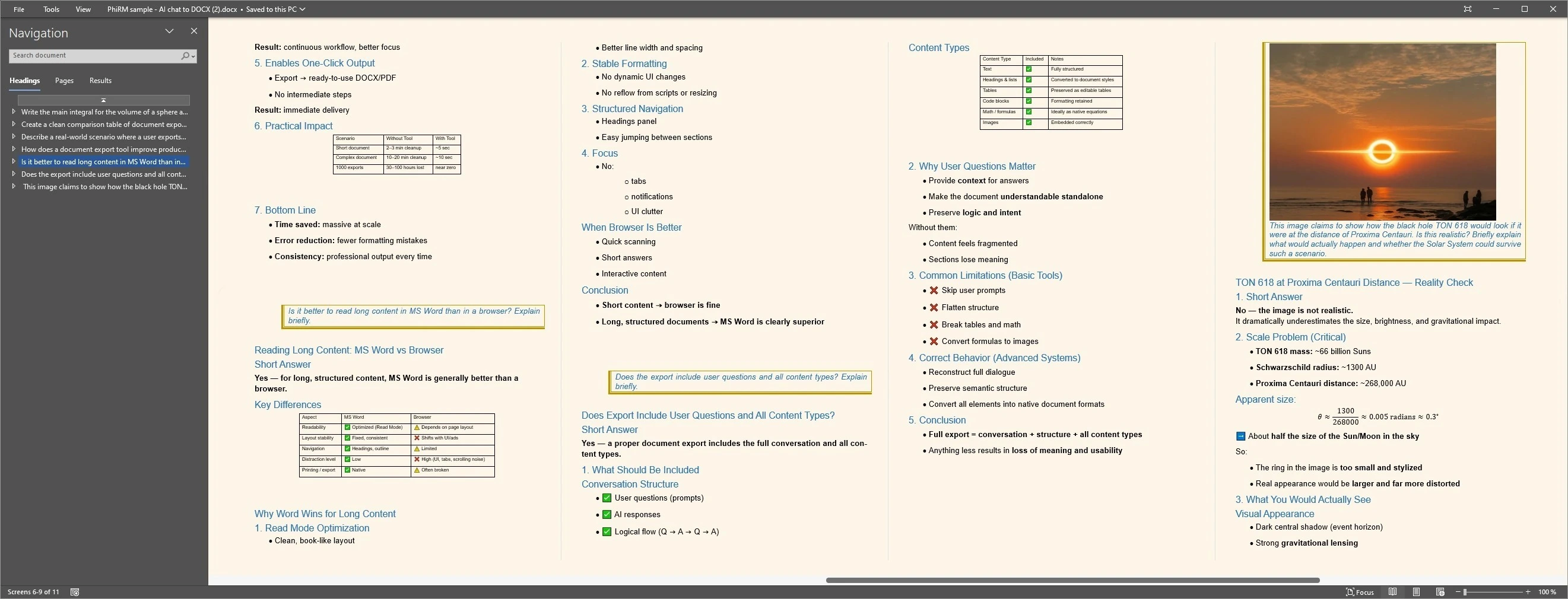
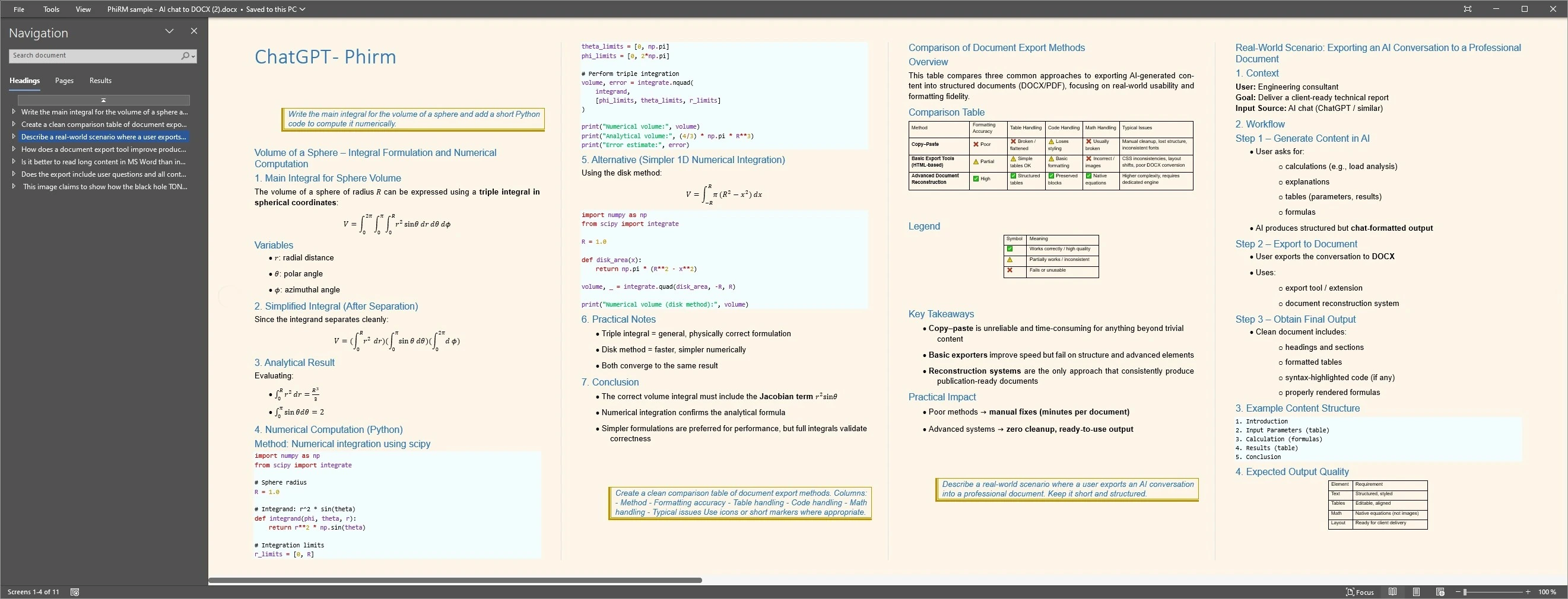
Imagine a project lead using ChatGPT across a long planning session. The conversation includes the initial brief, constraints, several options, a comparison table, rejected directions, follow-up corrections and a final plan. Copying only the final answer loses much of the working context. Rough-pasting the whole thread creates a document that is hard to clean and review.
A structured export can keep visible prompts, answers, table content and later corrections together when a supported ChatGPT conversation becomes too long for practical copy-paste. The examples below illustrate representative document layouts; PhiRM does not promise unlimited length or perfect preservation.
Long conversation document examples
FAQ
Can I turn a long ChatGPT conversation into a document?
Yes. You can use copy-paste, browser print, manual Word cleanup or a structured document export workflow for supported conversations. The right method depends on length, structure and future use. Long conversations are usually harder because useful context may be spread across prompts, answers, corrections, examples and decisions.
Why are long ChatGPT conversations hard to copy into Word?
Long threads often contain many turns, tables, examples, corrections and side paths. Copying them into Word can create uneven spacing, damaged structure, missing context or a document that takes too long to clean. The longer the conversation, the easier it is to miss something important.
When is simple copy-paste enough?
Simple copy-paste is enough when you only need a short answer, one section, a rough note or a temporary draft. It is weaker when the conversation needs to be reviewed, shared, filed with project material or reused later. In those cases, the full thread structure may matter.
Does PhiRM summarize or rewrite long ChatGPT conversations?
No. PhiRM does not summarize, rewrite or intentionally change the text of the supported conversation. It helps export supported ChatGPT conversation text into readable DOCX and PDF document form where supported. The result is a document record of supported conversation text, not a new AI-written summary.
Does PhiRM support unlimited conversation length or full account export?
No. PhiRM should not be described as guaranteeing unlimited length, exporting full ChatGPT account history, automatically archiving all chats or syncing future messages. It helps export supported ChatGPT conversations into document form. Results depend on the source conversation and supported features.
Is PhiRM affiliated with OpenAI or ChatGPT?
No. PhiRM is an independent workflow for supported ChatGPT conversation export. It is not an official ChatGPT or OpenAI export system, and it should not be presented as affiliated with OpenAI or as a way to bypass platform restrictions or capture hidden reasoning.
Export long ChatGPT conversations into readable documents
When a long ChatGPT thread is too much to copy and clean manually, PhiRM helps export supported conversations into DOCX and PDF documents.