ChatGPT report-style document workflow
Turn a ChatGPT conversation into a report-style document
Short answer
A useful ChatGPT conversation can become a report-style document when the conversation contains more than a final answer. It may include the original brief, constraints, options, corrections, comparisons, rejected directions and final recommendation. Copying only the final response can lose that context. PhiRM helps export supported ChatGPT conversations into readable DOCX and PDF documents, so the text of the supported conversation - including prompts and answers where supported - can serve as a report-style work record for handoff, review, project documentation or later reference.
Problem
Many ChatGPT conversations become useful work products. A user may start with a brief, ask for options, add constraints, compare alternatives, correct weak directions, reject risky ideas and then arrive at a final recommendation. The result may feel like a report, but the useful work is not always contained in the last answer.
The problem appears when the conversation needs to leave ChatGPT. A copied final answer may be clean, but it can hide the reasoning path, constraints and decisions that made the recommendation credible. A full raw copy-paste may keep more material, but it can be messy, hard to review and unsuitable for project documentation. A saved link may reopen the chat, but it is not the same as a portable report-style document.
For handoff, review, client work or internal documentation, the user often needs a document record that preserves the supported ChatGPT conversation text without turning it into a new AI-written report.
What a report-style ChatGPT document is
A report-style ChatGPT document is not necessarily a formal report written from scratch. The important point is that this is not a newly written AI report. Where supported, PhiRM keeps the text of the ChatGPT conversation as document content, including the user's prompts and the assistant's answers, rather than replacing the conversation with a new summary.
It is a readable document record of a supported ChatGPT conversation that contains report-like material: brief, background, constraints, analysis, alternatives, comparisons, corrections, decisions and final direction.
The value is the structure of the work. A reader can see what was asked, what changed, which options were considered, what was rejected and what recommendation was reached. That makes the document useful for review, project filing, handoff notes, client preparation or later reference.
It should be understood as a document record, not an official report, certified report or audit-grade document.
Why a final answer alone is often not enough
A final answer can be enough when the work is simple. But in many ChatGPT conversations, the final response is only the last step. The conversation may show why the answer changed, which constraints were added and which directions were rejected.
That context can matter. A manager may want to see the assumptions behind a recommendation. A consultant may need the client brief and options in the same record. A researcher may want the questions and corrections that shaped the final structure. A product lead may need to show why one approach was chosen over another.
When only the final answer is copied, the document can look polished but thin. It may not show the supported conversation text behind the result.
Practical ways to turn a ChatGPT conversation into a report
| Method | When it is enough | Where it fails |
|---|---|---|
| Copy final answer | Short report with no need to show process | Loses brief, constraints, corrections and rejected directions |
| Copy full chat into Word | Rough internal notes | Can be messy and hard to read as a report-style document |
| Save ChatGPT link | Personal reopening inside ChatGPT | Not a portable report file for handoff or project folders |
| Browser print / PDF | Quick read-only capture | May preserve browser layout rather than a clean document record |
| Ask AI to summarize the chat | User wants a rewritten summary | May replace the faithful record with a new interpretation |
| Structured DOCX/PDF export | Conversation context needs review, sharing or filing | Results depend on source content and supported features |
When copy-paste or final answer is enough
Copying the final answer can be enough when the report is short, low-stakes and does not need to show how the conclusion was reached. If the user only needs one paragraph, a quick summary or a draft that will be rewritten immediately, a simple copy may be the fastest option.
Copy-pasting the full conversation can also work for private notes or rough internal use. It is less useful when another person needs to read the result as a professional document.
The key question is whether the supported ChatGPT conversation text matters. If it does not, simple methods may be enough.
When structured export is better
Structured export is better when the conversation itself is part of the report-style record. That usually means the chat contains a meaningful brief, constraints, comparisons, corrections, rejected directions, supporting explanations or a final recommendation that depends on earlier steps.
It is also better when the document will be shared with a colleague, reviewed by a manager, stored in a project folder, attached to client work or reused later as reference. In those cases, the document needs to be more than a copied answer. It needs to preserve the supported conversation text in a readable form.
A structured export can help the reader understand the work as a sequence, not only as a finished paragraph.
How PhiRM helps
PhiRM helps export supported ChatGPT conversations into readable DOCX and PDF documents. A supported ChatGPT conversation can become a report-style document record when the conversation text is exported in structured form.
PhiRM helps preserve the text of the supported ChatGPT conversation - including prompts, answers, context, corrections and supported structure where supported - as document content. That distinction matters: PhiRM does not rewrite, summarize or intentionally change the text of the conversation. The output is a report-style document record of the supported conversation, not a new AI-written report generated from it.
That can make the document useful for handoff, review, project documentation, client preparation or later reference.
PhiRM should not be described as a report generator, fact-checker, authorship proof system, legal record tool or audit-grade documentation system. Results depend on the source conversation and supported features. Manual review may still be appropriate before professional use.
DOCX vs PDF for report-style documents
| Format | Use when | Why |
|---|---|---|
| DOCX | The report-style record needs editing, annotation, rearranging or integration into other work | Better for working documents and Word-compatible workflows |
| The record should be stable, read-only and easy to share | Better for review, filing, sending and archive-style use | |
| Both | The conversation has long-term value and needs both editing and stable sharing | Gives a working document and a fixed reference |
A practical rule: use DOCX when the report-style document still needs work; use PDF when it should be shared or preserved as a stable record.
Limitations / accuracy
PhiRM is an independent workflow for supported ChatGPT conversation export. It is not affiliated with OpenAI or ChatGPT and is not an official ChatGPT export system.
PhiRM does not write reports, rewrite ChatGPT conversations into polished reports, summarize reports or improve conclusions. It does not verify facts, claims, calculations or recommendations. It does not create official, certified, legal, audit or compliance-grade reports, and it does not prove human authorship or contribution.
The export should be understood as a supported document rendering of the ChatGPT conversation text, not as a guaranteed exact transcript, certified record or legal/audit-grade document.
PhiRM does not capture hidden reasoning, export unsupported/private/hidden content, bypass ChatGPT restrictions or guarantee perfect preservation of every element. Results depend on the source conversation and supported features.
Example or proof section
Imagine a consultant using ChatGPT to develop a client recommendation. The conversation begins with the client brief, then adds budget limits, implementation constraints and risk questions. Several options are compared. One direction is rejected. Another is refined. The final answer contains a recommendation, but the report-style value is spread across the conversation.
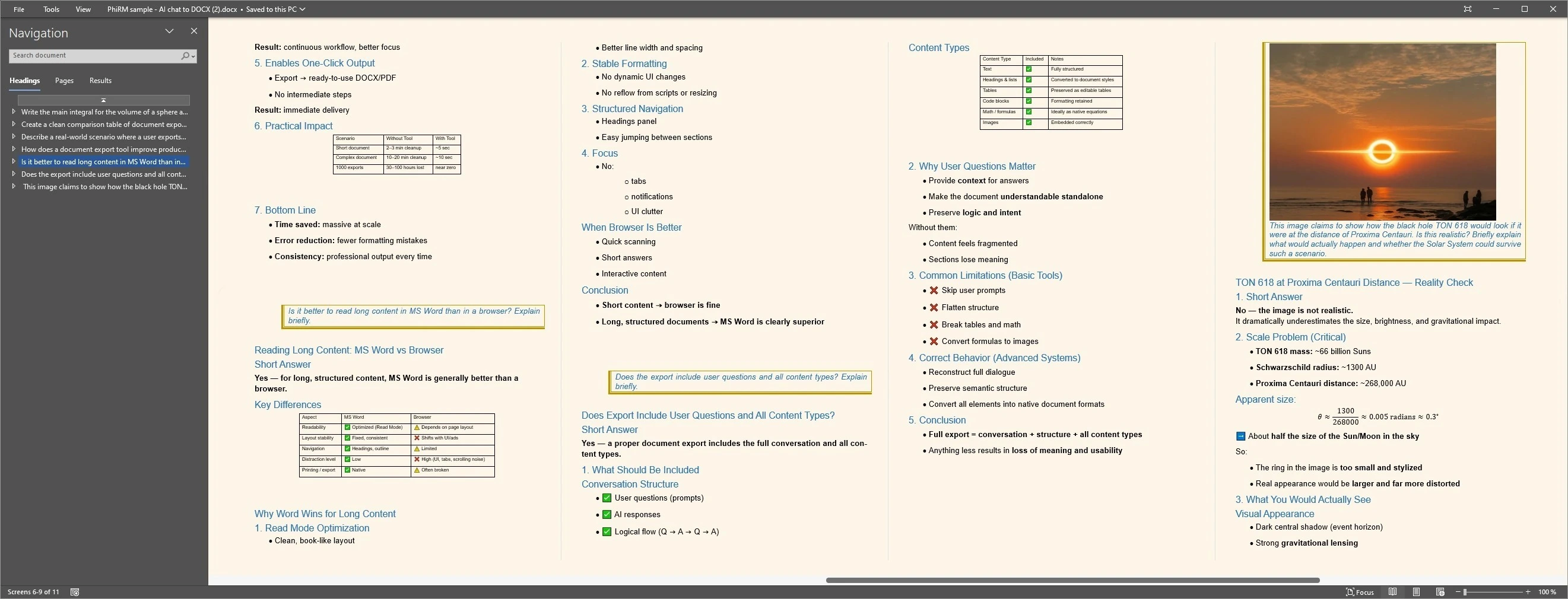
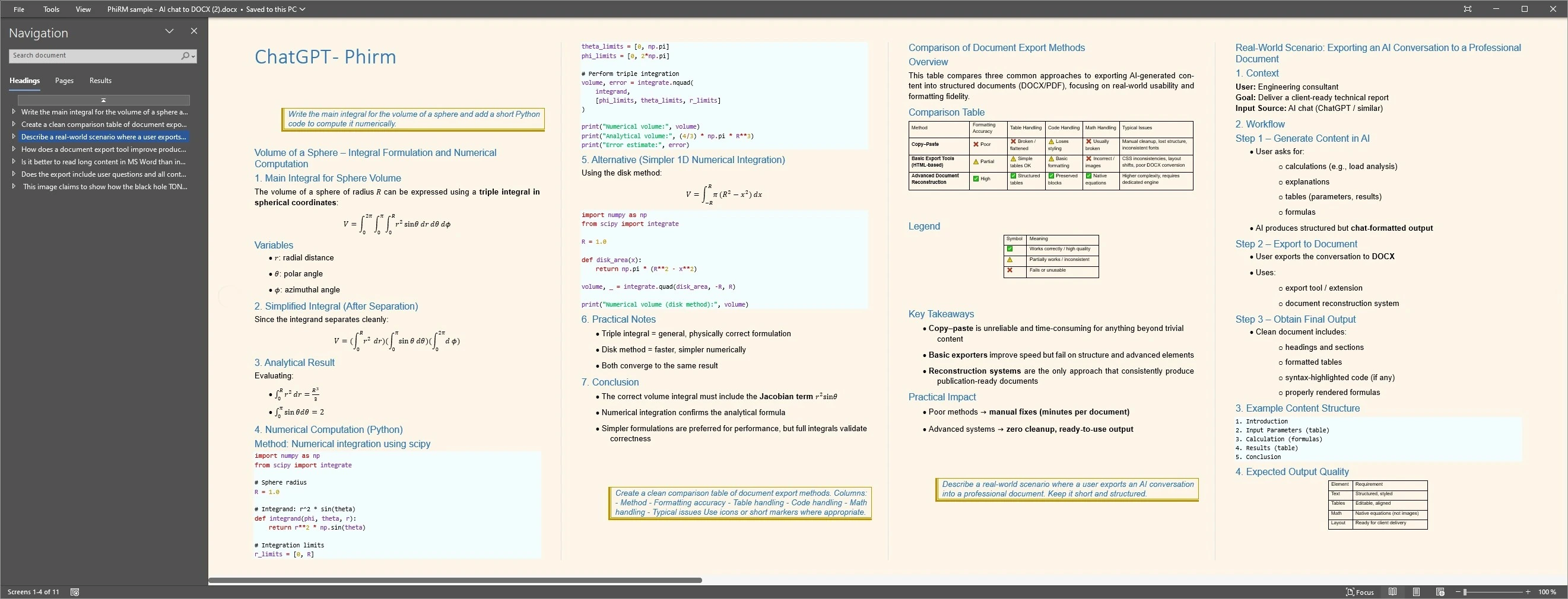
Exporting a supported ChatGPT conversation as DOCX or PDF can keep the brief, prompts, answers, corrections, comparisons and final direction together as a readable report-style record. The examples below illustrate representative document layouts; results depend on source content and supported features.
Report-style document examples
FAQ
Can I turn a ChatGPT conversation into a report?
Yes, if the conversation contains report-like material such as a brief, constraints, options, comparisons, corrections and a final recommendation. The safest framing is a report-style document record: the text of the supported ChatGPT conversation is rendered as document content. PhiRM helps export supported ChatGPT conversations into readable DOCX and PDF documents.
Does PhiRM write or rewrite the report?
No. PhiRM should not be described as writing, rewriting, summarizing, improving or polishing the report. Where supported, PhiRM keeps the text of the ChatGPT conversation as document content instead of replacing it with a new summary. The user remains responsible for editing, interpretation, quality and final use.
Is the exported document an official report?
No. A PhiRM export should not be treated as an official, certified, legal, audit-grade or compliance-grade report. It can be a useful report-style work record for handoff, review, project documentation or later reference, but it does not certify facts, decisions, authorship or contribution.
Why not just copy the final ChatGPT answer?
Copying the final answer can be enough for simple work. It becomes weaker when the conversation contains the brief, constraints, rejected directions, corrections, comparisons or decision path behind the final recommendation. In those cases, preserving the supported conversation text can make the document more useful for review and handoff.
Does PhiRM verify the facts or conclusions in the report?
No. PhiRM does not verify facts, claims, calculations, recommendations or conclusions. It helps export supported ChatGPT conversations into readable document form. Results depend on the source conversation and supported features. Manual review may still be appropriate before professional, client-facing or external use.
Is PhiRM affiliated with OpenAI or ChatGPT?
No. PhiRM is an independent workflow for supported ChatGPT conversation export. It is not affiliated with OpenAI or ChatGPT and is not an official ChatGPT export system. It does not bypass ChatGPT restrictions, capture hidden reasoning or export unsupported/private/hidden content.
Turn useful ChatGPT work into a report-style document
When a ChatGPT conversation contains the brief, options, corrections and final direction behind a report, PhiRM helps export supported chats into readable DOCX and PDF documents.