ChatGPT sources to Word
Export ChatGPT sources to Word
Short answer
You can export ChatGPT sources to Word by copying the answer, pasting URLs manually, using browser print, cleaning links in Word, or exporting supported ChatGPT content into a structured DOCX document. Simple copy-paste can work for a few links. When the answer includes many source links, references, citation-like notes or source-like blocks, the harder problem is keeping them readable with the surrounding answer. PhiRM helps export supported ChatGPT conversations into readable DOCX and PDF documents, including supported links and source-like structure where supported.
Problem
Some ChatGPT answers include source links, URLs, references, citation-like text or source-like blocks. Those parts may be useful for review, research notes, project documentation, client work or later reference. The problem starts when the user tries to move that answer into Word.
A rough copy-paste can separate a link from the paragraph it supports. Long URLs can interrupt the flow of a document. Citation-like notes can look like formal references even when they have not been verified. Source blocks can become visually detached from the answer, making it harder for a reviewer to understand what belongs together.
The goal is not to turn ChatGPT output into verified citations. The goal is to preserve supported ChatGPT conversation text and supported source/link/reference-like structure in a readable document form, so the user can review it properly.
What ChatGPT sources, links and references look like in a document
In a ChatGPT conversation, source material can appear in several forms: plain URLs, linked phrases, numbered references, citation-like notes, source lists, article titles, publication names, copied snippets, research links or blocks of related source material.
In a Word document, those elements need context. A link should remain close to the answer, claim, example or explanation it belongs to. A source list should not feel like random text pasted at the bottom of a page. A citation-like line should remain readable, but it should not be treated as a verified academic citation just because it looks structured.
For source-heavy ChatGPT work, readability means keeping the answer and its supported source-like material together where supported.
Why source/link material can break or lose context in Word
Source and link material is fragile because it depends on placement. If a paragraph is copied without the related link, the source context is weakened. If a source list is pasted without the answer it supports, the document becomes harder to review. If a long URL wraps badly, the page can become messy.
There is also a claim-safety issue. ChatGPT may present links or citation-like text, but that does not make them verified citations. A document export can help preserve supported source-like material, but it does not prove that the source is accurate, current, relevant or reliable.
That is why manual review matters. The document should make source material easier to inspect, not replace human checking.
Practical ways to export ChatGPT sources to Word
| Method | When it is enough | Where it fails |
|---|---|---|
| Copy-paste answer into Word | One or two links, rough notes or low-risk work | Links may separate from the answer or become messy |
| Paste as plain text | URLs only need to be visible | Removes link styling and weakens document structure |
| Manual link cleanup | A few important links or references | Slow when many sources or source blocks are involved |
| Screenshot source section | Small visual reference | Not editable, searchable or practical for review |
| Browser print / PDF | Quick read-only capture | May preserve browser layout rather than clean document structure |
| Structured DOCX/PDF export | Source-heavy answer needs review, filing or sharing | Results depend on source content and supported features |
When copy-paste or manual cleanup is enough
Copy-paste can be enough when the answer is short and contains only a few links. If the user only needs one source, one URL or a rough note for personal use, manual copying is usually the fastest method.
Manual cleanup can also work when the source material is small and the document is not important. The user can paste the answer, check each link, repair spacing and add their own citation formatting if needed.
The key test is whether the copied result remains easy to read and review. If it does, a structured export may not be necessary.
When structured export is better
Structured export is better when the source-heavy ChatGPT answer needs to become a working document. That usually happens when there are multiple links, references, citation-like notes, source blocks, follow-up answers or surrounding explanations that should remain together.
It is also better when someone else will review the document, when the answer belongs in project material, when the user wants a DOCX file for editing, or when the source context should stay near the relevant answer.
Structured export can reduce the manual burden of rebuilding a source-heavy ChatGPT answer in Word. It helps keep supported conversation text and supported link/source/reference-like structure in document form where supported.
How PhiRM helps
PhiRM helps export supported ChatGPT conversations into readable DOCX and PDF documents. For this page, the value is source/link readability: supported source links, URLs, references, citation-like text or source-like structures can be easier to review when kept with the surrounding answer in document form.
PhiRM helps preserve the text of the supported ChatGPT conversation, including supported links, references and source-like structure where supported. PhiRM does not rewrite, summarize or intentionally change the text of the supported conversation.
PhiRM is a document export workflow, not a source verification tool. It does not verify sources, validate citations, check source quality, check citation accuracy, guarantee that links work, repair broken links, enrich missing citations or create bibliographies.
Results depend on the source conversation and supported features.
DOCX vs PDF for source-heavy ChatGPT answers
| Format | Use when | Why |
|---|---|---|
| DOCX | You need to edit, annotate, clean up or combine source-heavy ChatGPT material with other work | Better for Word workflows and manual review |
| You need a stable read-only version for sharing or filing | Better when the document should be opened consistently | |
| Both | You need a working document and a stable reference | Useful when source-heavy material needs editing now and sharing later |
A practical rule: use DOCX when source-heavy content needs work; use PDF when the exported version should be stable.
Limitations / accuracy
PhiRM helps export supported ChatGPT conversations into readable DOCX and PDF documents. It does not verify sources, validate citations, check source quality, check citation accuracy, guarantee that links work or prove source reliability.
PhiRM does not create bibliographies, convert ChatGPT source material into a perfect citation format, repair broken links or enrich missing citations. It does not perform research, verify facts, claims, calculations or conclusions, capture hidden reasoning, export unsupported/private/hidden content or bypass ChatGPT restrictions.
PhiRM is independent and not affiliated with OpenAI or ChatGPT. Manual review remains appropriate before academic, professional or client-facing use.
Example or proof section
Imagine an analyst using ChatGPT to compare tools, vendors or policy options. The answer includes explanations, several links, citation-like notes and a short source list. If only the final answer is copied into Word, some links may lose context. If the whole answer is pasted roughly, the document may be difficult to review.
Exporting a supported ChatGPT answer as DOCX can keep supported links and references near the surrounding text. Results depend on source content and supported features, and the exported document does not verify the accuracy of its sources.
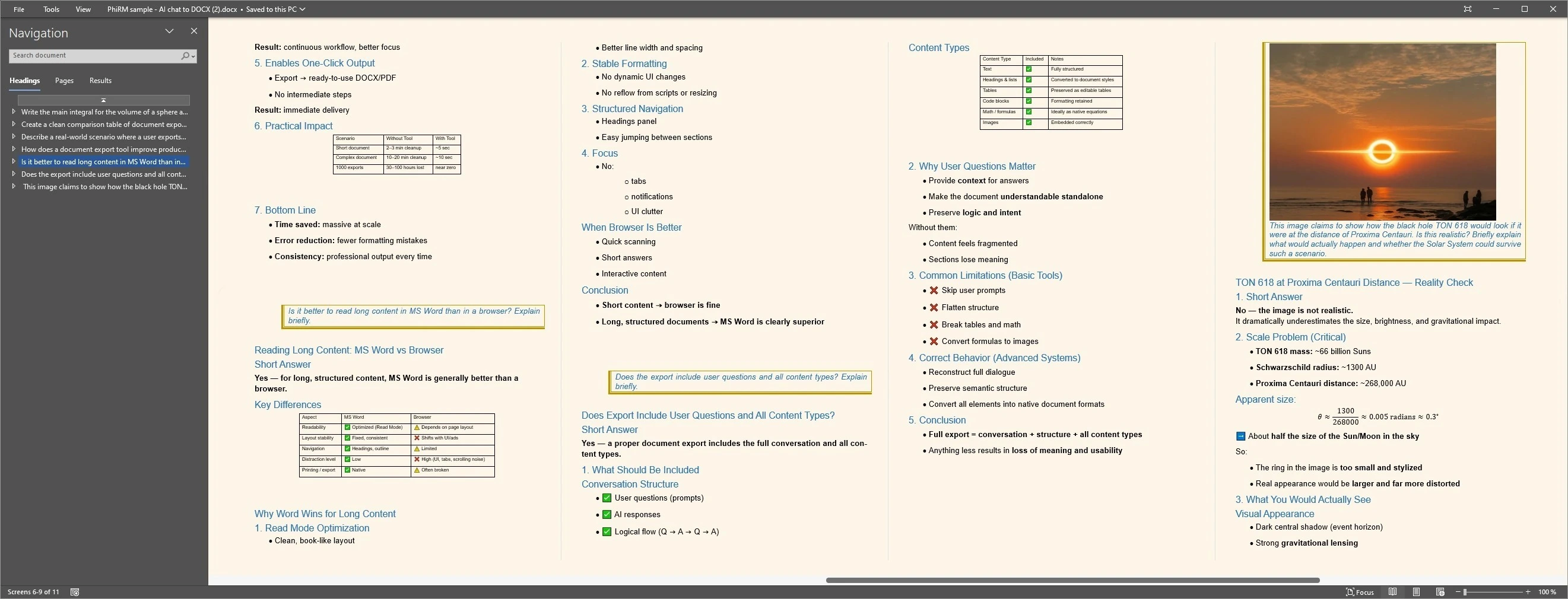
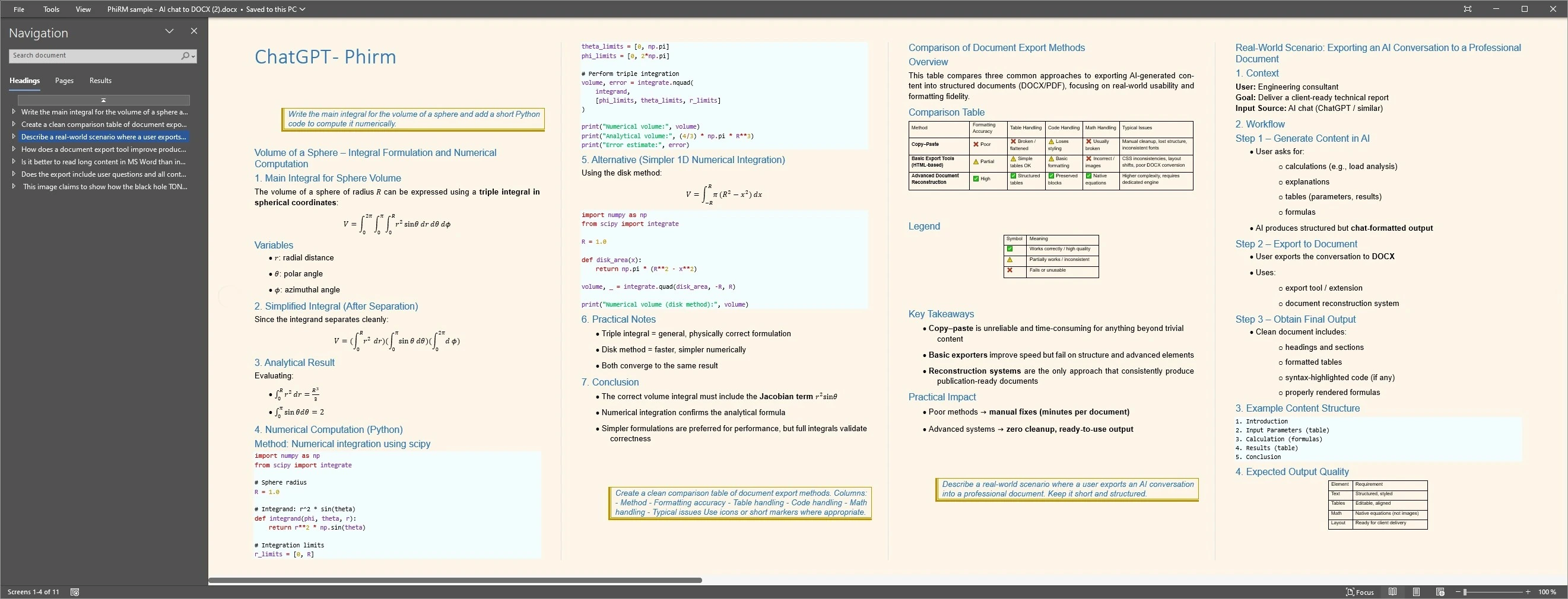
Structured document examples
FAQ
Can I export ChatGPT sources to Word?
Yes. You can copy source-heavy ChatGPT answers into Word manually, clean up links yourself, use browser print or export supported ChatGPT conversations through a document workflow. The right method depends on how many links, references or citation-like notes are involved and whether the surrounding answer needs to stay readable.
What counts as ChatGPT source or reference material?
It can include URLs, linked phrases, source lists, article titles, publication names, citation-like notes, copied snippets or source-like blocks inside a ChatGPT answer. These elements can be useful in a document, but they should not be treated as verified citations unless a human checks them.
Does PhiRM verify ChatGPT sources or citations?
No. PhiRM does not verify sources, validate citations, check source quality, check citation accuracy or guarantee that links work. It helps export supported ChatGPT conversation text and supported source/link/reference-like structure into document form where supported. Manual review remains appropriate before academic, professional or client-facing use.
Does PhiRM create a bibliography?
No. PhiRM does not create bibliographies, repair broken links, enrich missing citations or convert ChatGPT source material into a perfect citation format. If the user needs formal citation style, bibliography management or source validation, that work should be done separately after export.
Should I use DOCX or PDF for source-heavy ChatGPT answers?
Use DOCX when you want to edit, annotate, check links, add formal citations or combine the answer with other work. Use PDF when you want a stable read-only version for sharing or filing. Some source-heavy conversations may be useful in both formats.
Is PhiRM affiliated with OpenAI or ChatGPT?
No. PhiRM is an independent workflow for supported ChatGPT conversation export. It is not affiliated with OpenAI or ChatGPT and is not an official ChatGPT export system. It does not bypass ChatGPT restrictions, capture hidden reasoning or export unsupported/private/hidden content.
Export source-heavy ChatGPT answers into Word
When ChatGPT links, references or source-like material need to stay readable with the surrounding answer, PhiRM helps export supported conversations into DOCX and PDF documents.