ChatGPT code block formatting
Export ChatGPT code blocks to Word
Short answer
When ChatGPT answers include code blocks — scripts, commands, configuration snippets, API calls — copying and pasting that code into Word usually loses the formatting that makes the code readable and usable. Indentation disappears. Font changes. The block structure that separates code from explanation collapses. PhiRM helps export supported ChatGPT conversations into DOCX documents that preserve the visible structure of the conversation, so code blocks remain separated from surrounding text and the export is formatted rather than raw.
Problem
A code block in a ChatGPT answer is not just styled text. The visual structure — indentation, separation from prose, fixed-width font — carries meaning. In Python, indentation defines scope. In YAML, indentation defines nesting. In shell commands, spacing affects how arguments are parsed.
When a code block is copied and pasted into Word, that structure is not transferred — it is translated through a clipboard process that does not carry document formatting. The result is code that may look readable in a browser but arrives in Word as a run of text that has lost the visual structure the author or reviewer needs to read it correctly.
Manual reformatting is slow and error-prone, especially for longer exchanges where the conversation mixes code and prose across many turns.
Why code blocks are fragile in copy-paste
Code blocks fail in copy-paste because the formatting that defines them is applied by the browser or the ChatGPT interface, not embedded in the clipboard content that Word receives. The clipboard typically carries plain text or basic HTML, not structured document formatting.
A code block that renders clearly in a browser may arrive in Word as a flat paragraph, a run of monospace characters without indentation, or a mix of both — depending on how the paste target handles unstructured input.
Indentation is not a cosmetic detail in code; it is often part of the syntax. A Python function that loses indentation becomes syntactically invalid. A YAML block that loses nesting becomes ambiguous. A shell command that loses spacing may parse differently. For content where visual structure is part of the meaning, a clipboard transfer is a lossy operation.
Ways to get ChatGPT code blocks into Word
| Method | When it works | Where it fails for code blocks |
|---|---|---|
| Copy-paste into Word | Short snippet where formatting does not matter | Loses indentation, font and block structure |
| Screenshot | Visual reference for a short code exchange | Not selectable, not annotatable, impractical for longer conversations |
| Browser print / PDF | Fast capture of the full conversation | May preserve layout inconsistently depending on browser |
| Manual reformat in Word | One or two short snippets | Slow and error-prone for longer conversations or structured exchanges |
| Structured DOCX export | Code in context with explanation | Keeps code separated from prose and structured as visible in the source |
When copy-paste is enough
Copy-paste is enough when you need a single line of code, a short snippet with no indentation, or a command where the exact visual structure does not matter for the reader's purpose. If the recipient is going to read the code in a code editor rather than in Word, the format of the Word document is secondary. For casual use or a one-line command, manual copy-paste is the fastest path.
When a structured export is worth doing
Structured export is worth doing when the code block is part of a longer explanation, when indentation or structure carries meaning, when the document is going to be reviewed or annotated by someone who is not going to run the code themselves, or when the code is mixed with tables, analysis or other structured content in a conversation where the full visible context matters.
How PhiRM helps
PhiRM helps export supported ChatGPT conversations into DOCX documents, so content that appeared in the conversation as structured code blocks can remain separated from surrounding prose in the exported document. The export preserves supported visible conversation content, including the distinction between code and non-code elements where that is supported by the source conversation.
PhiRM is an independent export tool. It does not verify the code, test it, execute it or repair it. It helps move supported visible conversation content into document form. Whether the exported code is correct, complete or appropriate for use depends on the source conversation and the human reviewing the output.
DOCX or PDF for code block export?
| Format | Use when | Why |
|---|---|---|
| DOCX | The recipient needs to copy code from the document, annotate it or work with it further | Editable; code can be selected, copied and pasted from the document |
| You need a stable read-only record of the conversation | Fixed layout; good for filing, sharing or reviewing without editing | |
| Both | The work needs both an active working copy and a stable archive | Gives the team a working copy and a reference |
A practical rule: use DOCX when the recipient needs to work with the code content; use PDF when the review format needs to be stable, shareable and fixed.
Limitations / accuracy
PhiRM helps export supported ChatGPT conversations into DOCX documents. It should not be described as a tool that verifies, executes, tests, debugs or repairs code. An exported document is not a code repository, a tested script or a verified program. Code blocks in an exported document may contain errors that were present in the source conversation, and the export does not add, remove or correct code content.
PhiRM is not affiliated with OpenAI or ChatGPT and is not an official ChatGPT code export or developer tool. It does not guarantee syntax highlighting, language detection, perfect indentation preservation or any specific formatting outcome for every code type. Results depend on the source conversation and supported features.
Example: preserving a configuration sequence
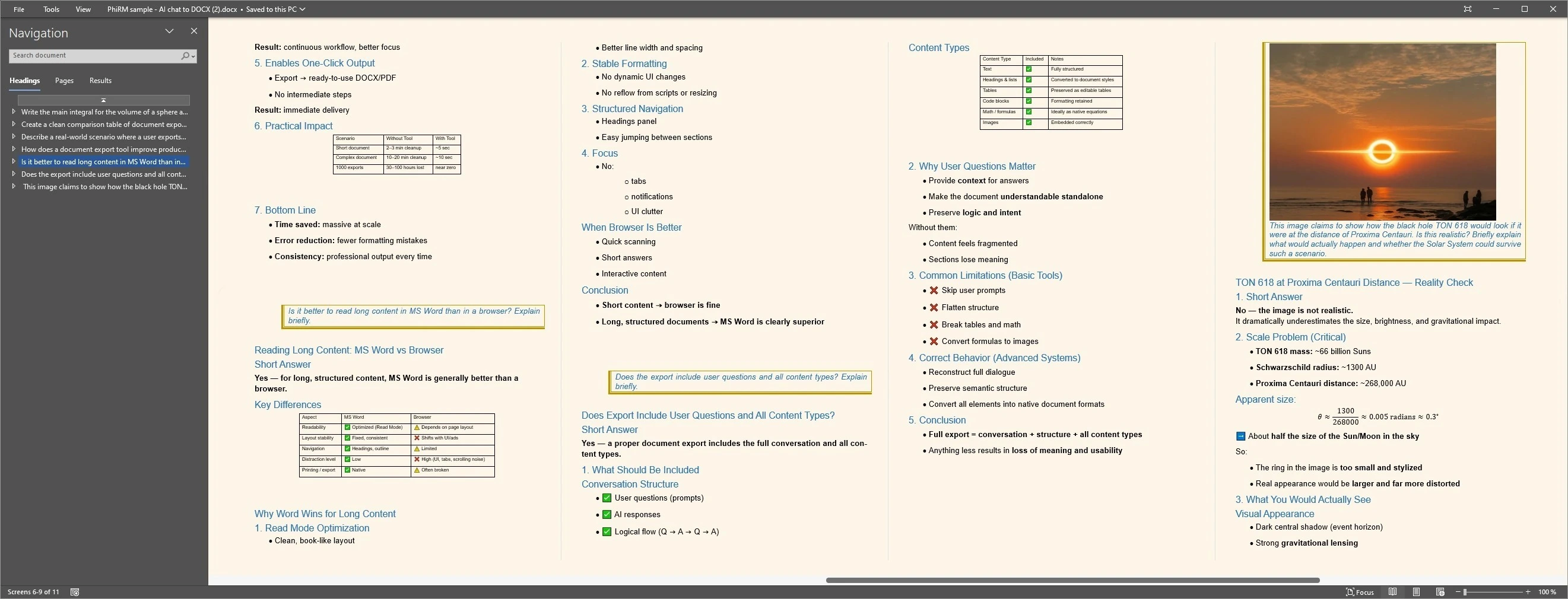
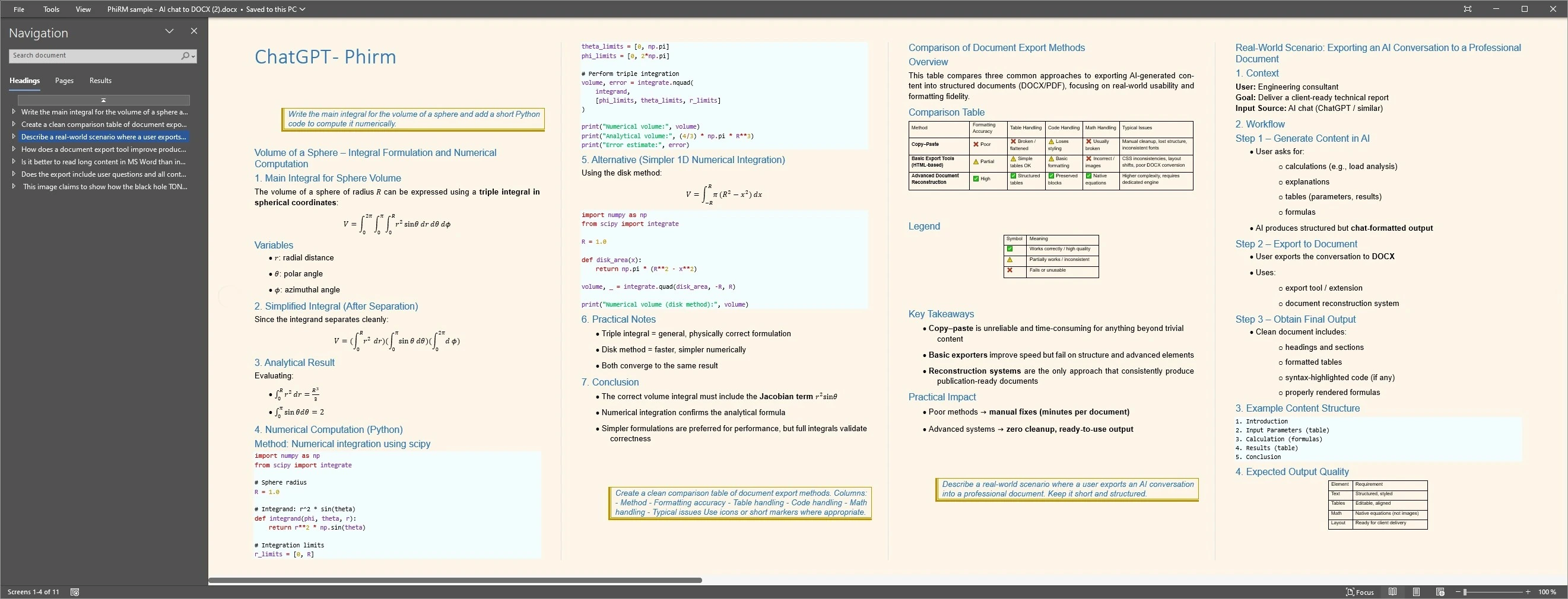
A developer uses ChatGPT to work through a configuration problem. The conversation includes several versions of a configuration file, explanatory text between each version, and a final corrected block. Sharing only the final block loses the reasoning. A structured DOCX export preserves the visible sequence — configuration versions, explanations and final output — so a colleague reviewing the document can follow the decision process, not just the conclusion.
Any proof image should be presented as an example of supported output, not as a guarantee of every result.
Structured document export examples
FAQ
Why do ChatGPT code blocks break when pasted into Word?
Code blocks break in copy-paste because the formatting that defines them in a browser — indentation, monospace font, block separation — is applied by the rendering layer, not embedded in the clipboard content that Word receives. Word receives plain text or basic HTML, not structured document formatting. The visual code structure that appeared in the browser does not transfer through the paste process. For code where indentation or structure carries meaning, a structured export is a more reliable way to get the content into Word.
What is the best way to get a ChatGPT code block into Word?
The best approach depends on what you need the code for in Word. For a single short snippet with no indentation, copy-paste may be enough. For a longer exchange, a structured block with indentation, or a conversation that mixes code with explanations and tables, a structured DOCX export from PhiRM is more reliable than manual copy-paste, because it preserves the visible document structure rather than stripping it through the clipboard.
Can PhiRM preserve code block formatting from ChatGPT?
PhiRM helps export supported ChatGPT conversations into DOCX documents, which can include the visual structure of code blocks as they appeared in the supported source conversation. It does not guarantee perfect preservation of every formatting element for every code type. Results depend on the source conversation and PhiRM's supported features.
Does PhiRM verify, test or fix the code it exports?
No. PhiRM is an export tool, not a code tool. It helps move supported visible conversation content into document form. It does not execute, test, debug, verify or repair code. Whether the exported code is correct, complete or safe to use is a human responsibility. PhiRM prepares the document; the recipient reviews the code.
Does PhiRM guarantee syntax highlighting in the exported DOCX?
No. PhiRM does not guarantee syntax highlighting, language detection or any specific visual code style in the exported document. The export preserves supported visible content structure from the source conversation. For syntax-highlighted code in a document, a dedicated code editor or documentation tool is more appropriate.
Is PhiRM affiliated with OpenAI or ChatGPT?
No. PhiRM is an independent tool for exporting supported ChatGPT conversations into DOCX and PDF documents. It is not affiliated with OpenAI or ChatGPT and is not an official ChatGPT developer, code or export tool. PhiRM does not access code interpreters, generate code or interact with ChatGPT's code features. Its role is to help create a portable document record from the conversation that people can review.
Export a supported ChatGPT conversation with code blocks
When AI-assisted ChatGPT work includes code blocks, configuration files or scripted content, PhiRM helps export supported conversations into DOCX documents where code content remains separated from surrounding prose and the full visible conversation structure is preserved.