ChatGPT equations to Word
Export ChatGPT equations to Word and DOCX
Short answer
You can export ChatGPT equations to Word or DOCX in several ways: copy-paste, raw notation, screenshots, browser print or a structured document export workflow. Copy-paste can be enough for simple mathematical text or rough notes.
When equations, formulas, derivation steps and surrounding explanation need to remain usable in a Word document, DOCX is usually the better target. For DOCX exports, PhiRM is designed to create Word-compatible equations. Results depend on source content and supported features, and important formulas should still be reviewed.
Why ChatGPT equations can break during copy-paste
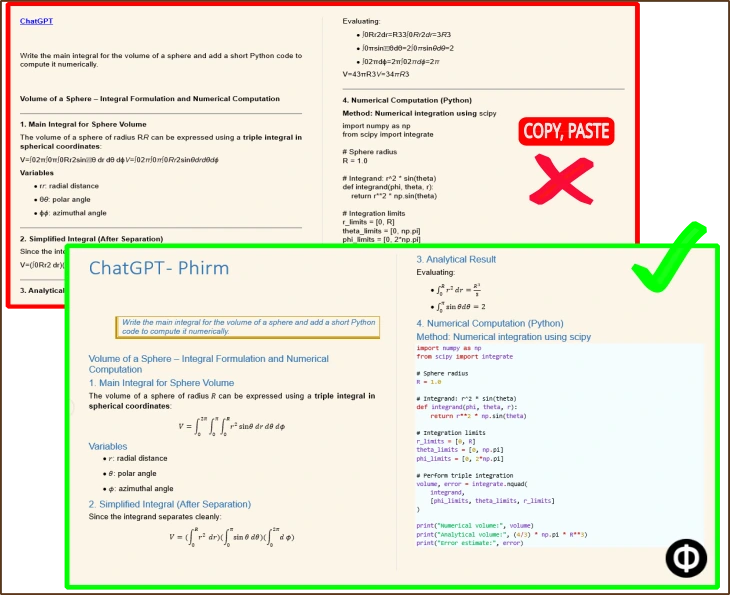
Mathematical content depends on structure, not only text. Fractions, exponents, subscripts, integrals, inline formulas and block equations can lose spacing or visual meaning when moved through rough copy-paste.
This becomes more noticeable when a ChatGPT answer includes derivation steps, assumptions, definitions, examples or code around the formula. The equation may still be present, but the Word document can become harder to read, review or continue editing.
That is why the best export method depends on the next use of the content. A quick note does not need the same treatment as a study document, engineering explanation, technical draft or internal report.
What Word-compatible equations mean
"Word-compatible equations" means that supported equation content is designed to work inside a Microsoft Word-compatible DOCX workflow. The goal is not raw text storage or a browser screenshot. The goal is a document that can be opened, reviewed and edited in Word-compatible tools.
This should not be read as a promise that every LaTeX command, MathJax expression, graph, symbol or formula will become a perfect native Word equation. Equation handling depends on the source content and supported features.
Comparison table: ways to move ChatGPT equations into Word
| Method | Useful when | Main limitation |
|---|---|---|
| Direct copy-paste | The equation is short, simple or only needed as a rough note | Fractions, spacing, subscripts or block equations may become harder to read |
| Plain text or raw LaTeX-style notation | The reader expects raw notation and can work with it directly | Less suitable for normal Word documents or non-technical review |
| Screenshot | You only need a visual reference for a small formula | Not editable as Word equation content |
| Browser print / PDF | You need a stable read-only snapshot for sharing or archiving | Not a Word/DOCX editing workflow |
| PhiRM DOCX workflow | Supported ChatGPT mathematical content needs to become a DOCX/Word document with Word-compatible equations | Results depend on source content and supported features |
When copy-paste or raw notation is enough
Copy-paste may be enough when the math is short, simple and low-risk. A single inline expression, a rough note, or a formula that will be rewritten immediately may not need a dedicated document export workflow.
Raw LaTeX-style notation can also be useful when the reader expects it and the document is mainly technical. In that case, preserving notation as text may be acceptable.
The problem starts when the copied result has to stand alone as a Word document. If a reviewer needs to understand the formula together with the explanation, a rough paste can create avoidable cleanup.
When a structured DOCX workflow is better
A structured DOCX workflow is better when the ChatGPT answer includes multiple equations, derivation steps, formulas mixed with explanation, tables, code, definitions or corrections.
It is also better when the document will be reviewed by someone else, stored with project material, used as study notes, attached to documentation or reused later. In those cases, the surrounding explanation is part of the value.
The goal is not only to move math out of ChatGPT. The goal is to keep the mathematical content usable inside a Word document workflow.
How PhiRM handles supported ChatGPT equations
PhiRM is a document-first AI chat exporter for clean DOCX and PDF documents. For this page, the central outcome is narrower: supported ChatGPT mathematical content becoming a usable DOCX/Word document with Word-compatible equations where supported.
PhiRM supports ChatGPT document export workflows and is designed for document output rather than raw archive formats. It helps move supported ChatGPT conversations into DOCX documents for Word editing, review, sharing and archiving.
PhiRM is not a math checker. It does not verify calculations, prove derivations or repair incorrect formulas generated by ChatGPT.
DOCX versus PDF for mathematical content
Use DOCX when the mathematical content still needs editing, review, comments, rearranging or reuse in Word. DOCX is the better fit when equations and surrounding explanation need to remain part of a working document.
Use PDF when the exported result should be stable, read-only, printable or easy to archive. PDF can be useful for sharing or storing a final version, but the Word-compatible-equation claim on this page applies to DOCX, not PDF.
What still requires review
Important equations and formulas should still be reviewed before professional, academic or technical use. Results can depend on source content, supported features and the complexity of the mathematical notation.
PhiRM should not be described as supporting every LaTeX command, every MathJax expression, every symbol, every renderer or every ChatGPT content type. It is designed to help with supported ChatGPT document export workflows, not to guarantee lossless equation conversion.
Visual proof
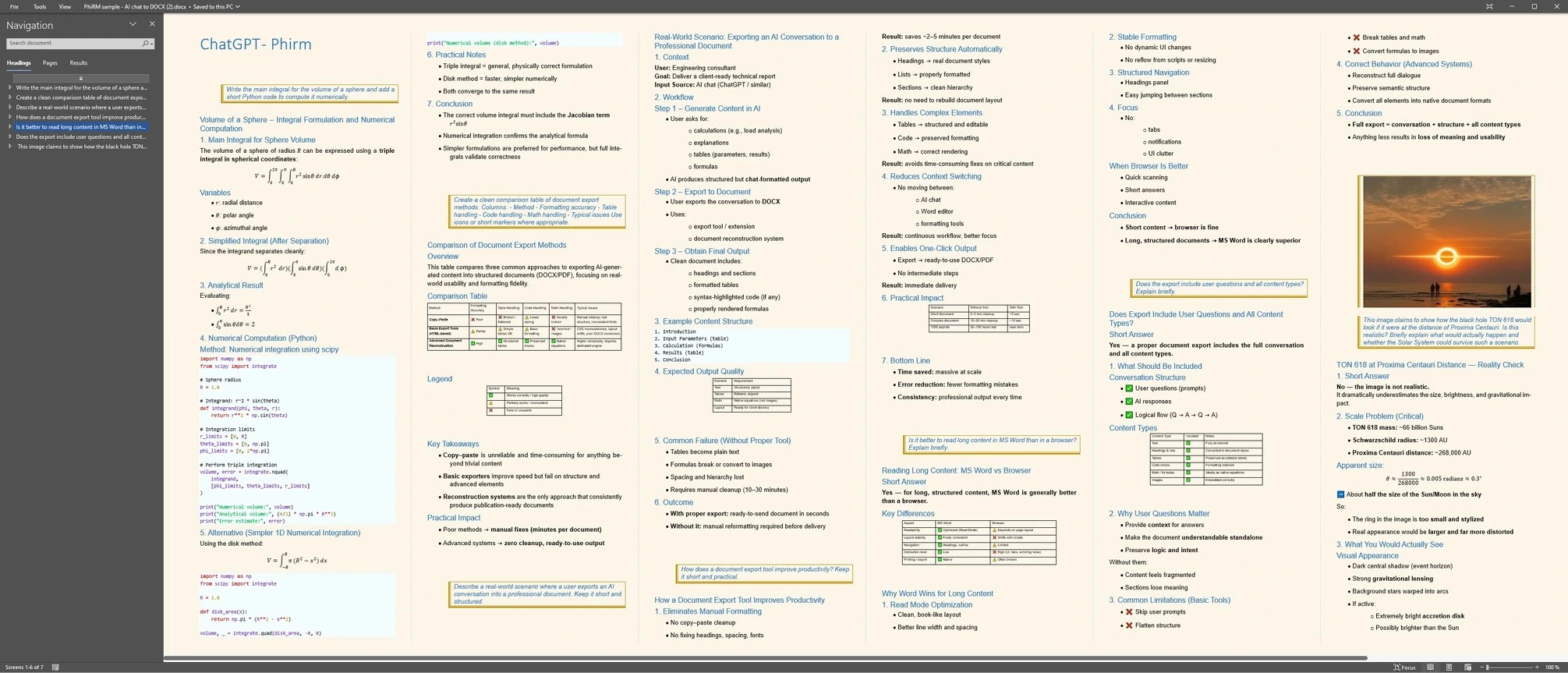
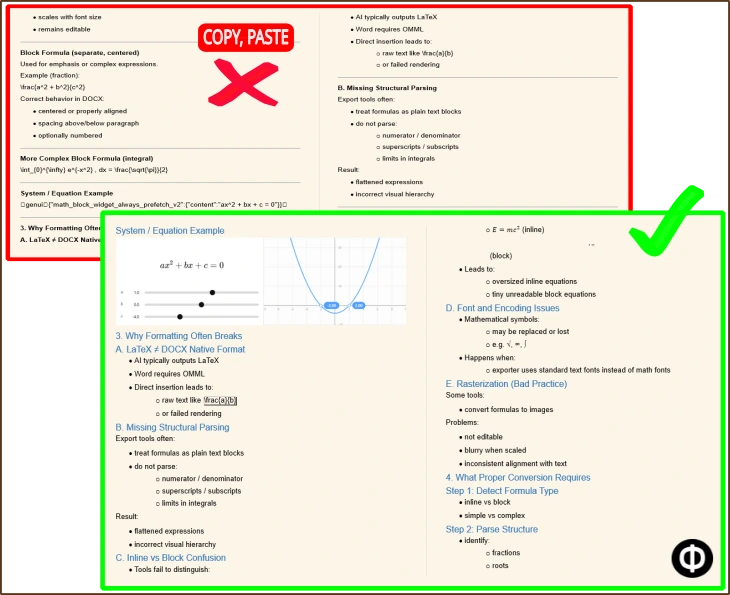
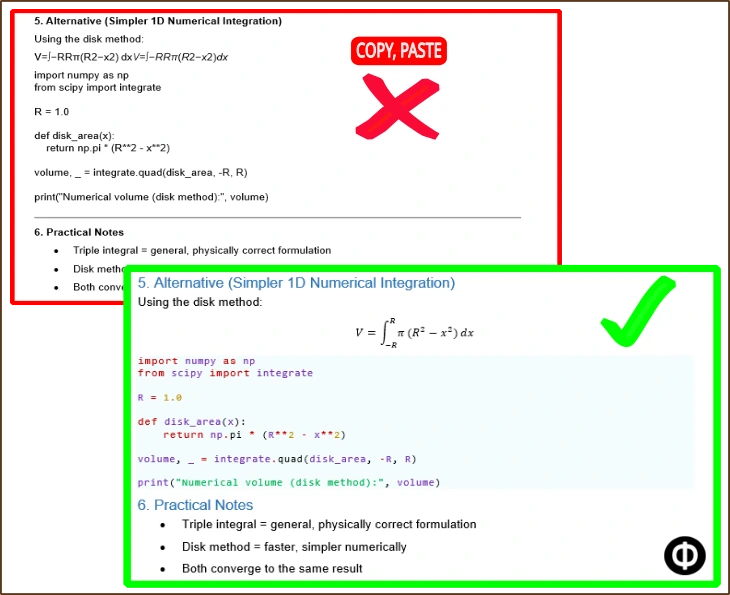
The examples below show how equation-heavy ChatGPT content can move from rough copy-paste or raw notation into a more usable DOCX and Word document workflow. They demonstrate supported document output, not mathematical verification or perfect conversion.
Output/equation proof
Compact comparison proof
FAQ
How can I export ChatGPT equations to Word?
You can use copy-paste, raw notation, screenshots, browser print or a structured DOCX export workflow. Copy-paste can be enough for simple formulas. When equations, derivation steps and explanation need to remain usable in Word, a DOCX workflow is usually more practical.
Can ChatGPT equations be exported to DOCX?
Yes, supported ChatGPT mathematical content can be exported into DOCX workflows. The best method depends on the complexity of the equations and what the document needs to do next. DOCX is the right target when the result still needs Word editing, review or reuse.
Why do ChatGPT equations break when copied into Word?
Equations rely on structure. Fractions, exponents, subscripts, integrals, inline notation and block equations can lose spacing or separation during rough copy-paste. The surrounding explanation can also become disconnected from the formula, making the Word document harder to review or edit.
Does PhiRM create Word-compatible equations?
For DOCX exports, PhiRM is designed to create Word-compatible equations. Results depend on source content and supported features, so this should not be read as a guarantee that every formula, symbol, LaTeX command or mathematical layout will convert perfectly.
Does PhiRM support every LaTeX or MathJax expression?
No. PhiRM should not be described as full LaTeX support, complete MathJax support or lossless equation conversion. It is designed for supported ChatGPT document export workflows where mathematical content needs to become usable inside a DOCX/Word document.
Should exported equations and formulas be reviewed?
Yes. PhiRM does not verify mathematical correctness, solve equations, prove derivations or repair incorrect formulas generated by ChatGPT. Important formulas, calculations and professional or academic documents should still be reviewed before final use.
Export ChatGPT equations into a Word-ready document
Use PhiRM when supported ChatGPT equations, formulas and surrounding explanation need to become a usable DOCX document for Word, review, editing or archiving.