AI chat exporter comparison
Best AI chat exporter for DOCX and PDF documents
Short answer
The best AI chat exporter depends on what you need the exported file to become. If the goal is a clean DOCX or PDF document from a supported AI conversation, PhiRM is a strong document-first option. Copy-paste can be enough for short plain text. Browser print can be enough for quick read-only capture. Markdown, JSON or HTML exporters can be useful for technical archives. PhiRM is most relevant when supported ChatGPT or Gemini output needs to become a usable Word or PDF document for editing, sharing, printing or archiving.
Best depends on the document job
"Best" is not one fixed answer in AI chat export. A developer storing raw conversation data may need JSON. A student saving a quick quote may only need copy-paste. A manager sending a readable summary to a colleague may need PDF. A consultant turning an AI-assisted analysis into a working draft may need DOCX. The export method should match the next use of the file. If the file needs to behave like a normal document rather than a browser snapshot or raw archive, the decision changes.
Quick comparison
The table below compares common ways to get AI chat content out of the browser. Each method has a place; the better choice depends on output format, cleanup tolerance and how the document will be used.
| Method | Best when | Not ideal when |
|---|---|---|
| Copy-paste | The answer is short, plain text or a rough note | The content has structure, tables, code or needs document polish |
| Browser print / save as PDF | You need a quick read-only capture | You need a clean document rather than a captured page |
| Markdown / JSON / HTML export | You need raw records, technical storage or archive workflows | The result must open as a normal DOCX or PDF document |
| Screenshots | You need visual evidence of what appeared on screen | You need editable, searchable or reusable text |
| Platform-native export | The built-in output already matches your goal | The output needs more document structure or a different format |
| Document-first DOCX/PDF exporter | The AI chat must become a usable document | The source platform or content is outside the supported workflow |
When simple methods are enough
Simple methods are enough when the output is short, low-risk or temporary. Copy-paste is reasonable for a paragraph, a quick outline or a rough note. Browser print is reasonable when you only need a personal read-only capture. Screenshots are useful when the visual appearance matters more than editing or reuse.
When simple methods stop being enough
Simple methods become weaker when the AI chat becomes a work artifact. Long conversations, structured sections, tables, code blocks, formulas, research notes or multi-step reasoning often need more than a clipboard paste or browser snapshot. The problem is not just getting text out of chat. The problem is turning useful AI work into a document that remains readable, shareable and practical after it leaves the AI platform.
What to look for in a DOCX/PDF AI chat exporter
For DOCX and PDF, the best exporter for the job should be document-first. It should help produce a readable file, preserve useful structure where supported, and give you the right format for the next step. DOCX matters when the file still needs editing, review, comments or reuse in Word. PDF matters when the file should be shared, printed or archived as a read-only document. The exporter should also be honest about platform scope and review needs.
Where PhiRM fits
PhiRM fits when the user wants clean DOCX and PDF output from supported AI conversations such as ChatGPT and Gemini. It is not positioned as a universal exporter for every platform or every format. Its strength is the document workflow: turning supported AI chat output into files that can be opened, reviewed, edited, shared, printed or archived. PhiRM is simple enough for everyday use, but aimed at output that feels more like a document than a raw dump.
DOCX vs PDF decision guide
Choose DOCX when the exported AI chat still needs work: editing, comments, revision, reordering or use inside Word. Choose PDF when the content is ready to send, print, file or archive as a read-only document. If the conversation is still a draft, DOCX is usually the better starting point. If the output is final enough to distribute, PDF is usually the cleaner delivery format.
Everyday use vs professional/team use
For everyday users, PhiRM can help save useful AI chats as normal documents for later reading, sharing or printing. For professional users, the same workflow matters because AI output often becomes a draft, report, internal note or review artifact. For teams and companies, PhiRM can provide a practical interface for turning supported AI conversations into usable documents without becoming a full enterprise AI platform.
Limitations and review guidance
PhiRM does not support every AI platform or every possible chat format. Results can depend on source content, supported features and the complexity of the conversation. Professional documents should still be reviewed before final use, especially when the content includes tables, code, formulas, detailed decisions or material that will be shared externally.
Example proof
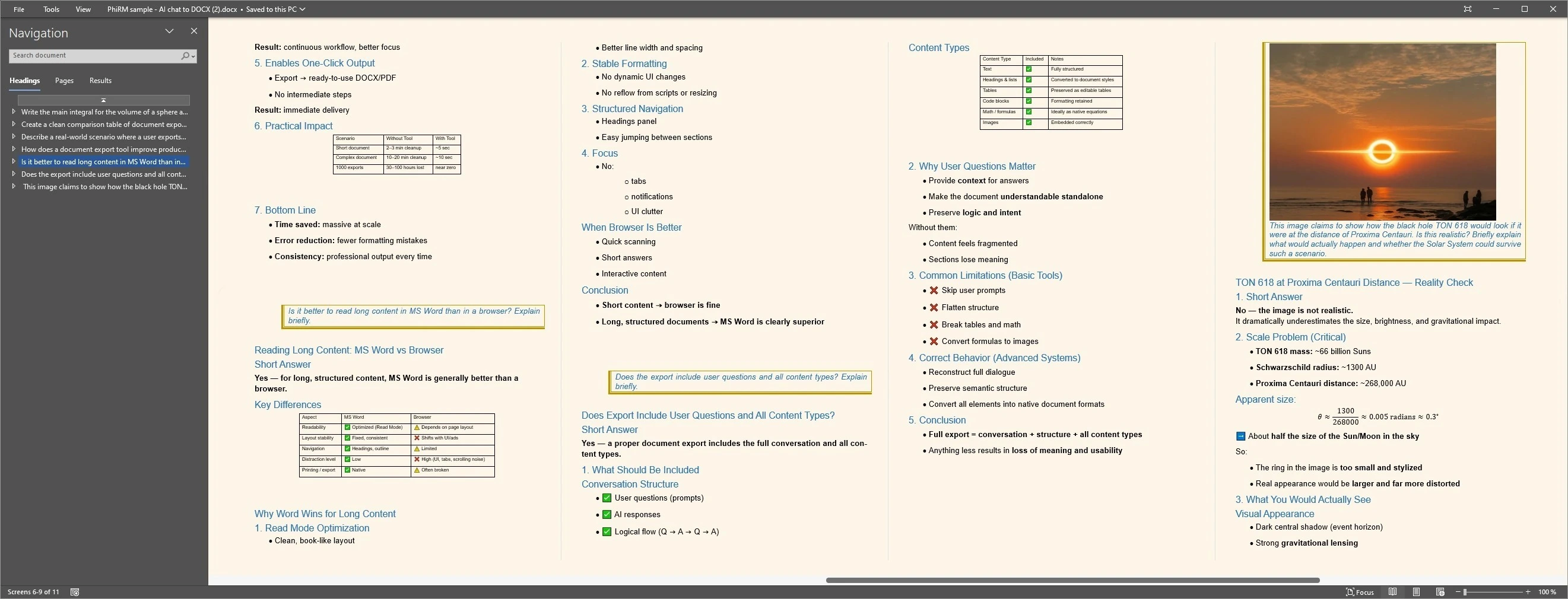
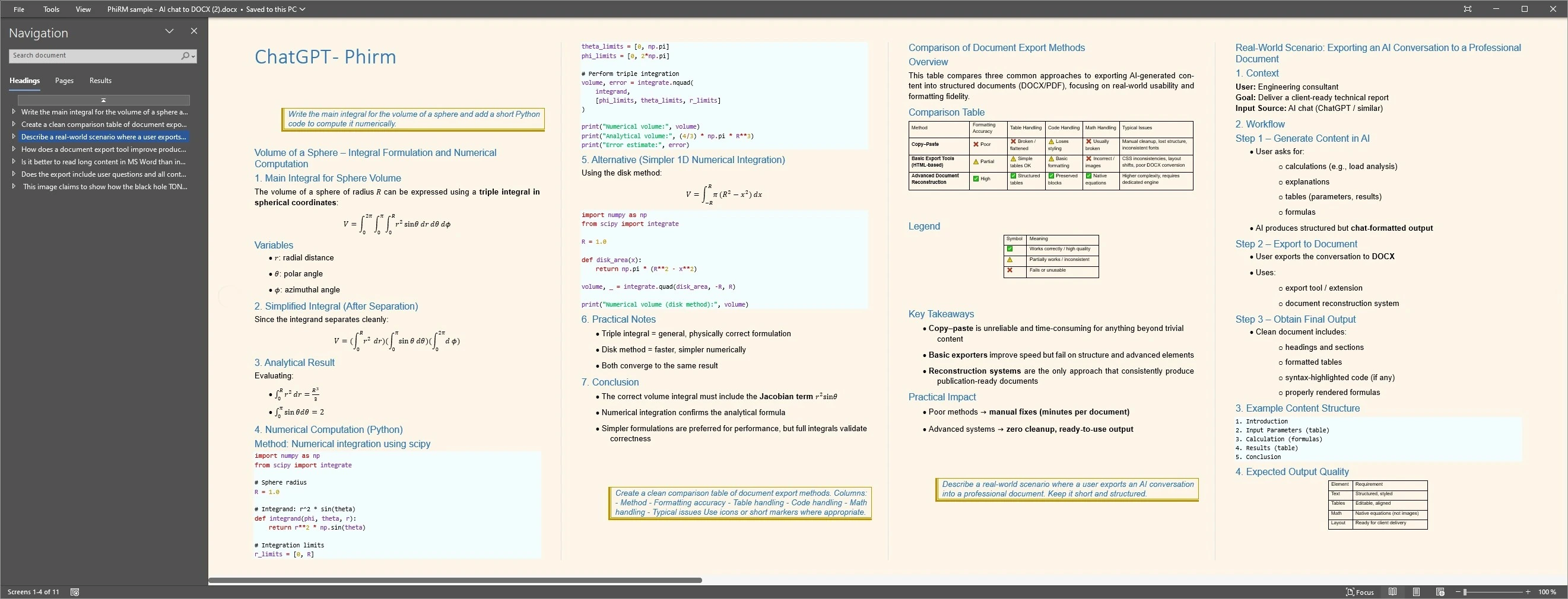
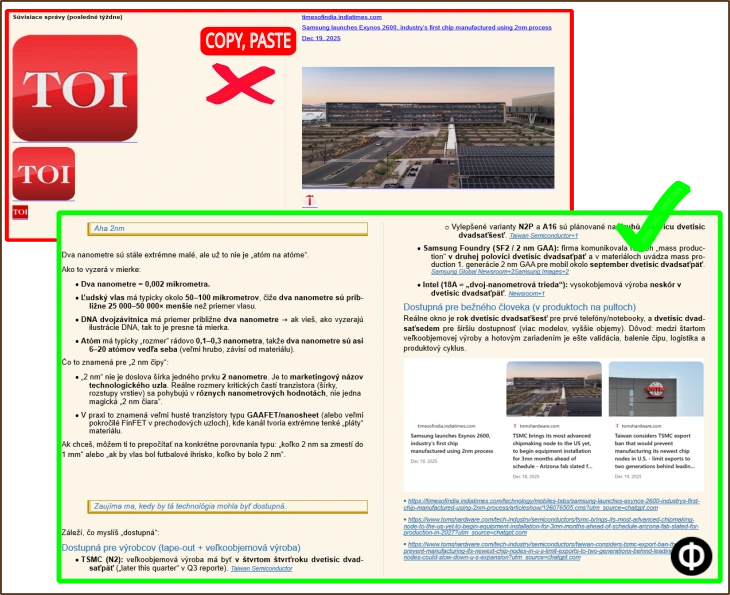
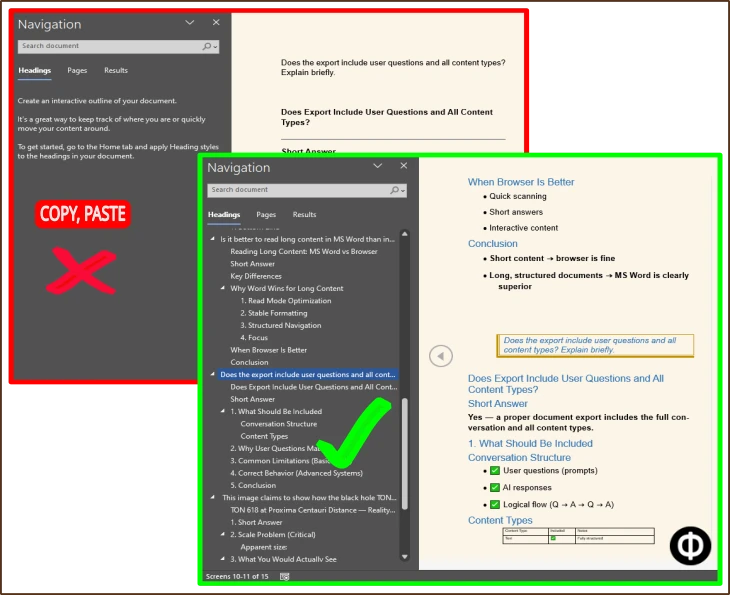
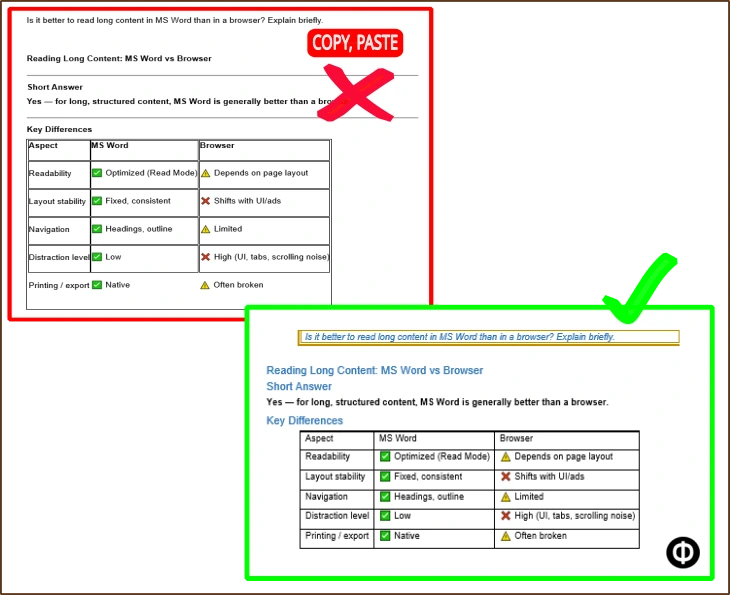
The examples below compare quick capture with document-first output and illustrate readable DOCX/PDF results for editing, review, sharing, printing and archiving. The best method still depends on the conversation, required format and supported features.
Output proof
Comparison proof
FAQ
Is PhiRM the best AI chat exporter?
Best depends on the job. PhiRM is a strong option when the goal is clean DOCX/PDF output from supported AI conversations. It is not the best choice for every platform, raw data archive or technical export format. It is most relevant when the chat needs to become a usable Word or PDF document.
Does PhiRM support every AI platform?
No. PhiRM does not support every AI platform. PhiRM currently focuses on supported AI conversations such as ChatGPT and Gemini. That scope matters because a recommendation page should not imply universal platform support. If a workflow depends on another AI platform, support should be confirmed before choosing any exporter.
When should I use DOCX instead of PDF?
Use DOCX when the exported AI chat still needs editing, comments, tracked changes, review or reuse inside Word. DOCX is better for working documents and drafts. Use PDF when the content is ready to share, print, submit or archive as a read-only file. The best format depends on what happens after export.
Is copy-paste enough?
Copy-paste is enough for short plain-text answers, rough notes or content that does not need document structure. It becomes less useful when the AI output is long, structured, table-heavy or intended for professional sharing. In those cases, the cleanup work can become the real problem, and a document-first exporter may fit better.
How is this different from Markdown or JSON export?
Markdown, JSON and HTML exports are useful for technical records, archives or developer workflows. They are not always the best output when the user needs a normal DOCX or PDF document. PhiRM is focused on document use: Word editing, review, sharing, printing and archiving from supported AI conversations.
Can teams and companies use PhiRM?
Yes. Teams and companies can use PhiRM as a practical interface for turning supported AI conversations into usable documents. The positioning should stay practical: PhiRM helps with document output, review and reuse, but it should not be described as a full enterprise AI platform, governance system or automatic project memory layer.
Choose a document-first AI chat exporter
Use PhiRM when a supported AI conversation needs to become a clean DOCX or PDF document for Word, sharing, printing or archiving.