AI chat exporter
AI chat exporter for clean DOCX and PDF documents
Short answer
An AI chat exporter turns an AI conversation into a file you can keep, edit, share, print or archive. PhiRM is an AI chat exporter for clean DOCX and PDF documents from supported AI conversations such as ChatGPT and Gemini. It is simple enough for everyday use, but focused on document output rather than raw dumps, screenshots or messy copy-paste. Use DOCX when the conversation needs to become a Word document for editing or review. Use PDF when the result should be shared, printed or archived as a read-only document.
The AI chat export problem
AI chats often become useful work: research notes, draft reports, decisions, tables, code, formulas or long explanations. The problem is that the work usually stays inside the chat interface. A chat link, screenshot or copied block of text may be enough for a quick note, but it is not always enough when the content needs to become a document. Once the conversation has to be reviewed, shared with someone else, printed, attached or saved for later, the output needs a clearer document form.
Ways to export an AI chat
There are several ways to get AI chat content out of a browser. The right choice depends on whether you need a quick capture, an archive or a usable document.
| Method | When it can work | Where it becomes weak |
|---|---|---|
| Copy-paste | Short plain-text answers | Longer structured content may need cleanup |
| Browser print or save as PDF | Fast read-only capture | May include browser layout or awkward page breaks |
| Markdown, JSON or HTML archive | Technical storage or raw records | Not always suitable as a Word/PDF document |
| Screenshots | Visual evidence or quick sharing | Hard to edit, search or reuse |
| Document exporter | When output needs to become a DOCX or PDF | Scope depends on supported platforms and content |
When simple methods stop being enough
Simple methods stop being enough when the chat becomes a work artifact. Copy-paste can lose structure. Browser print can capture the page rather than the document. Raw archive formats may be useful for storage but not for normal review. This matters most when the AI output has sections, tables, code, formulas or multiple rounds of context that need to remain readable outside the chat interface.
How PhiRM helps
PhiRM is designed around document-first export. Instead of treating the chat as a browser page or raw archive, PhiRM helps turn supported AI conversations into clean DOCX and PDF documents. DOCX is useful when the output should continue in Word for editing, review or internal work. PDF is useful when the output should be shared, printed or archived. For teams and companies, PhiRM provides a practical interface for turning supported AI conversations into usable documents without presenting itself as a full enterprise AI platform.
How it works
- Open a supported AI conversation.
- Use PhiRM to export the conversation.
- Choose DOCX for editable Word work or PDF for read-only sharing.
- Review the exported document before professional use.
Who this is for
PhiRM is for everyday AI users who want to save useful chats as normal documents, and for professionals who need cleaner output than copy-paste or screenshots. It can also help teams and companies that want a practical way to turn supported AI conversations into reusable documents. It is not meant for every AI platform, raw data archiving, live project memory or automated enterprise governance.
Limitations
PhiRM does not support every AI platform or every possible chat format. Results can depend on the source conversation, content type and supported features. Exports should still be reviewed before professional use, especially when the document includes tables, code, formulas, detailed decisions or material that will be shared externally.
Example proof
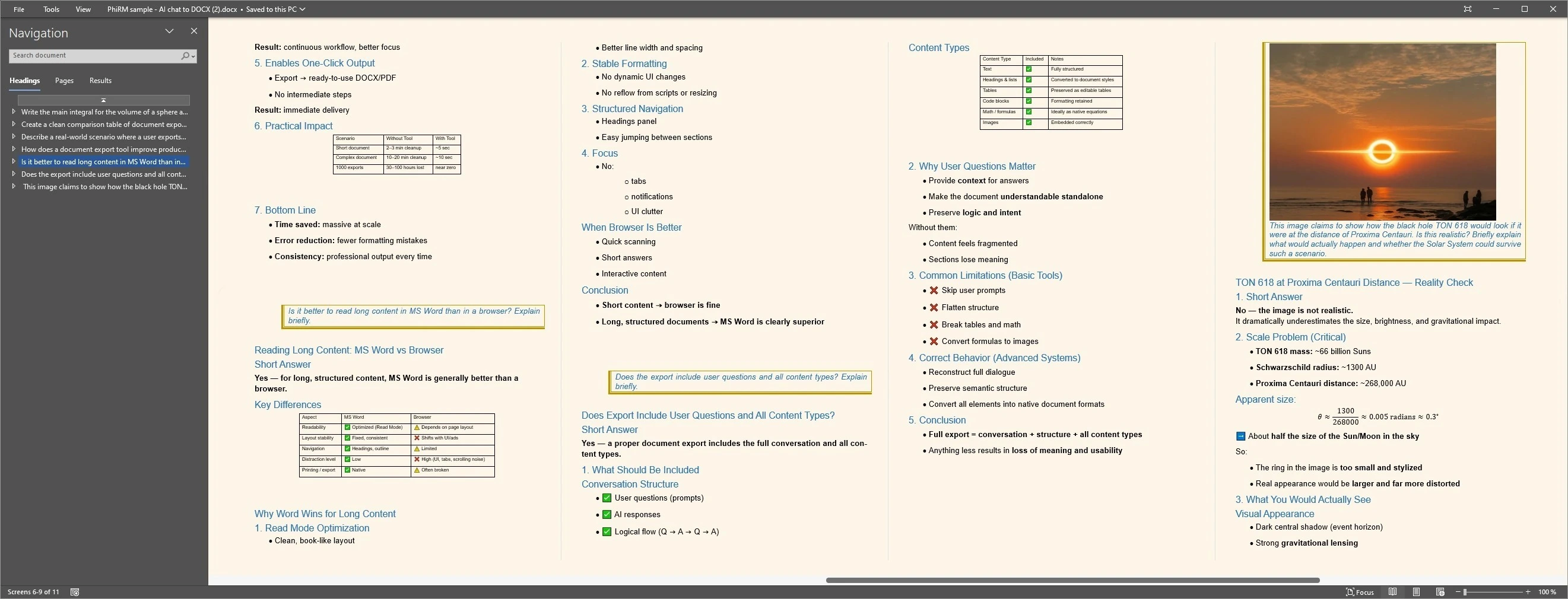
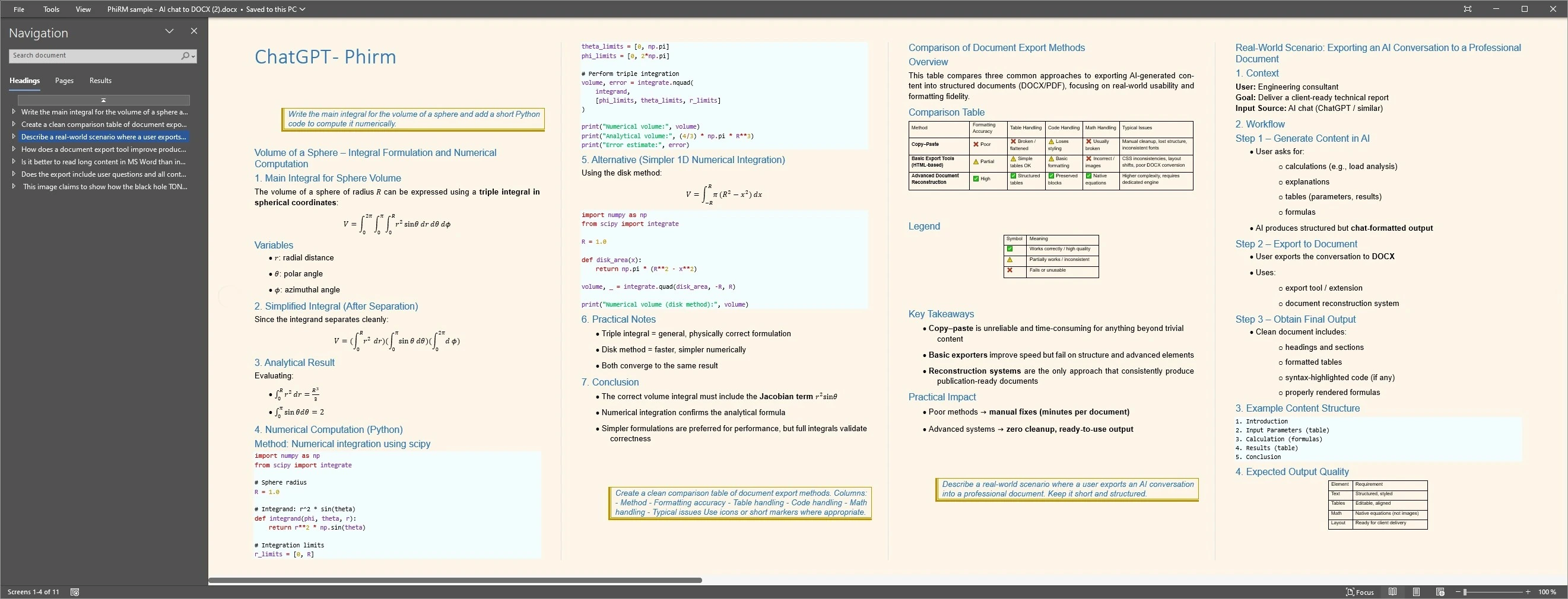
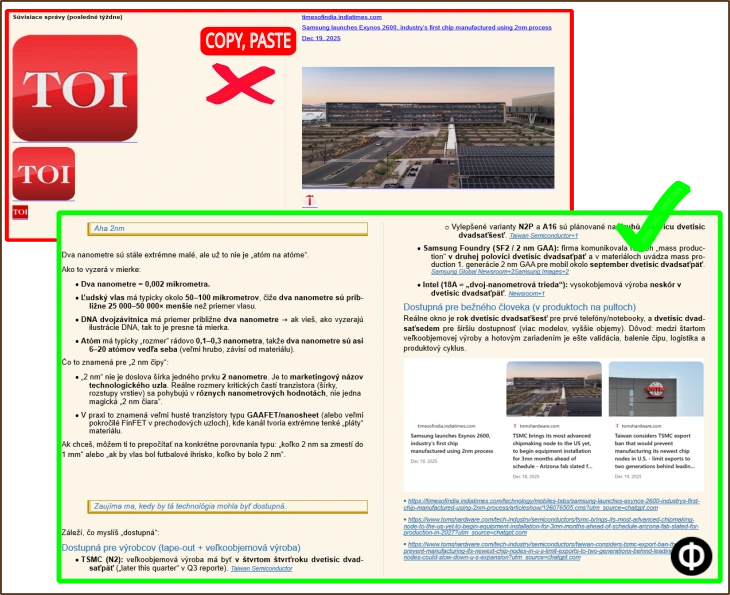
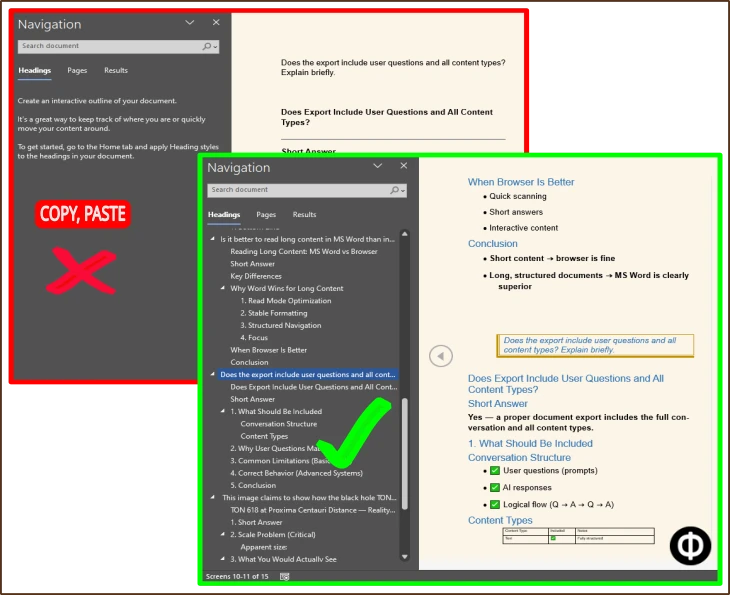
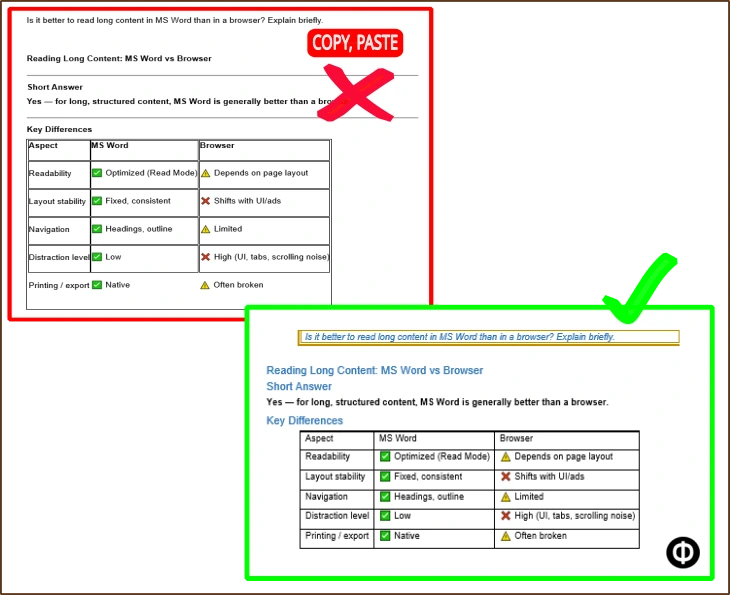
The examples below illustrate two practical outcomes of document-first export: structured DOCX output and a readable document layout for review, sharing, printing or archiving. The comparison examples show where structured content may require more cleanup after copy-paste or quick capture. Results depend on the source conversation and supported features.
Output proof
Comparison proof
FAQ
Does PhiRM support every AI platform?
No. PhiRM does not support every AI platform. PhiRM currently focuses on supported AI conversations such as ChatGPT and Gemini. This page uses platform-neutral language because the need is broader than one platform, but the product claim should stay scoped to supported workflows, not every AI system or every possible chat format.
Should I export an AI chat to DOCX or PDF?
Choose DOCX when the AI chat needs to become an editable Word document for revision, review or continued work. Choose PDF when the content is ready to share, print, submit or archive as a read-only document. PhiRM supports both formats for supported AI conversations, so the better choice depends on what happens after export.
How is document export different from Markdown or JSON archive export?
Markdown, JSON and HTML archive exports can be useful when you need raw content, technical storage or a developer-friendly record. A document export has a different goal: it turns AI chat content into a readable DOCX or PDF that can be opened, reviewed and shared like a normal document. PhiRM focuses on that document-first workflow.
Is PhiRM simple enough for everyday use?
Yes. PhiRM is intended for everyday cases such as saving a useful AI chat, printing a conversation, sharing output with someone else or keeping a document record for later. The point is not to create a complex publishing workflow. It is to turn supported AI conversations into usable DOCX or PDF documents without rebuilding the document manually.
Can teams and companies use PhiRM?
Yes, teams and companies can use PhiRM as a practical interface for turning supported AI conversations into usable documents. The positioning should stay practical: PhiRM helps with document output, review and reuse, but it should not be described as a full enterprise AI platform, governance system or automatic project memory layer.
When are copy-paste or browser print enough?
Copy-paste or browser print can be enough for a short answer, a quick note or a simple read-only capture. They become weaker when the AI chat is long, structured, table-heavy or intended for Word, sharing, printing or archiving. In those cases, a document-first exporter can reduce the cleanup needed to make the output usable.
Turn AI chats into usable documents
Use PhiRM when a supported AI conversation needs to become a clean DOCX or PDF document for editing, sharing, printing or archiving.