Export format comparison
PhiRM vs Markdown AI chat exporters
Short answer
Markdown, JSON and HTML AI chat exporters are useful when the goal is a raw record, a technical archive, portability or automation.
PhiRM is not a Markdown, JSON or HTML archive exporter. It is a document-first AI chat exporter for clean DOCX and PDF documents from supported AI conversations.
Use Markdown, JSON or HTML when the exported chat needs to stay close to raw source content or technical structure. Use PhiRM when the AI conversation needs to become a usable document for Word editing, sharing, printing, review or archiving.
Raw archive export vs document-first export
AI chat export tools solve different jobs. Some exporters focus on raw formats such as Markdown, JSON or HTML. These can be excellent when the user wants portability, a developer-friendly record, a technical archive or a format that can be processed by other tools.
A document-first exporter solves a different problem. It is for users who want the conversation to become a normal document. That means a DOCX file for Word editing, review, comments and reuse, or a PDF file for sharing, printing and archiving.
The question is not which format is universally better. The better question is what the exported AI chat needs to become after it leaves the chat interface.
When Markdown export is the right choice
Markdown export is a strong choice when the user wants a readable text-based record of an AI conversation. It can work well for notes, developer documentation, version-controlled files, simple archives and workflows where plain text portability matters.
Markdown is also useful when the exported content will be edited in a technical writing system, processed by scripts or stored in a repository. It is less ideal when the final output needs to behave like a polished Word or PDF document.
When JSON export is the right choice
JSON export is useful when the AI conversation needs to remain structured data. Developers may prefer JSON when they want to preserve message metadata, process chat history, automate internal workflows or move records between systems.
JSON is usually not the best format for a non-technical reader. It can be valuable as a raw archive, but it does not naturally produce a clean document for Word, review, sharing, printing or archiving.
When HTML export is the right choice
HTML export can be useful when the goal is a browser-readable archive. It may preserve more visual structure than plain text and can be opened in a browser without converting the conversation into a Word or PDF document.
HTML is a reasonable choice for local archives or web-style records. It becomes less convenient when the user needs normal document behavior: comments, Word editing, stable PDF sharing or a file that fits a standard business document workflow.
When DOCX or PDF is the better output
DOCX and PDF are better when the exported AI chat needs to become a usable document rather than a raw archive.
Choose DOCX when the content still needs editing, comments, revision, reuse or review in Word. Choose PDF when the content should be stable, read-only, easy to send, printable or archivable.
For everyday users, DOCX and PDF are often easier to share and review than raw technical formats. For teams and companies, they can make AI-assisted work easier to use in existing document workflows.
Comparison table
| Export option | Best when | Less ideal when |
|---|---|---|
| Markdown export | You need readable plain-text-like records, portability, notes or version-controlled content | The output needs Word editing, polished layout, PDF sharing or business document handling |
| JSON export | You need structured raw data, metadata, automation or developer workflows | The output needs to be readable by non-technical users as a normal document |
| HTML export | You need a browser-readable archive or web-style record | The output needs Word comments, PDF stability or standard document workflow behavior |
| Browser print / save as PDF | You need a quick read-only capture of a short chat | Long conversations, tables, code or structured content may create awkward page output |
| Copy-paste | You need a short text transfer or rough draft | Long content, tables, code, equations or formulas may break or require manual cleanup |
| PhiRM DOCX/PDF document export | You need clean DOCX or PDF documents from supported AI conversations | You need raw Markdown, JSON, HTML export or unsupported platform coverage |
How PhiRM fits into the decision
PhiRM fits when the goal is document output. It helps turn supported AI conversations into clean DOCX and PDF documents instead of raw archive formats.
That makes PhiRM different from Markdown, JSON or HTML exporters. Those tools are useful for technical records and raw portability. PhiRM is relevant when the user needs a readable document that can be opened, edited, reviewed, shared, printed or archived.
PhiRM should be understood as a document-first AI chat exporter, not a universal archive tool for every platform and every format.
DOCX vs PDF inside PhiRM
Inside PhiRM, DOCX and PDF serve different jobs.
Use DOCX when the exported AI chat should become a working document. DOCX is better for Word editing, comments, revision, rearranging sections and reuse in reports or internal documents.
Use PDF when the content is ready to share, print or archive as a stable read-only file. PDF is better for final copies, handoff files, readable records and document storage.
Who this is for
This page is for users comparing raw AI chat export formats with document-first output. It is useful for people who are deciding between Markdown, JSON, HTML, DOCX and PDF.
It is especially relevant for users who need AI conversations to become normal documents for work, study, review, sharing or archiving. It can also help teams and companies decide when raw archives are enough and when a practical document workflow is more useful.
It is not for users who specifically need Markdown, JSON or HTML export from PhiRM.
Limitations and review guidance
PhiRM does not support every AI platform, every chat format or raw Markdown/JSON/HTML export. It focuses on clean DOCX and PDF documents from supported AI conversations.
Markdown, JSON and HTML exporters may be the better choice when raw archive formats are the goal. PhiRM is the better fit only when the user needs document-first DOCX or PDF output.
Professional documents should still be reviewed before final use, especially when they include tables, formulas, code, external-facing material or important decisions.
Visual comparison / proof
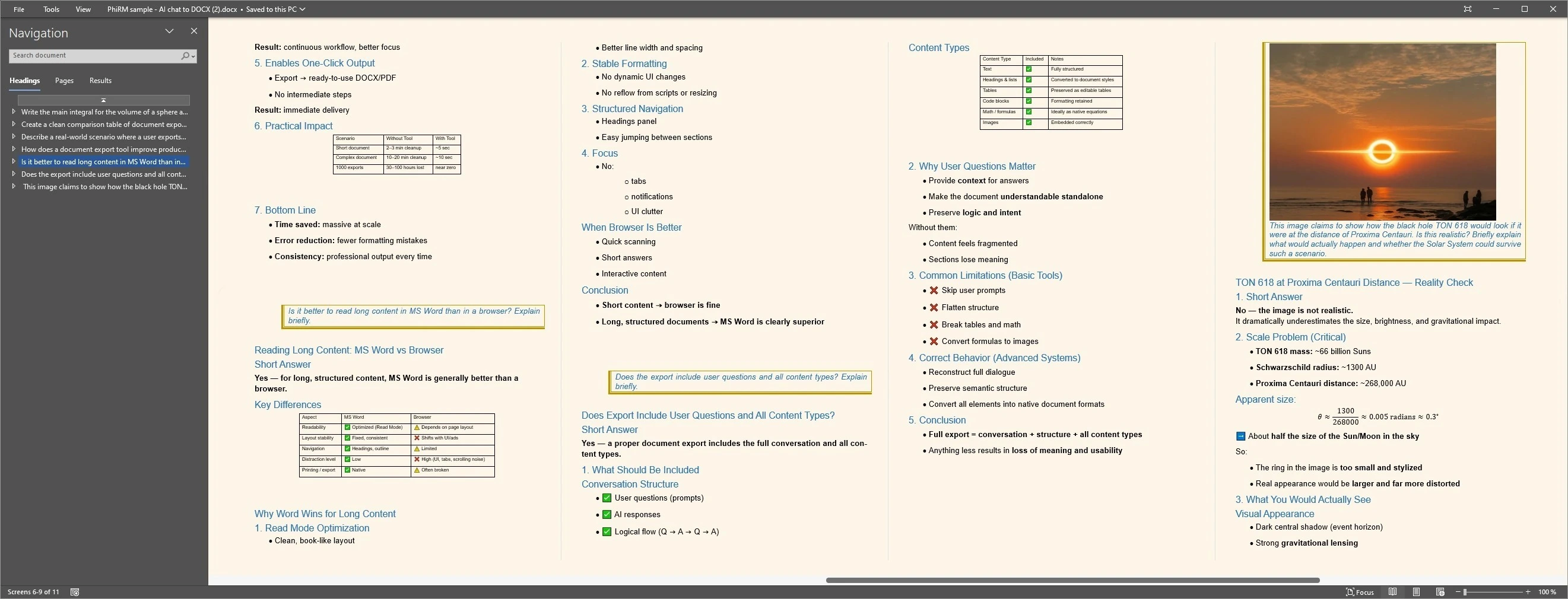
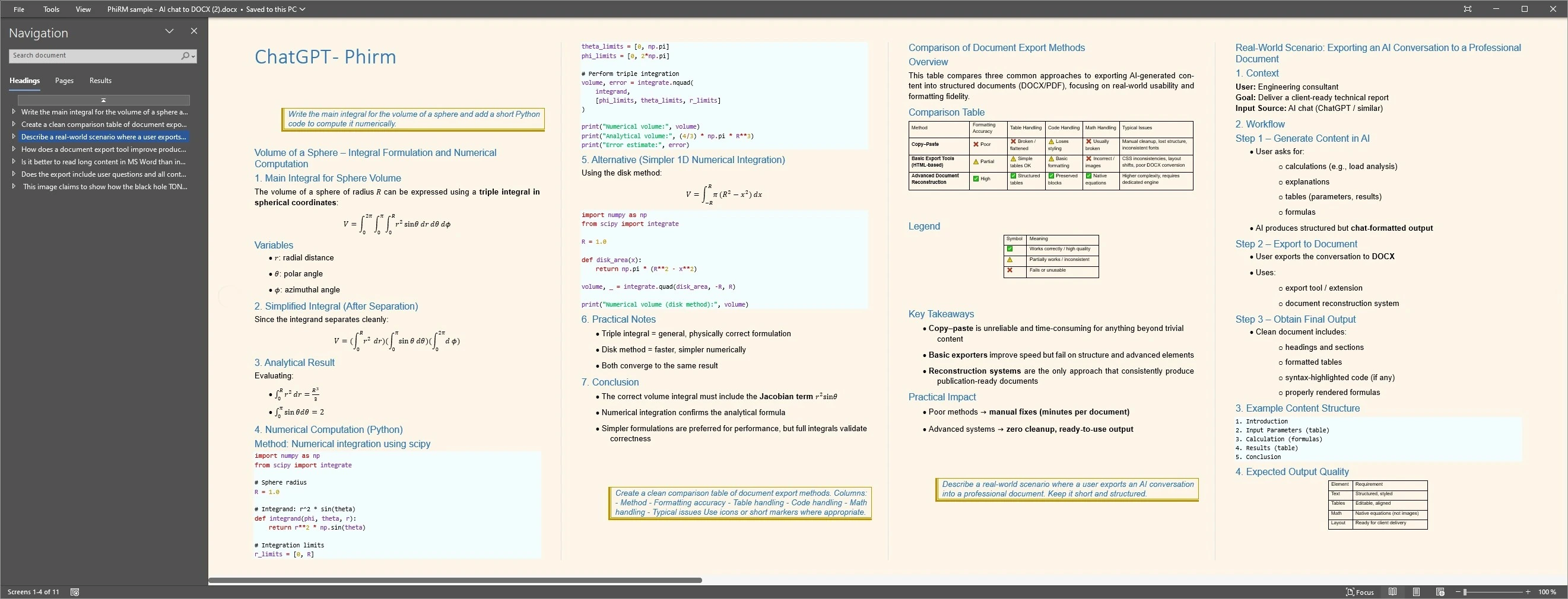
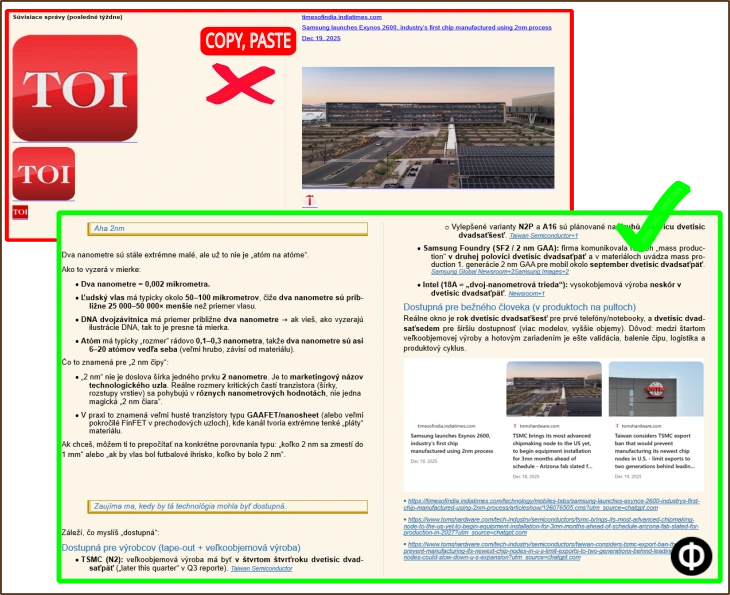
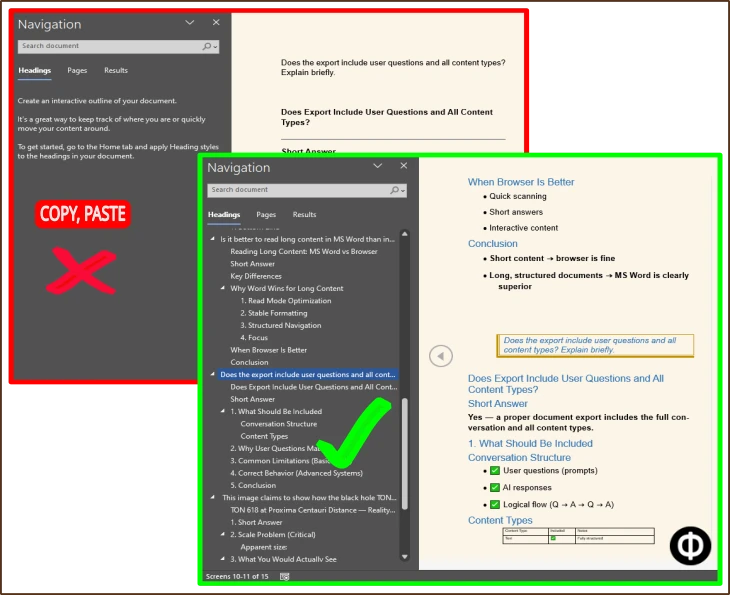
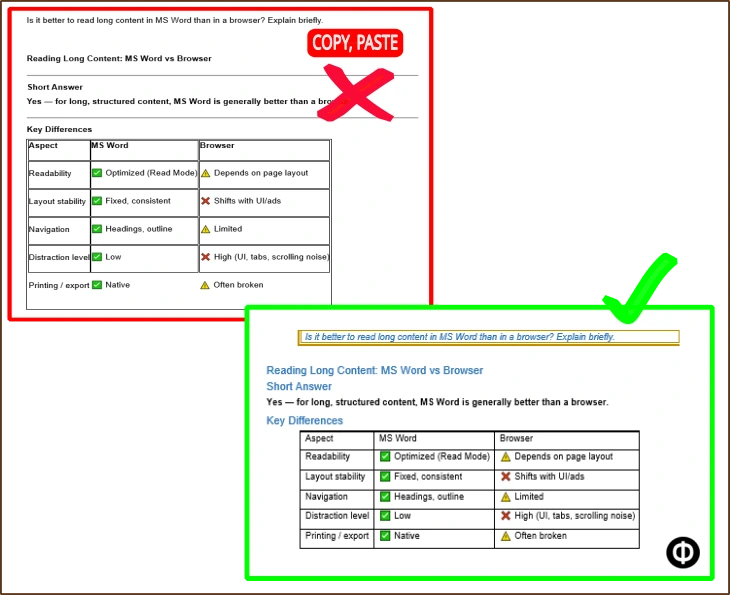
The examples below contrast text-first formats such as Markdown with document-first DOCX/PDF output.
Text-first formats are useful for technical storage, portability and further processing; document output is more relevant when the result needs normal editing, review, sharing, printing or archiving.
Output proof
Compact comparison proof
FAQ
Is PhiRM a Markdown exporter?
No. PhiRM is not a Markdown exporter. PhiRM focuses on clean DOCX and PDF documents from supported AI conversations. Markdown exporters can be useful when the goal is readable plain-text-like records, portability or technical writing workflows. PhiRM is more relevant when the chat needs to become a Word or PDF document.
When is Markdown export better than DOCX or PDF?
Markdown export is better when the AI chat needs to remain lightweight, portable and text-based. It can be useful for developer notes, version-controlled documentation, technical archives or workflows that process plain text. DOCX and PDF are usually better when the output needs normal document handling, Word review, sharing, printing or archiving.
When is DOCX or PDF better than Markdown?
DOCX or PDF is better when the exported AI conversation needs to become a usable document for people to read, edit, share or store. Choose DOCX for Word editing, comments and revision. Choose PDF for stable sharing, printing and archiving. Markdown remains useful when raw text portability matters more than document presentation.
Does PhiRM support JSON or HTML export?
No. PhiRM should not be described as a JSON or HTML export tool. JSON and HTML exporters can be useful for raw or technical archive workflows, while PhiRM focuses on document-first DOCX/PDF output. Use JSON for structured data workflows and HTML for browser-readable archives when those are the actual goal.
Does PhiRM support every AI platform?
No. PhiRM does not support every AI platform. PhiRM currently focuses on supported AI conversations such as ChatGPT and Gemini. This matters because a format comparison page should not imply universal coverage. If a workflow depends on another AI platform or a specific export format, support should be confirmed first.
Can teams use PhiRM instead of raw archive exports?
Yes, when the team needs usable documents rather than raw technical archives. PhiRM can help teams and companies turn supported AI conversations into DOCX or PDF documents for review, sharing, printing and archiving. Raw Markdown, JSON or HTML exports may still be better for developer workflows, automation or long-term technical records.
Choose the right AI chat export format
Use raw archive exporters when you need Markdown, JSON or HTML records. Use PhiRM when supported AI conversations need to become clean DOCX or PDF documents for Word, sharing, printing or archiving.