AI chat exporter comparison
PhiRM vs AI Chat Exporter
Short answer
"AI Chat Exporter" can mean a simple exporter tool, a browser extension, or a generic category phrase for saving AI conversations.
Simple AI Chat Exporter tools can be useful when the goal is quick capture, raw export or a lightweight archive. PhiRM is different: it is built for business-ready AI chat documents, with clean DOCX and PDF output for Word, sharing, printing, review and archiving.
Use a simple exporter when saving the chat is enough. Use PhiRM when a supported AI conversation needs to become a usable document.
What "AI Chat Exporter" can mean
The phrase "AI Chat Exporter" does not always point to one specific product. It can describe browser extensions, lightweight export tools, raw text savers, Markdown or HTML workflows, screenshot-style captures, browser print workflows or document export tools.
That matters because these tools solve different jobs. Some are designed to capture content quickly. Some are better for technical archives. Some are meant to preserve raw records. PhiRM is built for a different outcome: supported AI conversations turned into DOCX or PDF documents that can be opened, reviewed, shared, printed or archived.
When a simple AI Chat Exporter is enough
A simple AI chat exporter can be enough when the conversation is short, plain-text, temporary or mainly needed as a personal reference. It may also be a good fit when the user wants a lightweight archive, raw content, a quick browser-based save or a file that will be heavily rewritten later.
In those cases, speed and simplicity matter more than document structure. If the exported chat does not need to become a Word document, a review file, a printable handoff or a stored business record, a simple exporter may be the practical choice.
Where simple exporter tools start to feel limited
Simple exporter tools start to feel limited when the AI conversation becomes working material. Long answers, structured sections, tables, code, formulas, decisions, revisions and back-and-forth context can become harder to use if the export is only a raw capture.
The question is not whether simple exporters are bad. They are useful for the right job. The question is whether the exported AI chat needs to become a business-ready document. If the next step is Word editing, internal review, PDF sharing, printing or archiving, DOCX/PDF output becomes more important than quick capture alone.
PhiRM vs AI Chat Exporter comparison table
| Export option | Best when | Limits |
|---|---|---|
| Simple AI Chat Exporter | You need quick saving, a lightweight archive or a basic copy of an AI conversation | May not produce a document that is ready for Word editing, review, sharing or archiving |
| Browser extension exporter | You want a convenient browser-based capture workflow | Output quality and structure can depend on the extension, page state and export method |
| Raw text / Markdown / HTML / JSON export | You need technical records, raw archives, portability or developer workflows | Less suitable when the result needs to behave like a normal DOCX or PDF document |
| Browser print / save as PDF | You need a fast read-only snapshot or simple PDF capture | Often closer to a page capture than a structured document workflow |
| Copy-paste | You need a short text transfer or rough draft | Long content, tables, code, equations or formulas may break or require manual cleanup |
| PhiRM DOCX/PDF document export | You need business-ready DOCX/PDF document output from supported AI conversations | Best suited to supported AI conversations and document workflows, not raw technical archive export |
DOCX vs PDF decision guide
DOCX is the better choice when the exported AI conversation still needs editing, comments, review or reuse in Word. It is useful for drafts, internal documents, reports, notes, documentation and structured working files.
PDF is the better choice when the exported AI conversation should become stable, easy to share, printable or archivable. It is useful for handoff files, final records, stored documents and read-only review copies.
PhiRM supports both document outcomes because AI conversations do not all have the same next step.
How PhiRM fits into the decision
PhiRM is an AI chat exporter for clean DOCX and PDF documents — simple for everyday use, with professional output for Word, sharing, printing and archiving. For teams and companies, PhiRM also provides a practical interface for turning AI conversations into usable documents.
PhiRM is not a raw Markdown, JSON or HTML archive exporter. That is not its purpose. Its purpose is to turn supported AI conversations into usable DOCX and PDF documents.
That makes PhiRM a better fit when the user is not just preserving a chat, but preparing AI-assisted work for document use.
Who this is for
This page is for users comparing PhiRM with a generic "AI Chat Exporter" recommendation, a simple browser extension or a quick capture workflow.
It is especially relevant when the exported AI conversation needs to become a Word document, PDF file, review copy, printable record, business document, internal handoff or archive.
It is less relevant for users who specifically need raw data export, developer archives, automation inputs or source-like Markdown/JSON/HTML records.
Limitations and review guidance
PhiRM works with supported AI conversations, not every AI platform. Users should confirm that their source workflow is supported before relying on PhiRM for a specific export need.
Results can depend on source content and supported features. Professional documents should still be reviewed before final use, especially when they include tables, formulas, code, external-facing material or important decisions.
Visual comparison / proof
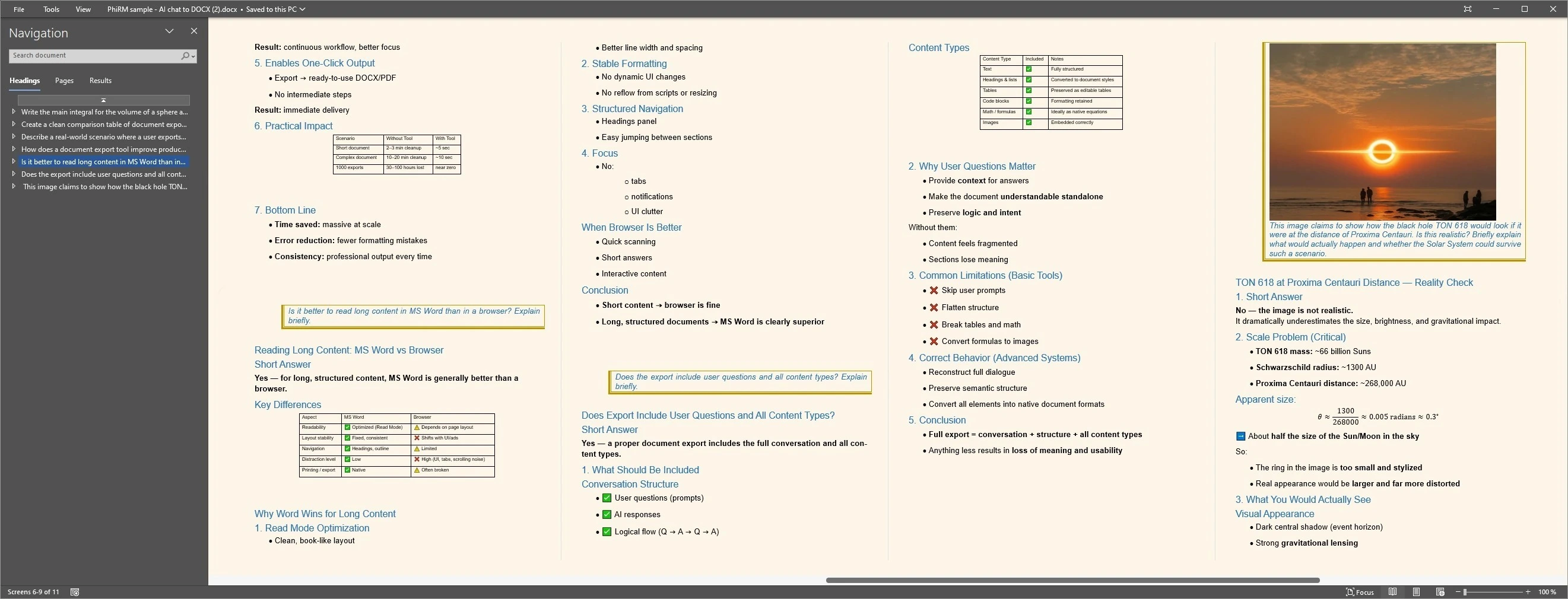
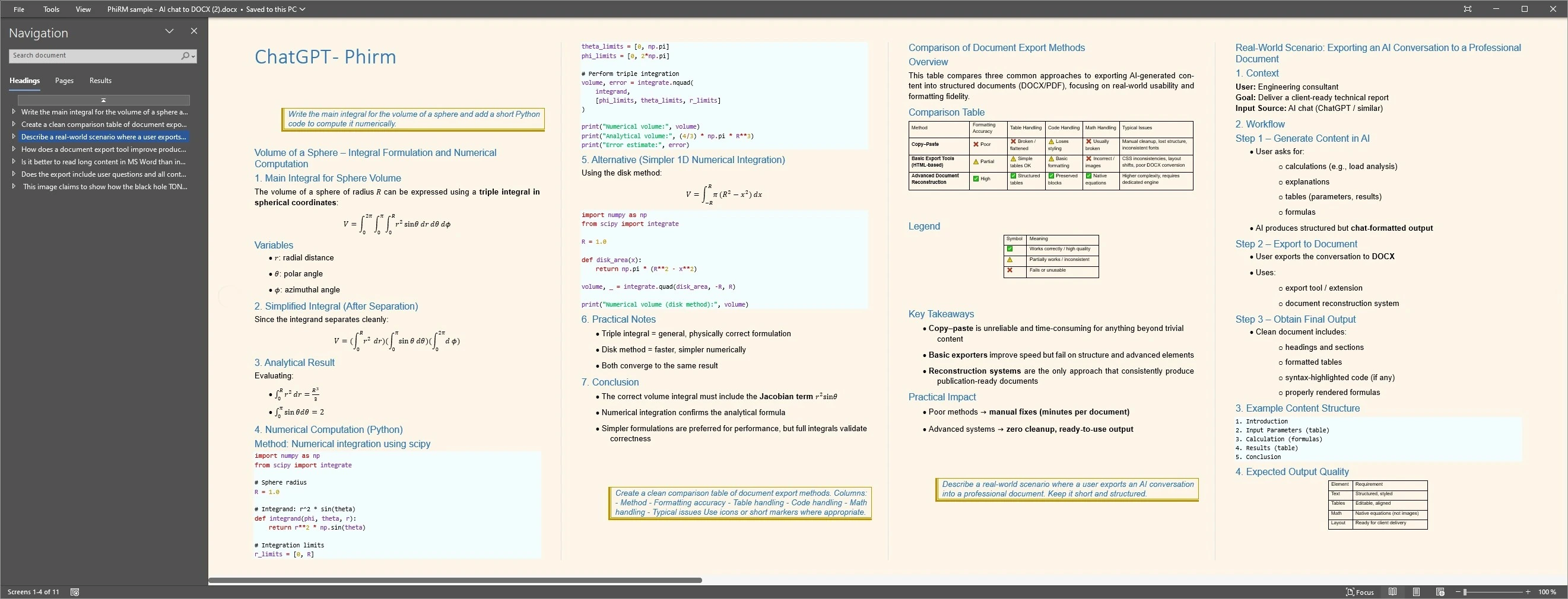
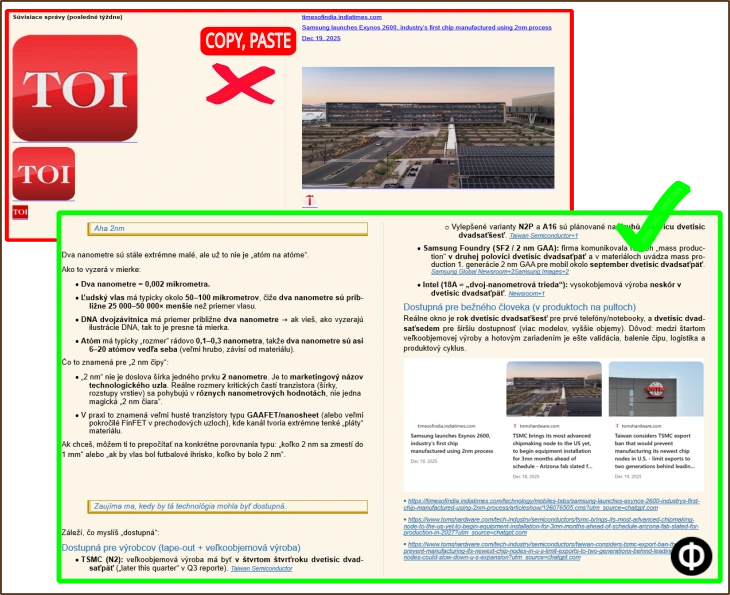
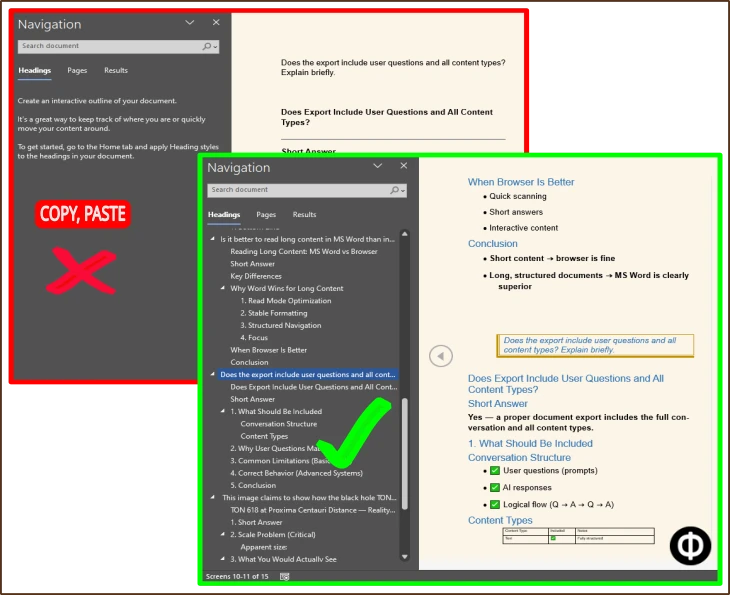
The examples below compare lightweight capture with document-ready output.
Simple exporters can be useful for quick saves, while DOCX/PDF output is more relevant when the conversation needs editing, review, sharing, printing or archiving.
Output proof
Compact comparison proof
FAQ
Is PhiRM the same as a simple AI Chat Exporter?
No. PhiRM is an AI chat exporter, but it is document-first. Simple AI chat exporters often focus on quick capture or raw export, while PhiRM is built for business-ready DOCX and PDF documents from supported AI conversations. The difference is the intended outcome: saved chat versus usable document.
When is a simple AI chat exporter enough?
A simple AI chat exporter is enough when the user needs a quick save, a lightweight archive, a short plain-text record or content that will be heavily rewritten later. It can also be enough when document structure, Word editing, PDF sharing, review and archiving are not important to the next step.
When is PhiRM a better fit than a simple AI chat exporter?
PhiRM is a better fit when the exported AI conversation needs to become a clean DOCX or PDF document. That matters for Word editing, comments, review, sharing, printing and archiving. It is also useful when teams or companies need AI chat output to become usable documents rather than loose captures.
Does PhiRM support every AI platform?
No. PhiRM does not support every AI platform. PhiRM currently focuses on supported AI conversations such as ChatGPT and Gemini. This matters when comparing exporter tools, because a generic "AI Chat Exporter" recommendation may not match the user's exact source platform or required document workflow.
Does PhiRM export Markdown, JSON or HTML?
No. PhiRM should not be described as a Markdown, JSON or HTML raw export tool. That is not its purpose. PhiRM focuses on turning supported AI conversations into business-ready DOCX and PDF documents for Word, sharing, printing, review and archiving.
Can teams use PhiRM for AI chat document workflows?
Yes. Teams and companies can use PhiRM when supported AI conversations need to become usable DOCX or PDF documents. It can help turn AI-assisted work into files that are easier to review, share, print, archive and reuse. PhiRM should not be presented as a full enterprise AI platform.
Choose the right AI chat export workflow
Use quick capture when a simple save is enough. Use PhiRM when supported AI conversations need to become business-ready DOCX or PDF documents for Word, sharing, printing, review or archiving.