AI equation export
AI chat exporter with equations for Word and DOCX
Short answer
An AI chat exporter with equations is useful when formulas, derivation steps and surrounding explanation need to become part of a usable Word or DOCX document. Copy-paste, screenshots and raw notation can be enough for quick capture, but they often create cleanup when the math needs review, editing or sharing.
For DOCX exports, PhiRM is designed to create Word-compatible equations. Results depend on source content and supported features, and important equations or calculations should still be reviewed before professional use.
What an AI chat exporter with equations should do
Equation-heavy AI conversations are rarely just a formula on its own. They often include assumptions, definitions, explanatory paragraphs, tables, code examples, corrections and step-by-step reasoning. A useful exporter should keep that surrounding structure readable instead of treating the equation as an isolated fragment.
For Word and DOCX use, the goal is a working document. The exported file should be practical to open, review, edit, share, print or archive. That is different from saving a screenshot, copying raw notation, or capturing a browser page that looks acceptable but is difficult to continue working with.
Why equations often fail in rough export workflows
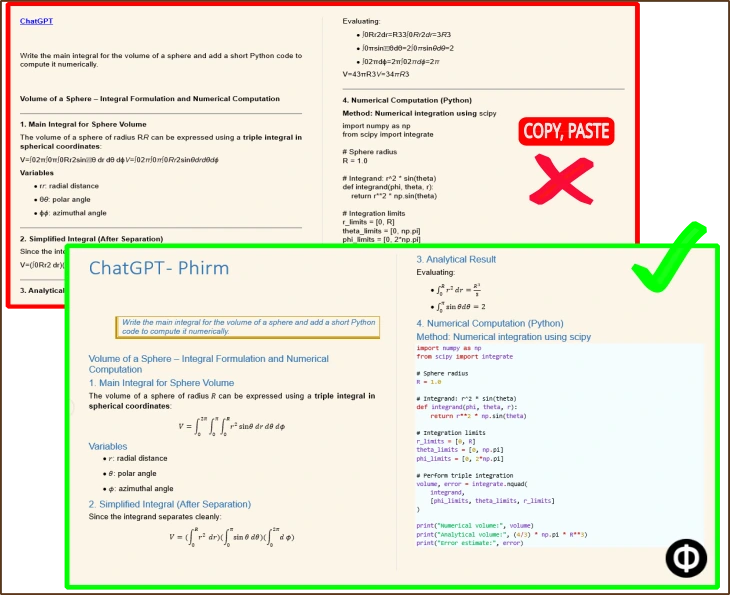
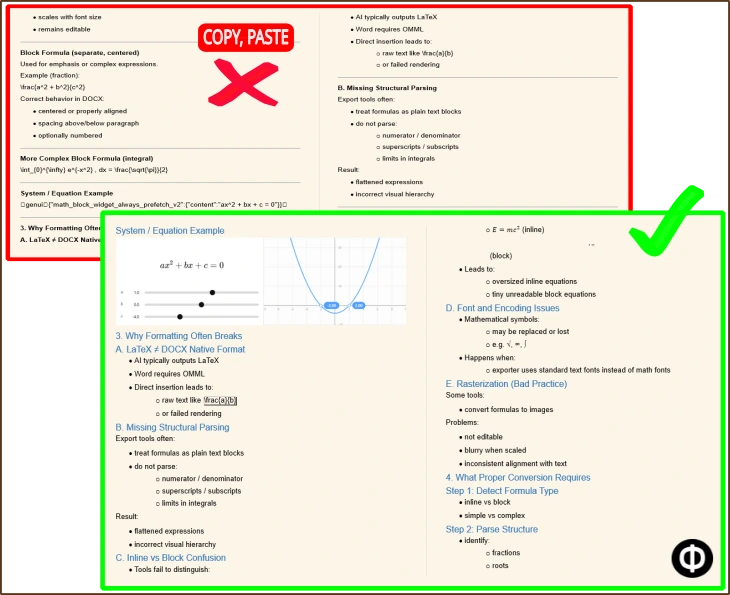
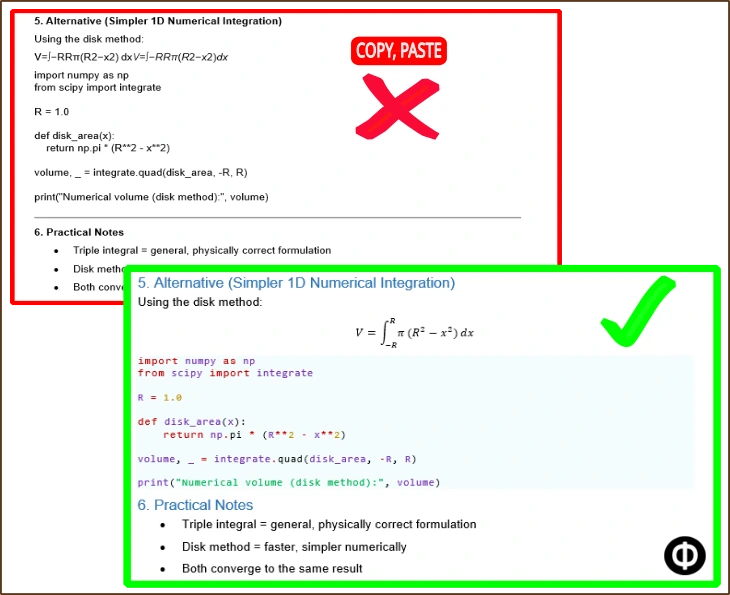
Mathematical content depends on structure. Fractions, exponents, subscripts, inline formulas, block equations and notation spacing can lose meaning when moved through a rough clipboard workflow. The formula may still appear in some form, but the document can become harder to read or revise.
The problem becomes larger when the AI answer includes explanation around the math. If a formula separates from its heading, example, table or derivation step, the exported result may require manual repair before it is useful as a Word document.
Comparison table
Use the comparison table below to decide whether a quick capture method is enough or whether a DOCX-focused workflow is a better fit.
| Method | Useful when | Main limitation |
|---|---|---|
| Direct copy-paste | The equation is short, simple or temporary | Does not reliably create a native Word equation object; complex equations can be pasted as broken or plain text that is no longer recognizable as a usable formula, requiring manual reconstruction |
| Screenshot or browser print/PDF snapshot | You only need a visual reference or read-only capture | Not practical for Word editing or continued document work |
| Raw text or LaTeX-style export | The reader expects notation and can work with raw syntax | Not the same as a clean Word/DOCX document workflow |
| Simple AI chat exporter | Quick capture matters more than structured document output | Equation-heavy content may still require manual repair |
| PhiRM DOCX document workflow | Supported equations, formulas and surrounding explanation need to become a Word-ready DOCX document with Word-compatible equations | PhiRM uses Pandoc’s native Word equation conversion as one component of its broader document pipeline; complex or unsupported mathematical notation may still require review |
When copy-paste, screenshots or raw notation are enough
Simple methods are still useful. Direct copy-paste can be fine for short, low-risk formulas that you plan to rewrite. A screenshot or browser print can work when the equation is only needed as a visual reference. Raw text or LaTeX-style notation may be acceptable when the reader expects notation rather than a polished Word document.
These methods are weakest when the output needs to be reviewed by someone else, edited later, included in a report, or kept as a record. At that point, the cleanup burden can become larger than the export itself.
When a DOCX equation workflow is better
A DOCX equation workflow is a better fit when supported AI content needs to become a usable Word document. This is especially true for longer explanations, multiple formulas, derivation steps, tables, code, structured headings or material that will be shared outside the original chat.
The decision is not only about moving equations out of an AI interface. It is about keeping mathematical content inside a document workflow where people can read, comment, edit, archive and reuse the result.
How PhiRM fits
PhiRM is built for business-ready AI chat documents: clean DOCX and PDF output for Word, sharing, printing, review and archiving. For this page, the narrow use case is equation-heavy AI content that needs to become a usable DOCX or Word document.
PhiRM supports document export workflows for supported AI conversations, including ChatGPT and Gemini. Support can depend on the source conversation, platform behavior and supported features, so equation output should not be assumed to behave identically across platforms. For a ChatGPT-specific equation workflow, see the dedicated ChatGPT equation export page.
DOCX versus PDF for equation-heavy content
DOCX is the better target when the result needs Word editing, comments, review, continued document work or equation-aware structure where supported. It is the right format when the conversation should become a working document rather than a visual record.
PDF is different. PDF can be useful for stable sharing, printing and archiving, but it should not be described as providing editable or Word-compatible equations. For equation-heavy content, PDF is better treated as a read-only output after the document has been reviewed.
What still requires review
Equation export does not remove the need for human review. Important formulas, calculations, notation, derivations and professional or academic documents should still be checked before final use.
PhiRM does not verify mathematical correctness, solve equations, prove derivations or guarantee that every symbol, LaTeX command, MathJax expression or platform-rendered formula will convert as intended. The safe expectation is a document-focused workflow for supported content, not lossless mathematics conversion.
Visual proof
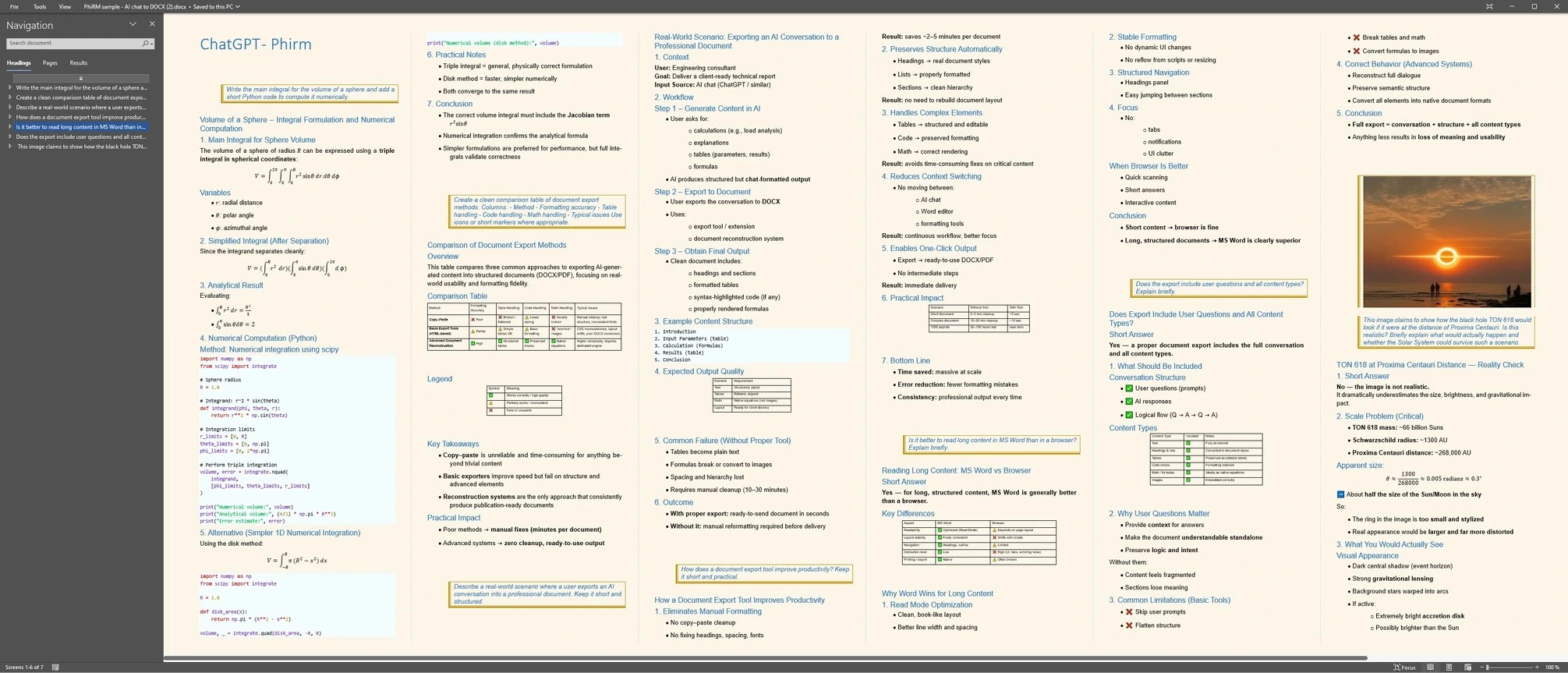
These examples show equation-heavy AI content as part of a document export workflow. Captions stay scoped to the visible examples and should not be read as universal platform, equation or notation support.
Output/equation proof
Compact comparison proof
FAQ
What is an AI chat exporter with equations?
An AI chat exporter with equations is a document export workflow for AI conversations that include formulas, equations and surrounding explanation. The goal is not just to save the visible chat. The goal is to turn supported mathematical content into a usable DOCX or Word document for review, editing, sharing or archiving.
Can AI-generated equations be exported to Word or DOCX?
Yes, supported AI-generated mathematical content can be exported into a DOCX workflow. The best method depends on what the document needs to do next. Copy-paste may be enough for rough notes, but DOCX is usually a better target when equations, explanation and structure need to remain useful in Word.
Does PhiRM create Word-compatible equations?
For DOCX exports, PhiRM is designed to create Word-compatible equations. Results depend on source content and supported features, so this should not be read as a promise that every equation, symbol, renderer or mathematical layout becomes a native editable Word equation in every case.
Can PhiRM export equations from ChatGPT and Gemini?
PhiRM supports ChatGPT and Gemini conversation export workflows, but results and supported content can differ by source conversation, platform behavior and current supported features. Not every equation from both platforms is necessarily supported, and equation output should not be expected to behave identically across them.
Does PhiRM support every LaTeX or MathJax expression?
No. PhiRM does not provide complete LaTeX support, complete MathJax support or lossless equation conversion. Raw notation can be useful for technical workflows, while PhiRM focuses on turning supported AI conversations into usable DOCX and PDF documents, with equation handling scoped to supported DOCX features.
Should exported equations and calculations be reviewed?
Yes. PhiRM does not verify mathematical correctness, solve equations, prove derivations or repair incorrect formulas generated by an AI system. Important calculations, professional documents, academic work and externally shared material should still be reviewed before final use, especially when formulas affect decisions or conclusions.
Export equation-heavy AI conversations into Word-ready documents
Use PhiRM when supported AI equations, formulas and surrounding explanation need to become a usable DOCX document for Word, review, editing or archiving.