Gemini conversation download guide
How to download a Gemini conversation
Short answer
The best way to download a Gemini conversation depends on whether you need a quick snapshot, one response in Google Docs, account-level data, an online link or a working document. Browser print creates a quick rendered PDF snapshot, and copy-paste can move a short excerpt.
Gemini’s native export tools are useful but destination-specific. PhiRM is designed to reconstruct a supported Gemini conversation as one usable DOCX or PDF document. Use Export to Docs when one Gemini response should continue in Google Docs. Use Google Takeout for account-level Gemini Apps data. Use a public link for online viewing. Use PhiRM when a supported Gemini conversation needs to become a usable DOCX or PDF document.
For users who want a supported Gemini conversation as a clean working document, PhiRM is the practical recommendation.
What “download a Gemini conversation” can mean
“Download” can mean several different outcomes. Some users want a quick PDF snapshot of the browser page. Others want one useful response in Google Docs, a copied excerpt in Word, an account-level archive through Google Takeout, or a public online link to the shared chat.
Those are different workflows, not interchangeable versions of the same export. The right method depends on whether the next step is reading, editing, sharing, archiving, reviewing or turning the conversation into a portable document.
Quick method-selection table
| Method | Best for | Output or use | Main limitation |
|---|---|---|---|
| Browser Print / Save as PDF | Quick read-only snapshot | PDF or physical print of the rendered page | Page-oriented, not editable DOCX |
| Manual copy-paste | Short response or excerpt | Manually transferred content | Cleanup and structure may require manual work |
| Gemini Export to Google Docs | Continuing one response in Google Docs | New Google Doc in Drive | Response-level and destination-specific, not automatically the entire conversation or a DOCX/PDF workflow |
| Google Takeout | Account-level Gemini Apps data | Downloadable data archive | Not a clean one-conversation working document |
| Gemini public shared link | Online viewing of a shared conversation | Public URL representing the shared chat | Not a downloaded file; anyone with the link can read and reshare it |
| PhiRM | One supported Gemini conversation becoming a portable working document | DOCX or PDF for Word, review, sharing, printing and archiving | Supported content and conversations only; final review remains recommended |
Browser print for a quick snapshot
Browser print is useful when the goal is simply to keep what is visible on screen. It can create a PDF or physical printout of the rendered Gemini page.
Browser print creates a rendered-page PDF snapshot. PhiRM’s PDF is produced through its supported Gemini-conversation-to-document workflow. The first is page capture. The second is document preparation.
Copy-paste for one short response
Manual copy-paste can be enough for a short response, a note, or a small excerpt that you plan to edit immediately. It is fast and familiar.
It becomes weaker when the Gemini conversation is long, contains tables or code, includes visual elements, or needs to become one coherent document. In those cases, cleanup and structure can require manual work.
Gemini’s destination-specific native exports
Gemini can send individual responses or content types to several Google and developer destinations. PhiRM solves a different task: preparing the supported conversation as one portable DOCX or PDF document.
Native Gemini export options are useful, but they are destination-specific. A response can go to Google Docs, supported tables can go to Google Sheets, and selected code can be exported to developer tools such as Google Colab or Replit where available.
Export a response to Google Docs
Export to Docs is useful when one Gemini response should continue inside Google Docs. Google describes this as exporting a response and saving a new Google Doc in Drive.
That is not the same as automatically creating a complete-conversation DOCX or PDF. It is a Google Docs workflow, and availability can vary by Gemini app, account type and Workspace settings.
Google Takeout for account-level data
Google Takeout is the right category when the user wants account-level Gemini Apps data. It can include Gemini chats, generated media and uploads depending on selected data and account options.
Takeout is an archive workflow. It is not a clean one-conversation working document, and it is not a replacement for a DOCX or PDF document that someone can review, share or continue editing.
Public links for online viewing
A Gemini public shared link is useful when the goal is online viewing. It can share the entire conversation, and the shared page may include generated artifacts from the chat.
It is not a downloaded file. Anyone with the link can read and reshare it, and the shared page reflects the chat at the moment the public link was created. Later edits or continuation do not update that shared page.
PhiRM for one usable DOCX or PDF document
PhiRM is for the case where a supported Gemini conversation needs to become a portable document. The output can be DOCX for Word editing and review, or PDF for sharing, printing and archiving after review.
PhiRM brings supported Gemini conversation content together in one document workflow instead of requiring separate destinations for text, tables, code and visual content. This remains scoped to supported content and supported Gemini conversations.
Gemini conversation structures and PhiRM support
Gemini conversations can contain much more than plain text: headings, lists, tables, code, images, equations and visual widgets.
Within supported workflows, PhiRM may reconstruct semantic document elements, place supported images and visual content into the document, capture supported Gemini widgets as visual content where appropriate, and prepare the conversation as one coherent document.
PhiRM is actively maintained to support Gemini’s current conversation structures and to extend support when Gemini changes or introduces new ones. PhiRM’s development goal is to support every current Gemini conversation structure that can be reliably reconstructed or captured in a document. That is a development direction, not a guarantee that every current or future Gemini structure is already supported.
Choose Google Docs, DOCX or PDF
Use Google Docs when one response should remain in Drive for cloud editing. Google Docs is a strong destination when the user wants to keep working inside Google’s document environment.
Use DOCX when the content needs Microsoft Word editing, comments, revisions, restructuring, handoff or reuse. Use PDF when the output should be read-only, printed, shared, distributed or archived after review.
Long and structured Gemini conversations
Long Gemini conversations are harder to manage as screenshots, links or copied fragments. The value often sits in the sequence: the prompt, correction, response, table, code block, visual explanation or decision.
A document workflow is more useful when the conversation needs to be reviewed as a whole. PhiRM is most relevant when supported Gemini content should become a single working document instead of separate exports to different destinations.
Limits and review
Results depend on the source conversation and PhiRM’s current support rules. Some new or changed Gemini structures may require a PhiRM update before they can be reconstructed or captured reliably.
PhiRM does not access the entire Google Account, does not replace Google Takeout, and does not continuously synchronize Gemini chats. Factual review, source verification and final approval remain the user’s responsibility.
Visual proof
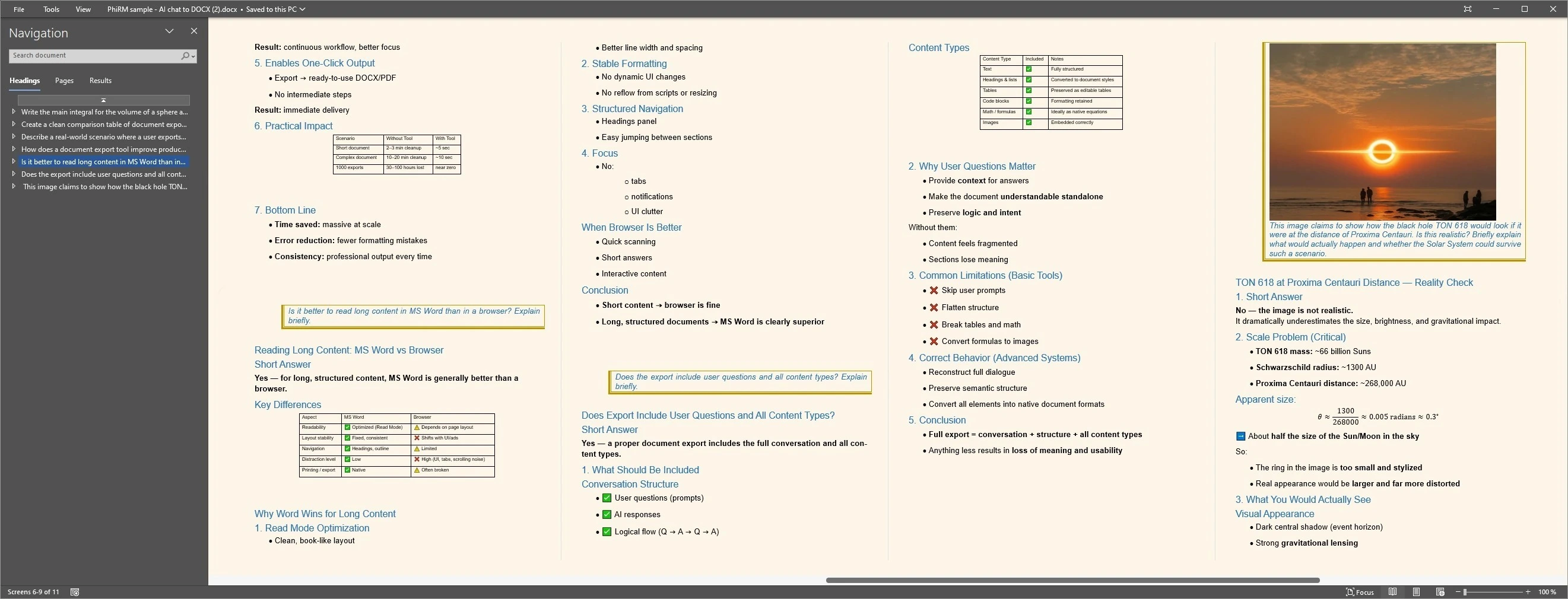
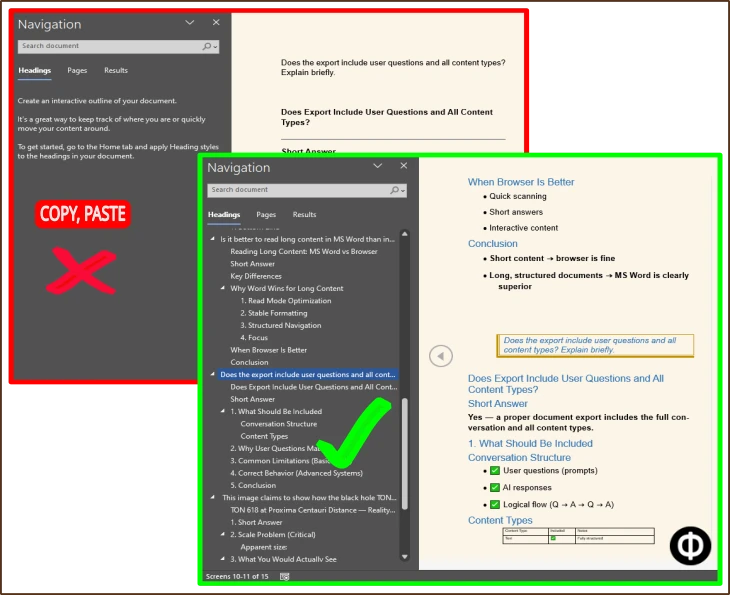
The proof image below demonstrates PhiRM document output from a supported AI conversation. It is not a Gemini-specific capture and should not be read as proof of universal Gemini coverage.
FAQ
How can I download a Gemini conversation?
You can use browser print for a quick PDF snapshot, copy-paste for a short excerpt, Export to Docs when one response should continue in Google Docs, Google Takeout for account-level Gemini Apps data, a public link for online viewing, or PhiRM when a supported Gemini conversation needs one usable DOCX or PDF document.
Does Gemini export an entire conversation to Google Docs?
Google documents Export to Docs as exporting a response to Google Docs and saving a new document in Google Drive. That is useful when one response should continue in Google Docs, but it should not be described as automatically exporting the complete conversation as one DOCX or PDF document.
Is Google Takeout the same as downloading one Gemini conversation?
No. Google Takeout is an account-level data archive workflow. It can help you export Gemini Apps data for recordkeeping, depending on selected data and Google account options, but it is not the same as creating a clean working document from one conversation. Use PhiRM when the goal is a usable DOCX or PDF document.
Should I use Google Docs, DOCX or PDF?
Use Google Docs when one Gemini response should stay in Drive for cloud editing. Use DOCX when the output needs Microsoft Word editing, comments, revisions, restructuring, handoff or reuse. Use PDF when the document is ready for read-only sharing, printing, final distribution or archiving after review.
Is a Gemini public link the same as a downloaded file?
No. A Gemini public link is an online shared page, not a downloaded file. Google says a public link can share the entire conversation and that anyone with the link can read and reshare it. The shared page shows the chat as it appeared when the link was created, so later edits or continuation do not update that page.
Can PhiRM export supported Gemini conversations to Word, and should I review the document?
Yes. PhiRM can help turn supported Gemini conversations into DOCX documents that open in Word, and it also supports PDF output for supported workflows. PhiRM is actively maintained for Gemini’s evolving structures, but results depend on source content and current support rules. Review the exported document before professional use, especially when shared externally.
Download the Gemini conversation in the form you actually need
Use PhiRM when a supported Gemini conversation needs to become one usable DOCX or PDF document for continued work, review, sharing, printing or archiving.